
文件下载(iframe、a)
const getAwardStudentTemplate = () => {
  exportAwardStudentsList({}).then((res) => {
    if (res.data.Data !== null) {
      const a = document.createElement('a') // a标签导出下载
      a.href = res.data.Data.DownloadUrl
      a.click()
      a.remove()
    }
  })
  getImportFileTemplate({ params: { TabName: 'AwardA' } }).then((res) => {
    if (res.data.Data !== null) {
      let downloadUrl2 = res.data.Data.DownloadUrl
      let iframe = document.createElement('iframe') // iframe导出下载
      iframe.id = 'iframe2'
      iframe.style.display = 'none'
      document.body.appendChild(iframe)
      iframe.src = downloadUrl2
    }
  })
}
自定义文件下载名
- 直接使用a标签下载可能会出现无法自定义a标签直接给download不生效
const link = document.createElement('a')
const body = document.querySelector('body')

link.href = window.URL.createObjectURL(blob)
link.download = filename

// fix Firefox
link.style.display = 'none'
body?.appendChild(link)

link.click()
body?.removeChild(link)

window.URL.revokeObjectURL(link.href)- 借用XMLHttpRequest将url转接成blob流下载,自定义文件名
// 1.
this.getBlob(res.data.Data.DownloadUrl).then((res) => {
  this.saveAs(res, '评奖记录列表.xlsx');
});

getBlob(url: string) {
  return new Promise((resolve, err) => {
    const xhr = new XMLHttpRequest();
    xhr.open('GET', url, true);
    xhr.responseType = 'blob';
    xhr.onload = () => {
      if (xhr.status === 200) {
        resolve(xhr.response);
      }
    }
    xhr.send();
  })
}

saveAs(blob: any, filename: any) {
  const link = document.createElement('a')
  const body = document.querySelector('body')

  link.href = window.URL.createObjectURL(blob)
  link.download = filename

  // fix Firefox
  link.style.display = 'none'
  body?.appendChild(link)

  link.click()
  body?.removeChild(link)

  window.URL.revokeObjectURL(link.href)
}

// 2.直接转blob后下载
const handleDownload = (url: string, filename: string) => {
  const x = new window.XMLHttpRequest();
  x.open('GET', url, true);
  x.responseType = 'blob';
  x.onload = () => {
    const url = window.URL.createObjectURL(x.response);
    const a = document.createElement('a');
    a.href = url;
    a.download = filename;
    a.click();
  };
  x.send();
}
url文件下载
/**
 * 下载文件
 */
const downloadFile = async (url: string, filename: string): Promise<void> => {
  try {
    console.log("%c Line:411 🍺 url", "color:#e41a6a", url, filename);

    const response = await fetch(url);
    if (!response.ok) {
      throw new Error(`HTTP error! status: ${response.status}`);
    }

    const blob = await response.blob();
    const blobUrl = URL.createObjectURL(blob);

    const a = document.createElement('a');
    a.href = blobUrl;
    a.download = filename || 'download';
    a.style.display = 'none';
    a.rel = 'noopener noreferrer';

    document.body.appendChild(a);
    a.click();
    document.body.removeChild(a);

    // 清理URL对象
    URL.revokeObjectURL(blobUrl);
  } catch (error) {
    console.error('使用fetch下载失败,回退到直接下载:', error);
    // 降级方案:使用原始的直接下载方式
    directDownload(url, filename);
  }
};

// 保留原有的直接下载方式作为降级方案
const directDownload = (url: string, filename: string): void => {
  const a = document.createElement('a');
  a.href = url;
  a.download = filename || 'download';
  a.style.display = 'none';
  a.rel = 'noopener noreferrer';

  document.body.appendChild(a);
  a.click();
  document.body.removeChild(a);
};
upload文件accept限制
上传组件时,不是直接上传后缀名,而是文件后缀(扩展名)对应有MIME类型,方便iis中或其他服务器对相应的文件进行解析。有些文件的后缀名没有默认解析就出现上传后无法访问或者下载的问题,这个时候就要设置文件后缀对应的MIME类型,设置后才能访问或者下载
后缀名          MIME名称
*.3gpp      audio/3gpp, video/3gpp
*.ac3        audio/ac3
*.asf         allpication/vnd.ms-asf
*.au         audio/basic
*.css       text/css
*.csv       text/csv
*.doc      application/msword
*.docx        application/vnd.openxmlformats-officedocument.wordprocessingml.document
*.dot       application/msword
*.dtd       application/xml-dtd
*.dwg        image/vnd.dwg
*.dxf       image/vnd.dxf
*.gif        image/gif
*.htm      text/html
*.html     text/html
*.jp2                 image/jp2
*.jpe                 image/jpeg
*.jpeg               image/jpeg
*.jpg                 image/jpeg
*.js                   text/javascript, application/javascript
*.json               application/json
*.mp2               audio/mpeg, video/mpeg
*.mp3               audio/mpeg
*.mp4               audio/mp4, video/mp4
*.mpeg            video/mpeg
*.mpg              video/mpeg
*.mpp              application/vnd.ms-project
*.ogg              application/ogg, audio/ogg
*.pdf               application/pdf
*.png              image/png
*.pot               application/vnd.ms-powerpoint
*.pps              application/vnd.ms-powerpoint
*.ppt              application/vnd.ms-powerpoint
*.rtf                application/rtf, text/rtf
*.svf                image/vnd.svf
*.tif                  image/tiff
*.tiff                 image/tiff
*.txt                 text/plain
*.wdb              application/vnd.ms-works
*.wps              application/vnd.ms-works
*.xhtml            application/xhtml+xml
*.xlc                application/vnd.ms-excel
*.xlm               application/vnd.ms-excel
*.xls                application/vnd.ms-excel
*.xlt                 application/vnd.ms-excel
*.xlw               application/vnd.ms-excel
*.xml               text/xml, application/xml
*.zip                aplication/zip
*.xlsx              application/vnd.openxmlformats-officedocument.spreadsheetml.sheet
js控制文件上传选择器(注意查看兼容性)
showOpenFilePicker选择文件
const importUserClick = async () => {
  try {
    const fileHandle = await (window as any).showOpenFilePicker({
      // 选择excel文件
      types: [{
        accept: {
          // 'image/*': ['.png', '.gif', '.jpeg', '.jpg', '.webp']
          'application/vnd.openxmlformats-officedocument.spreadsheetml.sheet': ['.xlsx'],
          'application/vnd.ms-excel': ['.xls']
        }
      }],
      multiple: false
    })
    // 获取File对象转为二进制文件流
    const file = await fileHandle[0].getFile()
    const arrayBuffer: any = await readFileAsArrayBuffer(file)
    const blob = new Blob([arrayBuffer], { type: 'application/vnd.openxmlformats-officedocument.spreadsheetml.sheet' });
    // 创建FormData结构传给后端
    const formData = new FormData();
    formData.append('file', blob, 'upload.xlsx');
    await importUser(formData)
    // 后续请求,更新数据
    userTableForm?.current?.getTableData()
  } catch (error) {
    console.log(error)
  }
}
showDirectoryPicker选择文件夹
文件上传导入(form-data的形式提交文件)文件上传组件借用Upload
const beforeUpload = async (file?: any) => {
  let formData = new FormData(); // 创建formData
  formData.append('File', file);
  formData.append('TabName', useLevel ? 'AwardB' : 'AwardA');
  formData.append('Term', TermYear);
  formData.append('Remark', AwardRecordID + '');
  axios({
    url: baseURL + '/Document/ImportData',
    method: 'post',
    data: formData,
    headers: {
      'Content-Type': 'multipart/form-data', // multipart/form-data
      'Authorization': `X-Token={${window.location.search.split('=')[1]}}`
    }
  }).then((res) => {
    console.log(res.data);
    if (res.data.Msg === 'success') {
      if (res.data.Data.url === '') {
        Message({
          message: '文件导入成功',
          type: 'success',
          duration: 1500
        })
        getStudentsList(props.tableRowData.AwardRecordID);
        props.refreshAwardTable && props.refreshAwardTable();
      } else {
        const iframe = document.createElement('iframe');
        iframe.id = 'iframe2';
        iframe.style.display = 'none';
        document.body.appendChild(iframe);
        iframe.src = res.data.Data.url;
        Message({
          message: '文件导入失败,具体原因请查看下载文件',
          type: 'error',
          duration: 2000
        })
      }
    } else if (res.data.Msg === '程序无法识别您所使用的模板,请尝试使用系统提供的模板') {
      useLevel ? (() => {
        Message({
          message: '导入文件模板错误,请使用正确的区分等级模板',
          type: 'error',
          duration: 2300
        })
      })() : (() => {
        Message({
          message: '导入文件模板错误,请使用正确的非等级模板',
          type: 'error',
          duration: 2300
        })
      })()
    }
  })
  return file;
}

<Upload // 借用Upload插件调用文件上传
  className="upload-demo"
  action='//jsonplaceholder.typicode.com/posts/'
  accept='application/vnd.openxmlformats-officedocument.spreadsheetml.sheet' // 参考上条
  beforeUpload={beforeUpload}
  listType='none'
>
  <LgButton
    className="lg_button_export"
    value={"导入"}
    type="default"
    showIcon
    gradient
  />
</Upload>
Date转string
const date = new Date();
date.toISOString(); // 天数会少一天 不行
JSON.stringify(date);

// date转string
const dateToString = (date: any) => {
  var year = date.getFullYear();
  var month = (date.getMonth() + 1).toString();
  var day = (date.getDate()).toString();
  if (month.length == 1) {
    month = "0" + month;
  }
  if (day.length == 1) {
    day = "0" + day;
  }
  var hours = date.getHours().toString();
  if (hours.length == 1) {
    hours = "0" + hours;
  }
  var mintus = date.getMinutes().toString();
  if (mintus.length == 1) {
    mintus = "0" + mintus;
  }
  var second = date.getSeconds().toString();
  if (second.length == 1) {
    second = "0" + second;
  }
  var dateTime = year + "-" + month + "-" + day + " " + hours + ":" + mintus + ":" + second;
  return dateTime;
}
后端Blob二进制文件预览与下载
- 项目中请求图片或者下载文件一般情况下都是接口返回url或者接口本身就是一个get请求访问接口直接下载。但是在某些情况下,接口会返回一个二进制文件流,在控制台打印或者network的preview中就是一串看不懂的字符串
- 接口返回的文件的二进制流,通过js的Blob对象是可以转成文件下载下来的
const fileType = getFileType(item.FileName.split('.')[item.FileName.split('.').length - 1])
axios({
  url: `${mobxStore.ResHttpRootUrl}Download.ashx`,
  method: 'get',
  params: {
    FileUrl: item.FileUrl,
    FileName: item.FileName,
  },
  headers: {
    Authorization: `X-Token={${window.location.search.split('=')[1]}}`,
  },
  responseType: 'blob',
}).then((res) => {
  // 拿到blob数据
  console.log(res)
  let blob = new Blob([res.data], { type: `${fileType};charset=utf-8` }) // 根据不同的文件类型转换成不同的blob
  // blob二进制文件预览
  let showFile = window.URL.createObjectURL(blob) // URL.createObjectURL可以将将blob资源转成一个地址
  window.open(showFile) // 跳转至该地址即为预览
  // blob二进制文件下载
  if ((navigator as any).msSaveBlob) {
    // 如果浏览器具备
    console.log('13214214')
    ;(navigator as any).msSaveBlob(blob)
  } else {
    const a = document.createElement('a')
    a.href = showFile
    a.download = item.FileName
    a.click() // 通过a链接点击的方式即为下载
    URL.revokeObjectURL(a.href)
    a.remove()
  }
})

const getFileType = (type: string) => {
  switch (type) {
    case 'pdf':
      return 'application/pdf'
    case 'jpeg':
      return 'image/jpeg'
    case 'jpg':
      return 'image/jpeg'
    case 'png':
      return 'image/png'
    case 'gif':
      return 'image/gif'
    case 'doc':
      return 'application/msword'
    case 'docx':
      return 'application/vnd.openxmlformats-officedocument.wordprocessingml.document'
    default:
      return 'text/plain'
  }
}Blob文件流获取,文件流转File上传(同组件),获取文件链接
  const downloadWaterMarkFile = async (data: any) => {
    try {
      const res: any = await request({
        url: 'escis/api/file/download',
        method: 'get',
        params: { fileName: fileName },
        responseType: 'blob'
      });
      console.log('%c Line:39 🌽 res', 'color:#ea7e5c', res, res instanceof Blob);
    } catch (error) {
      // console.log('%c Line:60 🥔 error', 'color:#42b983', error);
      // Toast.show({ content: `${error}`, duration: 3000 });
      if (error instanceof Blob) {
        // 1.文件流获取
        const blob = new Blob([error], {
          type: 'application/octet-stream'
        });
        const fileName = `隐患报送_${dayjs().format('YYYYMMDDHHmmss')}.docx`;

        // 2.文件流Blob转File进行上传,获取文件链接
        const file = new File([blob], fileName, { type: blob.type });
        const formData = new FormData();
        formData.append('file', file, fileName);
        try {
          const res: any = await request({
            url: 'escis/api/file/emergency/uploadAttachment',
            method: 'post',
            data: formData
            // responseType: 'blob'
          });
          const filePath = Decrypt(res.data).split('"').join('')
          const path = `${window.location.origin}/file/escis/${filePath}`
          console.log('%c Line:86 🍑 res,文件后缀', 'color:#93c0a4', res, filePath, '请求', path);
          Toast.show({ content: `res,文件后缀${path}`, duration: 3000 });

          // 3.发送action获取链接触发手机下载
          const action = {
            actionType: 'download_action',
            extra: {
              path: path,
              // fileName总长度不能超过82否则app下载文件会出错 fileName90+ _xxx四位时间戳 + .docx五位后缀名
              fileName: (fileName).slice(0, 80) + '_' + (new Date().getTime() + '').slice(-3) + (fileName.indexOf('.doc') ? filePath.slice(filePath.indexOf('.doc')) : '.docx')
            }
          };
          window.postMessage(JSON.stringify(action));
        } catch (err: any) {
        }
      }
    }
  }
window.location.href和window.open
window.location.href适用于改变当前页面的地址路径
window.open适用于保留当前页面,新开一个tab页(不适合用于在app内嵌套的h5内使用)
谨记!!!
Blob文件流下载 type类型
accept类型限制直接使用'.jpg,.jpeg,.png'也可!!!
let url = window.URL.createObjectURL(new Blob([文件流(一般为res.data)], { type: 'Blob类型' }))
let link = document.creatElement('a') // 创建a标签来下载
link.style.display = 'none'
link.href = url
link.setAttribute('download', '下载的文件名')
document.body.appendChild(link)
link.click()
document.body.removeChild(link)

注:在request请求中需加responseType: 'Blob'
原文链接:https://blog.csdn.net/weixin_43550766/article/details/121991772
批量处理后端返回的img图片(blob格式的文件流),并转成url展示、多重异步处理Promise.all
getConsultantDetail({ // 请求数据
  ConsultantID: consultantItemInfo.consultant_id
}).then(async (res) => {
  if(res.data.Data !== null && res.data.Data.Files) {
    console.log(`有${res.data.Data.Files.length}张图片`);
    // map里包含异步操作的处理
    // 使用Promnise.all包裹map返回的多个promise,注意async 与 await的使用用法
    let urls = await Promise.all(res.data.Data.Files.map(async (item: any, index: number) => {
      return await downloadData(item);
    }))
    setImgUrlList([...urls]);
  } else {
    console.log('没有图片');
    setImgUrlList([]);
  }
})
//
const downloadData = async (item: any): Promise<string> => {
    // console.log(res);
    // 根据不同的文件类型进行转码->blob
    let blob = new Blob([item], { type: `${fileType};charset=utf-8` }); // 根据不同的文件类型转换成不同的blob
    let url = window.URL.createObjectURL(blob); // 转成url
    urlStr = url;
}
img和background-image(uri的编解码decodeURIComponent)
- decodeURI 只能解码 encodeURI 处理的字符串,多用于处理相对路径文件的传递
- decodeURIComponent 可以处理 encodeURIComponent 和 encodeURI 处理的字符串,多用于处理url图片路径这些
<img src='./image/test.jpg' alt='图片加载失败' />
<img src='https://s1.ax1x.com/2022/07/30/vi4KtU.png' alt='图片加载失败' />

background-image: url('./image/test/jpg');
background-image: url(decodeURIComponent('https://s1.ax1x.com/2022/07/30/vi4KtU.png'));
iframe通信相关(iframe.postMessage跨域通信与window的message消息捕获)
iframe.contentWindow.postMessage
postMessage方法第二个参数可以设置要发送到哪个url,如果当前子页面的url和设置的不一致,则会发送失败,我们设置为*,代表所有url都允许发送。postMessage方法还有第三个参数,属于高级用法,这里不做讨论,可以稍后去MDN了解。
// 判断是否是iframe
const isIFrame = (input: HTMLElement | null): input is HTMLIFrameElement =>
input !== null && input.tagName === 'IFRAME';

const iframe = document.createElement('iframe');
iframe.id = 'test_iframe_message';

let addExamIframe = document.getElementById('test_iframe_message');
// react+ts中可能会报错iframe上不存在contentWindow属性,要先通过isIFrame函数判断该iframe属于HTMLIFrameElement元素,
// 再通过postMessage将数据发送出去,第二个参数代表
addExamIframe && isIFrame(addExamIframe) && addExamIframe.contentWindow?.postMessage(JSON.stringify(addExamObj), '*');useEffect(() => {
window.addEventListener('message', messageHandler);
}, [window])
useEffect(() => {
return () => {
// 移除window的message监听
window.removeEventListener('message', messageHandler);
}
}, [])
// 获取iframe返回的数据回调,message的监听会进到许多其他来自window的消息,注意区分即可
const messageHandler = (data: any) => {
console.log(data);
}const btnClick = () => {
window.parent.postMessage(messageToParent, '*') // 注意:'*' 表示不限制接收消息的源,出于安全考虑,你应该指定确切的源。
}
// 父级页面
useEffect(() => {
window.addEventListener('message', messageListener)
return () => {
window.removeEventListener('message', messageListener)
}
}, [])
const messageListener = (event) => {
console.log('接收到iframe传递过来的信息', event)
}常用使用的工具方法(utilFunctions)
import { useEffect, useRef, useState } from 'react'

const moment = require('moment')

export function formatDataSize(size: number) {
  if (size >= 1073741824) {
    let integer = size / 1024
    return integer.toFixed(1) + 'G'
  } else if (size >= 1048576) {
    let integer = size / 1024
    return integer.toFixed(1) + 'M'
  } else {
    let integer = size / 1024
    return integer.toFixed(1) + 'K'
  }
}

// 阿拉伯转一二三
export function toChinesNum(num: any) {
  let changeNum = ['零', '一', '二', '三', '四', '五', '六', '七', '八', '九']
  let unit = ['', '十', '百', '千', '万']
  num = parseInt(num)
  let getWan = (temp: any) => {
    let strArr = temp.toString().split('').reverse()
    let newNum = ''
    let newArr: any = []
    strArr.forEach((item: any, index: number) => {
      newArr.unshift(item === '0' ? changeNum[item] : changeNum[item] + unit[index])
    })
    let numArr: any = []
    newArr.forEach((m: any, n: any) => {
      if (m !== '零') numArr.push(n)
    })
    if (newArr.length > 1) {
      newArr.forEach((m: any, n: any) => {
        if (newArr[newArr.length - 1] === '零') {
          if (n <= numArr[numArr.length - 1]) {
            newNum += m
          }
        } else {
          newNum += m
        }
      })
    } else {
      newNum = newArr[0]
    }
    return newNum
  }
  let overWan = Math.floor(num / 10000)
  let noWan: any = num % 10000
  if (noWan.toString().length < 4) {
    noWan = '0' + noWan
  }
  return overWan
    ? getWan(overWan) + '万' + getWan(noWan)
    : getWan(num).slice(0, 2) === '一十'
      ? getWan(num).slice(1)
      : getWan(num)
}

// Date转string
export function dateToString(date: any) {
  var year = date.getFullYear()
  var month = (date.getMonth() + 1).toString()
  var day = date.getDate().toString()
  if (month.length == 1) {
    month = '0' + month
  }
  if (day.length == 1) {
    day = '0' + day
  }
  var hours = date.getHours().toString()
  if (hours.length == 1) {
    hours = '0' + hours
  }
  var mintus = date.getMinutes().toString()
  if (mintus.length == 1) {
    mintus = '0' + mintus
  }
  var second = date.getSeconds().toString()
  if (second.length == 1) {
    second = '0' + second
  }
  var dateTime = year + '-' + month + '-' + day + ' ' + hours + ':' + mintus + ':' + second
  return dateTime
}

// 获取最近四个学年
export function getRecentYearOptions() {
  let [currentYear, currentMonth] = moment().format('YYYY-MM').split('-')
  if (currentMonth[0] === '0') currentMonth = currentMonth[1]
  const yearOptions = []
  if (parseInt(currentMonth) < 9) {
    for (let i = 0; i < 4; i++) {
      yearOptions.push({
        value: `${parseInt(currentYear) - i - 1}-${parseInt(currentYear) - i}`,
        label: `${parseInt(currentYear) - i - 1}-${parseInt(currentYear) - i}学年`,
      })
    }
  } else {
    for (let i = 0; i < 4; i++) {
      yearOptions.push({
        value: `${parseInt(currentYear) - i}-${parseInt(currentYear) - i + 1}`,
        label: `${parseInt(currentYear) - i}-${parseInt(currentYear) - i + 1}学年`,
      })
    }
  }
  return yearOptions
}

// 动态获取窗口宽高
interface WindowSize {
  width: number
  height: number
}

export const useWindowSize = (): WindowSize => {
  const [windowSize, setWindowSize] = useState<WindowSize>({
    width: 0,
    height: 0,
  })

  useEffect(() => {
    const handler = () => {
      setWindowSize({
        width: window.innerWidth,
        height: window.innerHeight,
      })
    }

    window.addEventListener('resize', handler)
    return () => {
      window.removeEventListener('resize', handler)
    }
  }, [])

  return windowSize
}

// 获取setData回调的最新值
export const useSyncState: any = (state: any) => {
  const cbRef: { current: any } = useRef()
  const [data, setData] = useState(state)

  useEffect(() => {
    cbRef.current && cbRef.current(data)
  }, [data])

  return [
    data,
    (val: any, callback: any) => {
      cbRef.current = callback
      setData(val)
    },
  ]
}

// 获取url的各个参数:协议、主机、端口、路径
//解析URL
export function parseUrl(str: any): any {
  //JS正则表达式解析URL(协议/域名/端口/路径/参数/锚点)
  const options = {
    key: [
      'source',
      'protocol',
      'authority',
      'userInfo',
      'user',
      'password',
      'host',
      'port',
      'relative',
      'path',
      'directory',
      'file',
      'query',
      'anchor',
    ],
    q: {
      name: 'queryKey',
      parser: /(?:^|&)([^&=]*)=?([^&]*)/g,
    },
    parser: {
      loose:
        /^(?:(?![^:@]+:[^:@\/]*@)([^:\/?#.]+):)?(?:\/\/)?((?:(([^:@]*)(?::([^:@]*))?)?@)?([^:\/?#]*)(?::(\d*))?)(((\/(?:[^?#](?![^?#\/]*\.[^?#\/.]+(?:[?#]|$)))*\/?)?([^?#\/]*))(?:\?([^#]*))?(?:#(.*))?)/,
    },
  }

  if (!str) {
    return ''
  }

  let m = options.parser.loose.exec(str) as any
  let uri = {}
  let i = 14

  while (i--) uri[options.key[i]] = m[i] || ''

  uri[options.q.name] = {}
  uri[options.key[12]].replace(options.q.parser, function (_: string, $1: string, $2: string) {
    if ($1) uri[options.q.name][$1] = $2
  })

  return uri
}
myEvent全局事件总线
class Event {
  events
  constructor() {
    this.events = {}
  }

  // 监听
  on(eventName, callBack) {
    if (this.events[eventName]) {
      // 存在事件
      this.events[eventName].push(callBack)
    } else {
      // 不存在事件
      this.events[eventName] = [callBack]
    }
  }

  // 触发
  emit(eventName, params) {
    if (this.events[eventName]) {
      this.events[eventName].map((callBack) => {
        callBack && callBack(params)
      })
    }
  }

  // 移除
  remove(eventName, callBack) {
    let _index = -1
    if (this.events[eventName]) {
      this.events[eventName].forEach((item, index) => {
        if (item == callBack) {
          _index = index
        }
      })
    }
    this.events[eventName].splice(_index, 1)
  }
}
const myEvent = new Event()
export default myEvent
动态修改页面标题和icon
querySelector与getElementBy
- 常见的获取元素的方法有3种,分别是通过元素ID、通过标签名字和通过类名字来获取
- document.getElementById('idName'); document.getElementsByTagName(tagName); document.getElementsByClassName('className');
- querySelector() 方法返回匹配指定 CSS 选择器元素的第一个子元素 。 该方法只返回匹配指定选择器的第一个元素。如果要返回所有匹配元素,需要使用 querySelectorAll() 方法替代.
- 区别:getElementBy是动态的,当元素的内容改变了,获取的元素节点内容也随之改变。
- querySelector是不变的。
// 动态修改图标
let titleIcon: any = document.querySelector('link[rel="icon"]')
if (titleIcon !== null) {
  titleIcon.href = decodeURIComponent(require('./images/123333.png'))
}
// 动态修改浏览器title
// console.log(document.getElementsByTagName('title')[0]);
// let title: any = document.getElementsByTagName('title')[0];
// title.innerHTML = '心理咨询预约';
// 或下面的方法
let title = document.querySelector('title')
if (title !== null) {
  title.innerHTML = '新标题'
}
div富文本显示
<div
  dangerouslySetInnerHTML={{ __html: this.state.psychologyInformationItem.content }}
  className="lg_rich_text_show"
></div>
TypeScript针对元素(Element)的类型
(原生js)自定义事件的触发
// 创建事件
var event = document.createEvent('HTMLEvents')
// 定义事件名
event.initEvent('aaa', true, true) // 3个参数:事件类型,是否冒泡,是否阻止浏览器的默认行为
// 触发事件
window.dispatchEvent(event)

// 通过事件名监听事件的触发
window.addEventListener(
  'aaa',
  function (event) {
    console.log(event.name, event.message)
  },
  false,
) // 第三个参数为false表示该元素在事件的“冒泡阶段”(由内向外传递时)响应事件。
react中各组件css作用域解决方案(data-component) 最优方案(错误)!!
function App() {
  return (
    <div
      className="app"
      data-component="app"
    >
      <div className="content"></div>
    </div>
  )
}[data-component='app'] {
.content {
}
}iframe通信
- 父页面发送消息
let addExamIframe = document.getElementById('lg_add_psychology_exam')
addExamIframe && isIFrame(addExamIframe) && addExamIframe.contentWindow?.postMessage(JSON.stringify(addExamObj), '*')
websocket
- websocket是一种网络通信协议,是HTML5开始提供的在单个TCP连接上进行全双工通信的协议,这个对比着HTTP协议来说,HTTP协议是一种无状态的、无连接的、单向的应用层协议,通信请求只能由客户端发起,服务端对请求做出应答处理;
- HTTP协议无法实现服务器主动向客户端发起消息,websocket连接允许客户端和服务器之间进行全双工通信,以便任一方都可以通过建立的连接将数据推送到另一端。websocket只需要建立一次连接,就可以一直保持连接状态;
- WebSocket使得客户端和服务器之间的数据交换变得更加简单,允许服务端主动向客户端推送数据。在WebSocket API中,浏览器和服务器只需要完成一次握手,两者之间就直接可以创建持久性的连接,并进行双向数据传输。
// 创建websocket连接
const socket = new WebSocket('ws://localhost:3000')

// 连接成功触发
socket.addEventListener('open', function (event) {
  socket.send('Hello server')
})

// 监听消息
socket.addEventListener('message', function (event) {
  console.log('message from server', event.data)
})
淘宝镜像、cnpm
npm config get registry,查看当前镜像使用的地址,返回成功,则代表设置成功npm config set registry https://registry.npm.taobao.org,切换国内镜像,使用淘宝镜像
cnpm
npm install -g cnpm --registry=https://registry.npmmirror.com
普通时间字符串转时间戳
'2022-12-16 16:54:42' 转成时间戳:
new Date('2022-12-16 16:54:42').getTime() // 1671180882000

Date.parse('2022-12-16 16:54:42') // 1671180882000
时间戳转'刚刚'、'1分钟前'、'1小时前'、'2025-08-19 06:50:50'转为'刚刚'、'1分钟前'、'1小时前'
formatTimeStamp(1671180882000)
export function formatTimeStamp(timespan) {
  console.log(timespan)
  //timespan是一个时间毫秒,注意时间戳是秒的形式,在这个毫秒的基础上除以1000,就是十位数的时间戳。13位数的都是时间毫秒。
  var dateTime = new Date(timespan) // 将传进来的字符串或者毫秒转为标准时间
  var year = dateTime.getFullYear()
  var month = dateTime.getMonth() + 1
  var day = dateTime.getDate()
  var hour = dateTime.getHours()
  var minute = dateTime.getMinutes()
  var second = dateTime.getSeconds()
  // var second = dateTime.getSeconds()
  var millisecond = dateTime.getTime() // 将当前编辑的时间转换为毫秒
  var now = new Date() // 获取本机当前的时间
  var nowNew = now.getTime() // 将本机的时间转换为毫秒
  var milliseconds = 0
  var timeSpanStr
  milliseconds = nowNew - millisecond
  if (milliseconds <= 1000 * 60 * 1) {
    // 小于一分钟展示为刚刚
    timeSpanStr = '刚刚'
  } else if (1000 * 60 * 1 < milliseconds && milliseconds <= 1000 * 60 * 60) {
    // 大于一分钟小于一小时展示为分钟
    timeSpanStr = Math.round(milliseconds / (1000 * 60)) + '分钟前'
  } else if (1000 * 60 * 60 * 1 < milliseconds && milliseconds <= 1000 * 60 * 60 * 24) {
    // 大于一小时小于一天展示为小时
    timeSpanStr = Math.round(milliseconds / (1000 * 60 * 60)) + '小时前'
  } else if (1000 * 60 * 60 * 24 < milliseconds && milliseconds <= 1000 * 60 * 60 * 24 * 15) {
    // 大于一天小于十五天展示位天
    timeSpanStr = Math.round(milliseconds / (1000 * 60 * 60 * 24)) + '天前'
  } else if (milliseconds > 1000 * 60 * 60 * 24 * 15 && year === now.getFullYear()) {
    timeSpanStr = year + '-' + month + '-' + day + ' ' + hour + ':' + minute + ':' + second
  } else {
    timeSpanStr = year + '-' + month + '-' + day + ' ' + hour + ':' + minute + ':' + second
  }
  return timeSpanStr
}
数组方法
会改变原数组的
arr.push('aaa')
arr.pop()
arr.shift()
arr.unshift('bbb')
arr.sort()
arr.reverse()
arr.splice(0, 1, 'ccc')
不会改变原数组的
arr.split() // 返回符合条件的数组
arr.concat() // 返回连接后的数组
arr.slice() // 返回切割后的新数组
arr.forEach() // 遍历数组
arr.map() // 返回操作过item的数组
arr.some() // 判断item符合条件否,返回Boolean
浏览器获取用户地理位置(geolocation)
可以通过获取到的经度(longitude)、纬度(latitude),通过后端服务器或者调用百度、高德的sdk(software develop kit)获取位置
chrome浏览器中需要科学上网才能获取到经纬度(从chrome中获取位置信息,如果有,则使用电脑保存的地址拿到电脑ip地址,把ip地址发到google服务器),edge浏览器中(从edge中获取位置信息,如果有,则使用电脑保存的地址)
function positionClick() {
  console.log('position点击')
  navigator.geolocation.getCurrentPosition(
    (res) => {
      console.log(res)
    },
    (err) => {
      console.log(err)
    },
    {
      enableHighAccuracy: true,
      timeout: 5000,
      maximumAge: 0,
    },
  )
}
dayjs使用
import dayjs from 'dayjs'

// 获取MM/DD,具体其他使用参考官方文档
export function formatMonthDay(date) {
  return dayjs(date).format('MM月DD日')
}

// 获取间隔天数
export function getDiffDays(startDate, endDate) {
  return dayjs(endDate).diff(startDate, 'day')
}
日期格式化
const date = new Date()
const year = date.getFullYear()
const month = date.getMonth() + 1
const day = date.getDate()
const nowDate: string = year + '.' + (month < 10 ? ('0' + month) : '' + month) + '.' + (day < 10? '0' + day: '' + day)
数字间隔三位加,
parseFloat(123456 + '').toLocaleString() // 123,456时间戳相关(Date方法, 非moment)
Date.parse(new Date())(
  // 非精确
  new Date(),
).valueOf() // 精确
new Date().getTime() // 精确

// 日期时间转时间戳
Date.parse('2024-01-24 15:30:00')(
  // 1706081400000
  // 获取当前星期数值 1234567
  new Date(),
).getDay()
自动循环滚动,鼠标悬停暂停,移除继续
首先滚动的节点要先确定是存在滚动条,以下代码才生效
  useEffect(() => {
    // 滚动相关
    const scrollItem = document.getElementById('auto_scroll')
    let timer: any = null
    if (scrollItem) scrollOperate(scrollItem, timer)
    return () => {
      if (scrollItem) clearOperate(scrollItem, timer)
    }
  }, [])

  // 滚动相关
  const scrollOperate = (scrollItem: HTMLElement, timer: any) => {
    // 滚动
    timer = setInterval(() => { scrollItem.scrollTop += 1 }, 25)
    scrollItem.addEventListener('scroll', scrollHandler)

    // 鼠标移入移出监听
    scrollItem.addEventListener('mouseenter', () => {
      clearInterval(timer) // 暂停滚动
      scrollItem.removeEventListener('scroll', scrollHandler) // 暂停监听滚动
    })
    scrollItem.addEventListener('mouseleave', () => {
      timer = setInterval(() => { scrollItem.scrollTop += 1 }, 25) // 继续滚动
      scrollItem.addEventListener('scroll', scrollHandler) // 继续监听滚动
      // 特殊情况:鼠标离开时滚到了底部
      if (scrollItem!.scrollTop + scrollItem!.clientHeight >= scrollItem!.scrollHeight - 0.8) {
        console.log('离开时在底部')
        scrollItem!.scrollTop = 0 // 归0重滚
      }
    })
  }

  // 触底监听
  const scrollHandler = (e: any) => {
    const scrollItem = document.getElementById('auto_scroll')
    const curScrollHeight = scrollItem!.scrollTop // 当前滚动了的高度
    const scrollBarHeight = scrollItem!.clientHeight // 滚动条高度/节点窗口高度
    const totalScrollHeight = scrollItem!.scrollHeight // 总高度
    console.log(scrollItem!.scrollTop, scrollItem!.clientHeight, scrollItem!.scrollHeight)
    if (curScrollHeight + scrollBarHeight >= totalScrollHeight - 0.8) { // -1增加容错
      console.log('滚动触底了')
      scrollItem!.scrollTop = 0 // 归0重滚
    }
  }

  // 移除相关
  const clearOperate = (scrollItem: HTMLElement | null, timer: any) => {
    if(scrollItem) {
      scrollItem.removeEventListener('scroll', scrollHandler)
      clearInterval(timer)
    }
  }
防抖节流ts版
export function _debounce(fn: any, delay: number, immediate = false, resCallback?: any) {
  let timer: any = null
  let isInvoke = false
  function debounce(...args: any) {
    return new Promise((resolve, reject) => {
      // 取消上一次的定时器
      if (timer) clearTimeout(timer)
      // 是否立即执行
      if (immediate && !isInvoke) {
        const result = fn(args)
        resolve(result) // Promise方式返回值
        if (resCallback) resCallback(result) // 回调返回值
        isInvoke = true
      } else {
        timer = setTimeout(() => {
          const result = fn(args)
          resolve(result) // Promise方式返回值
          if (resCallback) resCallback(result) // 回调返回值
          isInvoke = false
        }, delay)
      }
    })
  }
  // 取消功能(初始化)
  debounce.cancel = function () {
    if (timer) clearTimeout(timer)
    timer = null
    isInvoke = false
  }

  return debounce
}

export function _throttle(fn: any, interval: number, options = { leading: true, trailing: false }) {
  // 默认第一次触发,最后一次不触发
  let lastTime = 0
  const { leading, trailing } = options
  let timer: any = null

  function throttle(...args: any) {
    // 获取当前事件触发的时间
    const nowTime = new Date().getTime()
    if (!leading && lastTime === 0) lastTime = nowTime // 如果第一次不触发
    // 计算还要多长时间触发执行函数
    const remainTime = interval - (nowTime - lastTime)
    if (remainTime <= 0) {
      if (timer) {
        clearTimeout(timer)
        timer = null
      }

      fn(args)
      lastTime = nowTime // 重置初始时间(保留上次触发时间)
      return
    }

    // 最后触发
    if (trailing && !timer) {
      timer = setTimeout(() => {
        timer = null
        lastTime = !leading ? 0 : new Date().getTime()
        fn(args)
        // console.log('123');
      }, remainTime)
    }
  }

  throttle.cancel = function () {
    if (timer) clearTimeout(timer)
    timer = null
    lastTime = 0
  }
  return throttle
}
滚动触底监听(加载更多)
import { _throttle } from '@/utils/utils'

const Index = () => {
  const scrollListRef = useRef < any > null

  useEffect(() => {
    if (scrollListRef.current) {
      scrollListRef.current.addEventListener('scroll', handleScroll)
    }

    return () => {
      scrollListRef.current?.removeEventListener('scroll', handleScroll)
    }
  }, [])

  const handleScroll = _throttle(
    () => {
      // 节流监听
      if (scrollListRef.current) {
        const { scrollTop, scrollHeight, clientHeight } = scrollListRef.current
        // console.log(scrollTop, scrollHeight, clientHeight, scrollListRef.current)

        // 判断是否滚动到底部
        if (scrollTop !== 0 && scrollTop + clientHeight + 15 >= scrollHeight) {
          console.log('已经滚动到距离底部15px')
          if (vm.isLastPage) {
            Toast.show({
              content: '没有更多数据了',
              duration: 1500,
            })
            return
          }
          search()
        }
      }
    },
    200,
    { leading: true, trailing: true },
  )

  return <div ref={scrollListRef}></div>
}
const search = async (firstPage: boolean = false) => {
if (firstPage) {
vm.setInfo({ current: 1, list: [] })
}
console.log(toJS(vm.current), toJS(vm.size), toJS(vm.total), vm.current * vm.size)
if (vm.total !== 0 && (vm.current - 1) * vm.size > vm.total) {
Toast.show('没有更多了')
return
}
vm.getPageList()
}
// mobx.ts
export class IndexMobx {
// 列表数据
list: any[] = []
current: number = 1
isLastPage: boolean = false
size: number = 20
total: number = 0
constructor() {
makeAutoObservable(this)
}
getPageList = async (data: any) => {
const res = await request({
url: '',
method: 'post',
data: { current: this.current, size: this.size },
})
const resData = res.data
console.log('%c Line:98 🌽 列表数据', 'color:#6ec1c2', resData)
if (resData?.records?.length) {
this.setInfo({
list: [...this.list, ...resData.records],
current: resData.current < resData.pages ? this.current + 1 : this.current,
isLastPage: resData.current >= resData.pages,
total: resData.total,
})
} else {
this.setInfo({
current: this.current,
total: resData.total,
})
}
}
}
export default new IndexMobx()复制文本到剪切板
export const copyToClipboardFn = (text: string) => {
  var textArea = document.createElement("textarea");
  textArea.value = text;
  // 避免文本域在页面上可见
  textArea.style.position = "fixed";
  textArea.style.top = "-9999px";
  document.body.appendChild(textArea);
  textArea.focus();
  textArea.select();
  try {
    var successful = document.execCommand('copy');
    var msg = successful ? 'successful' : 'unsuccessful';
    console.log('Text copy command was ' + msg);
  } catch (err) {
    console.error('Fallback: Oops, unable to copy', err);
  }
  document.body.removeChild(textArea);
  Toast.show({ content: '复制成功' })
  modal.close()
}
限制用户缩放控制(css)
touch-action: auto;
touch-action: none; // 可能会限制其他时间如滚动、点击,需具体测试后使用
touch-action: pan-y; // 限制横向缩放,不限制竖向滚动、点击事件
校验是否是JSON字符串
export const isJsonString = (str: string) => {
  try {
    const toObj = JSON.parse(str) // json字符串转对象
    /*
        判断条件 1. 排除null可能性
                 2. 确保数据是对象或数组
    */
    if (toObj && typeof toObj === 'object') {
      return true
    }
  } catch {}
  return false
}
base64加密
base64.ts
/**
 * Minified by jsDelivr using Terser v5.3.5.
 * Original file: /npm/js-base64@3.6.0/base64.js
 *
 * Do NOT use SRI with dynamically generated files! More information: https://www.jsdelivr.com/using-sri-with-dynamic-files
 */
!(function (e, t) {
  'object' == typeof exports && 'undefined' != typeof module
    ? (module.exports = t())
    : 'function' == typeof define && define.amd
      ? define(t)
      : (function () {
          const r = e.Base64,
            o = t()
          ;((o.noConflict = () => ((e.Base64 = r), o)), e.Meteor && (Base64 = o), (e.Base64 = o))
        })()
})(
  'undefined' != typeof self
    ? self
    : 'undefined' != typeof window
      ? window
      : 'undefined' != typeof global
        ? global
        : this,
  function () {
    'use strict'
    const e = '3.6.0',
      t = 'function' == typeof atob,
      r = 'function' == typeof btoa,
      o = 'function' == typeof Buffer,
      n = 'function' == typeof TextDecoder ? new TextDecoder() : void 0,
      a = 'function' == typeof TextEncoder ? new TextEncoder() : void 0,
      f = [...'ABCDEFGHIJKLMNOPQRSTUVWXYZabcdefghijklmnopqrstuvwxyz0123456789+/='],
      i = ((e) => {
        let t = {}
        return (e.forEach((e, r) => (t[e] = r)), t)
      })(f),
      c = /^(?:[A-Za-z\d+\/]{4})*?(?:[A-Za-z\d+\/]{2}(?:==)?|[A-Za-z\d+\/]{3}=?)?$/,
      u = String.fromCharCode.bind(String),
      s =
        'function' == typeof Uint8Array.from
          ? Uint8Array.from.bind(Uint8Array)
          : (e, t = (e) => e) => new Uint8Array(Array.prototype.slice.call(e, 0).map(t)),
      d = (e) => e.replace(/[+\/]/g, (e) => ('+' == e ? '-' : '_')).replace(/=+$/m, ''),
      l = (e) => e.replace(/[^A-Za-z0-9\+\/]/g, ''),
      h = (e) => {
        let t,
          r,
          o,
          n,
          a = ''
        const i = e.length % 3
        for (let i = 0; i < e.length; ) {
          if ((r = e.charCodeAt(i++)) > 255 || (o = e.charCodeAt(i++)) > 255 || (n = e.charCodeAt(i++)) > 255)
            throw new TypeError('invalid character found')
          ;((t = (r << 16) | (o << 8) | n), (a += f[(t >> 18) & 63] + f[(t >> 12) & 63] + f[(t >> 6) & 63] + f[63 & t]))
        }
        return i ? a.slice(0, i - 3) + '==='.substring(i) : a
      },
      p = r ? (e) => btoa(e) : o ? (e) => Buffer.from(e, 'binary').toString('base64') : h,
      y = o
        ? (e) => Buffer.from(e).toString('base64')
        : (e) => {
            let t = []
            for (let r = 0, o = e.length; r < o; r += 4096) t.push(u.apply(null, e.subarray(r, r + 4096)))
            return p(t.join(''))
          },
      A = (e, t = !1) => (t ? d(y(e)) : y(e)),
      b = (e) => {
        if (e.length < 2)
          return (t = e.charCodeAt(0)) < 128
            ? e
            : t < 2048
              ? u(192 | (t >>> 6)) + u(128 | (63 & t))
              : u(224 | ((t >>> 12) & 15)) + u(128 | ((t >>> 6) & 63)) + u(128 | (63 & t))
        var t = 65536 + 1024 * (e.charCodeAt(0) - 55296) + (e.charCodeAt(1) - 56320)
        return u(240 | ((t >>> 18) & 7)) + u(128 | ((t >>> 12) & 63)) + u(128 | ((t >>> 6) & 63)) + u(128 | (63 & t))
      },
      g = /[\uD800-\uDBFF][\uDC00-\uDFFFF]|[^\x00-\x7F]/g,
      B = (e) => e.replace(g, b),
      x = o ? (e) => Buffer.from(e, 'utf8').toString('base64') : a ? (e) => y(a.encode(e)) : (e) => p(B(e)),
      C = (e, t = !1) => (t ? d(x(e)) : x(e)),
      m = (e) => C(e, !0),
      U = /[\xC0-\xDF][\x80-\xBF]|[\xE0-\xEF][\x80-\xBF]{2}|[\xF0-\xF7][\x80-\xBF]{3}/g,
      F = (e) => {
        switch (e.length) {
          case 4:
            var t =
              (((7 & e.charCodeAt(0)) << 18) |
                ((63 & e.charCodeAt(1)) << 12) |
                ((63 & e.charCodeAt(2)) << 6) |
                (63 & e.charCodeAt(3))) -
              65536
            return u(55296 + (t >>> 10)) + u(56320 + (1023 & t))
          case 3:
            return u(((15 & e.charCodeAt(0)) << 12) | ((63 & e.charCodeAt(1)) << 6) | (63 & e.charCodeAt(2)))
          default:
            return u(((31 & e.charCodeAt(0)) << 6) | (63 & e.charCodeAt(1)))
        }
      },
      w = (e) => e.replace(U, F),
      S = (e) => {
        if (((e = e.replace(/\s+/g, '')), !c.test(e))) throw new TypeError('malformed base64.')
        e += '=='.slice(2 - (3 & e.length))
        let t,
          r,
          o,
          n = ''
        for (let a = 0; a < e.length; )
          ((t =
            (i[e.charAt(a++)] << 18) |
            (i[e.charAt(a++)] << 12) |
            ((r = i[e.charAt(a++)]) << 6) |
            (o = i[e.charAt(a++)])),
            (n +=
              64 === r
                ? u((t >> 16) & 255)
                : 64 === o
                  ? u((t >> 16) & 255, (t >> 8) & 255)
                  : u((t >> 16) & 255, (t >> 8) & 255, 255 & t)))
        return n
      },
      E = t ? (e) => atob(l(e)) : o ? (e) => Buffer.from(e, 'base64').toString('binary') : S,
      v = o ? (e) => s(Buffer.from(e, 'base64')) : (e) => s(E(e), (e) => e.charCodeAt(0)),
      D = (e) => v(z(e)),
      R = o ? (e) => Buffer.from(e, 'base64').toString('utf8') : n ? (e) => n.decode(v(e)) : (e) => w(E(e)),
      z = (e) => l(e.replace(/[-_]/g, (e) => ('-' == e ? '+' : '/'))),
      T = (e) => R(z(e)),
      Z = (e) => ({ value: e, enumerable: !1, writable: !0, configurable: !0 }),
      j = function () {
        const e = (e, t) => Object.defineProperty(String.prototype, e, Z(t))
        ;(e('fromBase64', function () {
          return T(this)
        }),
          e('toBase64', function (e) {
            return C(this, e)
          }),
          e('toBase64URI', function () {
            return C(this, !0)
          }),
          e('toBase64URL', function () {
            return C(this, !0)
          }),
          e('toUint8Array', function () {
            return D(this)
          }))
      },
      I = function () {
        const e = (e, t) => Object.defineProperty(Uint8Array.prototype, e, Z(t))
        ;(e('toBase64', function (e) {
          return A(this, e)
        }),
          e('toBase64URI', function () {
            return A(this, !0)
          }),
          e('toBase64URL', function () {
            return A(this, !0)
          }))
      },
      O = {
        version: e,
        VERSION: '3.6.0',
        atob: E,
        atobPolyfill: S,
        btoa: p,
        btoaPolyfill: h,
        fromBase64: T,
        toBase64: C,
        encode: C,
        encodeURI: m,
        encodeURL: m,
        utob: B,
        btou: w,
        decode: T,
        isValid: (e) => {
          if ('string' != typeof e) return !1
          const t = e.replace(/\s+/g, '').replace(/=+$/, '')
          return !/[^\s0-9a-zA-Z\+/]/.test(t) || !/[^\s0-9a-zA-Z\-_]/.test(t)
        },
        fromUint8Array: A,
        toUint8Array: D,
        extendString: j,
        extendUint8Array: I,
        extendBuiltins: () => {
          ;(j(), I())
        },
        Base64: {},
      }
    return (Object.keys(O).forEach((e) => (O.Base64[e] = O[e])), O)
  },
)
//# sourceMappingURL=/sm/8bca8602e2256d240cef904e1c1df432ccfdd2a2a73f6911c60be79e526e3e1e.map
import base64 from './base64'
encodeURIComponent(base64.encode(url))
decodeURIComponent(base64.encode(url))文件上传(antd, antd-mobile, Taro.chooseMedia(wx.chooseMedia)方式)
antd
const fn = () => {
const [fileList, setFileList] = useState<any[]>([
    // {
    //   uid: 'rc-upload-1730187304845-7',
    //   name: "首报模版.docx",
    //   size: 13800
    // }
  ]);

const uploadFileChange = (file: any) => {
    console.log(file)
    if (file.file.percent === 100 && 'response' in file.file) {
      const res = file.file.response
      const filePath = JSON.parse(Decrypt(res.data))
      // // console.log(res, filePath)
      file.file.filePath = filePath
      onUploadSuccess && onUploadSuccess(file.file)
    }
  }

		return <Upload
            name="file"
            accept='.doc,.docx'
            maxCount={1}
            onRemove={(file) => {
              const index = fileList.indexOf(file);
              const newFileList = fileList.slice();
              newFileList.splice(index, 1);
              setFileList(newFileList);
            }}
            // customRequest={({ file, onSuccess }) => {
            //   const formData = new FormData();
            //   formData.append('file', file);
            //   request({
            //     url: '/escis/api/file/emergency/uploadAttachment',
            //     method: 'post',
            //     for
            //   })
            // }}
            headers={{
              platformtoken: window.localStorage.getItem('webLocal/token')
                ? window.localStorage
                  .getItem('webLocal/token')
                  ?.split('"')[1]
                : '',
              timestamp: new Date().valueOf()
            }}
            action={`${BASE_URL}/escis/api/file/emergency/uploadAttachment`}
            beforeUpload={(file) => {
              console.log(file)
              if (file.type === 'application/vnd.openxmlformats-officedocument.wordprocessingml.document' || file.type === 'application/msword') {
                setFileList([file]);
                return true;
              } else {
                Toast.show({
                  content: '只能选择doc或docx文件进行上传'
                })
                return false
              }
            }}
            onChange={uploadFileChange}
            fileList={fileList}
          >
            <div className={styles['right_upload']}>
              <img src={require('@/images/upload.png')} alt="" />
            </div>
          </Upload>
}
antd-mobile
const fn = () => {
    const problemUploadFn = async (file: any) => {
    // console.log(file, URL.createObjectURL(file))
    const formData = new FormData();
    formData.append('file', file);
    formData.append('type', '1');
    const url = await vm.uploadProblemImg(formData);
    console.log(url);
    return {
      url: `${window.location.origin}/file/escis/${url}`
    };
  };

  const problemImgChange = (items: any) => {
    // console.log(items)
    vm.setInfo({ problemImgList: items });
  };

  const problemImgDelete = async (item: any) => {
    const index = item.url.indexOf('/escis');
    const fileName = item.url.slice(index + 7);
    console.log(toJS(item), fileName);
    await vm.deleteProblemImg({ fileName });
  };

  const beforeUpload = (file: any) => {
    if (file.size > 1024 * 1024 * 3) {
      Toast.show('请选择小于 3M 的图片');
      return null;
    }
    return file;
  };

  return <ImageUploader deletable={!disabled} disableUpload={disabled}  {...{
                maxCount: 3,
                value: vm.problemImgList,
                upload: problemUploadFn,
                onChange: problemImgChange,
                onDelete: problemImgDelete,
                beforeUpload: beforeUpload
              }} />
}
Taro(wx).chooseMedia
const fn = () => {
  const uploadClick = () => {
    Taro.chooseMedia({
      count: 1,
      mediaType: ['image'],
      sourceType: ['album', 'camera'],
      camera: 'back',
      success: (res) => {
        Taro.showLoading({ title: '文件上传中...' })
        Taro.uploadFile({
          url: BASE_URL + `/blade-resource/oss/endpoint/put-file`, //仅为示例,非真实的接口地址
          // url: apiConfig.baseUrl + `/blade-resource/oss/endpoint/put-file`, //仅为示例,非真实的接口地址
          filePath: res.tempFiles[0].tempFilePath,
          name: 'file',
          header: {
            'Blade-Auth': Taro.getStorageSync('access_token'),
          },
          formData: {},
          success(rea) {
            Taro.hideLoading()
            // console.log(rea, JSON.parse(Decrypt(rea.data)), 595959)
            const data = JSON.parse(Decrypt(rea.data))
            console.log('%c Line:65 🥟 rea', 'color:#7f2b82', rea, data)
            if (data.code === 200 && data.success) {
              const newUploadUrlList = [...uploadUrlList]
              newUploadUrlList.push(data.data.link)
              // setUploadUrlList(newUploadUrlList)
              uploadUrlListChange && uploadUrlListChange(newUploadUrlList)
            } else {
              Taro.showToast({ title: `文件上传失败 ${data.msg}`, icon: 'none' })
            }
          },
          fail: (err) => {
            Taro.hideLoading()
            Taro.showToast({ title: `文件上传失败 ${err}`, icon: 'none' })
          },
        })
      },
      fail: (err) => {
        // Taro.showToast({ title: `文件选择失败 ${err}`, icon: 'none' })
      },
    })
  }
}
exceljs结合后端模板,填入前端数据
注意区分一个excel文件和一个excel中的多个工作表
https://blog.csdn.net/baidu_41927649/article/details/135544463

import request from '@/service/request';
import ExcelJS from 'exceljs';
import dayjs from 'dayjs';

const downTemplateTable = async () => {
  const backValue: any = await request({
    url: '/beris/api/static/patterns/教辅材料.xlsx',
    method: 'GET',
    responseType: 'blob'
  });

  return backValue as Blob;
};

const returnArrayBuffer = (blob: Blob) => {
  const reader = new FileReader();

  return new Promise(
    (res: (value: ArrayBuffer) => void, rej) => {
      reader.readAsArrayBuffer(blob);
      reader.onload = (e: any) => {
        res(e.target.result);
      };
    }
  );
};

// 使用arrayBuffer
const initWorkbook = async (arrayBuffer: ArrayBuffer) => {
  // 创建一个excel
  const workbook = new ExcelJS.Workbook();

  return new Promise(
    async (
      res: (value: {
        sheet: ExcelJS.Worksheet;
        workbook: ExcelJS.Workbook;
      }) => void,
      rej
    ) => {
      // excel中加入模板数据
      const bolbLoad = await workbook.xlsx.load(
        arrayBuffer
      );

      // 创建且返回excel中的一个工作表
      const sheet = await bolbLoad.getWorksheet('情况表22');

      res({
        sheet: sheet as ExcelJS.Worksheet,
        workbook: workbook
      });
    }
  );
};

// 仅供参考,部分方法解释
const addRowToExcel = (
  sheet: ExcelJS.Worksheet,
  data: any,
  semester: string
) => {
  const titleString =
    '全省中小学(幼儿园)和中职学校XXXXXX统计表';

  const sheetTitleRow = sheet.getRow(1);
  sheetTitleRow.values = [`${titleString}  ${semester}`];
  sheet.mergeCells(
    `A${sheetTitleRow.number}:U${sheetTitleRow.number}`
  );

  sheetTitleRow.height = 39.15;
  sheetTitleRow.font = {
    name: '黑体',
    size: 12,
    bold: true
  };

  sheetTitleRow.alignment = {
    vertical: 'middle',
    horizontal: 'center',
    wrapText: false
  };

  const lastString = `注:
  1.XXXXXXXXXXXXXXXXXX等。
  2.XXXXXXXXXXXXXXXXXX“无”。
  3.XXXXXXXXXXXXXXXXXX。
  4.XXXXXXXXXXXXXXXXXX`;

  const typeOne = `一、“XXXXXXXXXXXXXXXXXX)`;
  const typeTwo = `二、XXXXXXXXXXXXXXXXXX`;
  const typeThree = `三、XXXXXXXXXXXXXXXXXX`;

  const { jfcl, qt, xsdw } = data;

  if (jfcl.length > 0) {
    const titleRow = sheet.addRow([typeOne]);
    sheet.mergeCells(
      `A${titleRow.number}:U${titleRow.number}`
    );
    titleRow.font = {
      name: '华文仿宋',
      size: 8,
      bold: true
    };
    titleRow.alignment = {
      vertical: 'middle',
      horizontal: 'center',
      wrapText: true
    };
    jfcl.forEach((item: any, index: number) => {
      const row = sheet.addRow(item);
      item.forEach((oo: string, i: number) => {
        row.getCell(i + 1).border = {
          top: { style: 'thin' },
          left: { style: 'thin' },
          bottom: { style: 'thin' },
          right: { style: 'thin' }
        };
      });
      row.height = 30.8;
      row.font = {
        name: '宋体',
        size: 8
      };
      row.alignment = {
        vertical: 'middle',
        horizontal: 'left',
        wrapText: true
      };
    });
  }

  if (qt.length > 0) {
    const titleRow = sheet.addRow([typeTwo]);
    sheet.mergeCells(
      `A${titleRow.number}:U${titleRow.number}`
    );
    titleRow.font = {
      name: '华文仿宋',
      size: 8,
      bold: true
    };
    titleRow.alignment = {
      vertical: 'middle',
      horizontal: 'center',
      wrapText: true
    };
    qt.forEach((item: any, index: number) => {
      const row = sheet.addRow(item);
      item.forEach((oo: string, i: number) => {
        row.getCell(i + 1).border = {
          top: { style: 'thin' },
          left: { style: 'thin' },
          bottom: { style: 'thin' },
          right: { style: 'thin' }
        };
      });
      row.height = 30.8;
      row.font = {
        name: '宋体',
        size: 8
      };
      row.alignment = {
        vertical: 'middle',
        horizontal: 'left',
        wrapText: true
      };
    });
  }

  if (xsdw.length > 0) {
    const titleRow = sheet.addRow([typeThree]);
    sheet.mergeCells(
      `A${titleRow.number}:U${titleRow.number}`
    );
    titleRow.font = {
      name: '华文仿宋',
      size: 8,
      bold: true
    };
    titleRow.alignment = {
      vertical: 'middle',
      horizontal: 'center',
      wrapText: true
    };
    xsdw.forEach((item: any, index: number) => {
      const row = sheet.addRow(item);
      item.forEach((oo: string, i: number) => {
        row.getCell(i + 1).border = {
          top: { style: 'thin' },
          left: { style: 'thin' },
          bottom: { style: 'thin' },
          right: { style: 'thin' }
        };
      });
      row.height = 30.8;
      row.font = {
        name: '宋体',
        size: 8
      };
      row.alignment = {
        vertical: 'middle',
        horizontal: 'left',
        wrapText: true
      };
    });
  }

  // @ts-ignore
  Array.apply(null, { length: 2 }).forEach(() => {
    sheet.addRow([]);
  });

  const lastRow = sheet.addRow([lastString]);
  lastRow.height = 66.65;
  sheet.mergeCells(`A${lastRow.number}:S${lastRow.number}`);
  lastRow.font = {
    name: '黑体',
    size: 8
  };
  lastRow.alignment = {
    vertical: 'top',
    horizontal: 'left',
    wrapText: true
  };
};

// 外部文件调取DownExcel
const DownExcel = async (data: any, semester: string) => {
  // 1.获取excel模板 blob二进制文件流
  const blob = await downTemplateTable();
  // 2.blob转ArrayBuffer
  const arrayBuffer = await returnArrayBuffer(blob);
  // 3.exceljs初始化,获取workbook excel文件和内部工作表sheet
  const { sheet, workbook } = await initWorkbook(
    arrayBuffer
  );
  // 4.根据拿到的工作表sheet,将数据前端js数据填入表格中
  // 详细的插入数据方法参照exceljs相关文档
  addRowToExcel(sheet, data, semester);

  // 5.workbook excel表格转为buffer文件流
  const file = await workbook.xlsx.writeBuffer();

  // 6.文件流常规下载
  const newBlob = new Blob([file], {
    type: 'application/vnd.openxmlformats-officedocument.spreadsheetml.sheet'
  });

  const url = window.URL.createObjectURL(newBlob);
  const a = document.createElement('a');
  a.href = url;
  a.download = `教辅材料项目情况统计表${dayjs().format(
    'YYYYMMDDHHmmss'
  )}.xlsx`;
  document.body.appendChild(a);
  a.click();
  window.URL.revokeObjectURL(url);
  document.body.removeChild(a);
};

export default DownExcel;
react MediaRecorder实现录音功能
import { observable, makeObservable, action, toJS, makeAutoObservable } from 'mobx'
import request from '@/utils/request'

export class IndexMobx {
  // 0未开始 1录音中 2已暂停 3录音结束
  recordState: number = 0
  // 计时显示
  recordTimeText: string = '00:00:00'

  constructor() {
    makeAutoObservable(this)
  }

  setInfo = (info: Record<string, any>) => {
    Object.keys(info).forEach((key) => {
      this[key as keyof typeof this] = info[key]
    })
  }

  clean = () => {
    this.setInfo({
      recordState: 0,
    })
  }
}

export default new IndexMobx()
import React, { FC, useEffect, useRef, useState } from 'react'
import styles from './index.module.less'
import { observer, useLocalObservable } from 'mobx-react'
import IndexMobx from './mobx/index'
import dayjs from 'dayjs'
import { useNavigate } from 'react-router-dom'
type IndexProps = {
}
const Index: FC<IndexProps> = (props) => {
const vm = useLocalObservable(() => IndexMobx)
const radiusClick = () => {
if (vm.recordState == 3) return
if (vm.recordState == 0) {
// 开始
startRecording()
} else if (vm.recordState == 1 || vm.recordState == 2) {
// 暂停或继续
togglePause()
}
}
const overRecord = () => {
if (vm.recordState == 0 || vm.recordState == 3) return
stopRecording()
}
// 录音功能模块代码
const [audioUrl, setAudioUrl] = useState('');
const [duration, setDuration] = useState(0);
const mediaRecorder = useRef<any>(null);
const audioChunks = useRef<any>([]);
const timerRef = useRef<any>(null);
const startTime = useRef<any>(0);
// 初始化录音
const startRecording = async () => {
try {
const stream = await navigator.mediaDevices.getUserMedia({ audio: true });
mediaRecorder.current = new MediaRecorder(stream);
mediaRecorder.current.ondataavailable = (e: any) => {
audioChunks.current.push(e.data);
};
mediaRecorder.current.onstop = () => {
const audioBlob = new Blob(audioChunks.current, { type: 'audio/webm' });
const url = URL.createObjectURL(audioBlob);
setAudioUrl(url);
audioChunks.current = [];
};
mediaRecorder.current.start();
vm.setInfo({ recordState: 1 })
startTimer();
} catch (err) {
console.error('无法获取麦克风权限:', err);
}
};
// 暂停/恢复录音
const togglePause = () => {
if (vm.recordState == 2) {
mediaRecorder.current.resume();
startTimer();
} else {
mediaRecorder.current.pause();
clearInterval(timerRef.current);
}
vm.setInfo({ recordState: vm.recordState == 1 ? 2 : 1 })
};
// 停止录音
const stopRecording = () => {
mediaRecorder.current.stop();
vm.setInfo({ recordState: 3 })
clearInterval(timerRef.current);
};
// 计时器逻辑
const startTimer = () => {
startTime.current = Date.now() - (duration * 1000);
clearInterval(timerRef.current);
timerRef.current = setInterval(() => {
setDuration(Math.floor((Date.now() - startTime.current) / 1000));
}, 1000);
};
// 格式化时间显示
const formatTime = (seconds: any) => {
console.log("%c Line:102 🥐 seconds", "color:#b03734", seconds);
const hour = Math.floor(seconds / 60 / 60).toString().padStart(2, '0');
const mins = Math.floor(seconds / 60).toString().padStart(2, '0');
const secs = (seconds % 60).toString().padStart(2, '0');
return `${hour}:${mins}:${secs}`;
};
return (
<div className={styles['sound_record']}>
<div className={styles['record_radius']}>
<div className={`${styles['center_radius']} ${vm.recordState == 1 ? styles['center_radius_active'] : ''}`} onClick={radiusClick}>
<div className={styles['icon']}>
<img src={require(`@/images/recordSound/${vm.recordState == 0 || vm.recordState == 2 ? 'voice' : vm.recordState == 1 ? 'record_pause' : vm.recordState == 3 ? 'record_over' : ''}.png`)} alt="" />
</div>
<div className={styles['state_text']}>{vm.recordState == 0 ? '开始录音' : vm.recordState == 1 ? '录音中' : vm.recordState == 2 ? '继续录音' : vm.recordState == 3 ? '完成录音' : ''}</div>
</div>
</div>
<div className={styles['time']}>
<div className={styles['start_time']}>{formatTime(duration)}</div>
<div className={styles['center']}>/</div>
<div className={styles['end_time']}>06:00:00</div>
</div>
{/* 播放录音 */}
{audioUrl && (
<div>
<audio controls src={audioUrl} />
<a href={audioUrl} download="recording.wav">下载录音</a>
</div>
)}
</div>
)
}
export default observer(Index)js-audio-recorder在react中实现录音功能
/mobx/index.ts
/*
 * @Author: OctopusRoe
 * @Date: 2024-05-28 17:22:57
 * @LastEditors: OctopusRoe
 * @LastEditTime: 2024-05-29 16:09:38
 * @Description:
 */

import { observable, makeObservable, action, toJS, makeAutoObservable } from 'mobx'
import request from '@/utils/request'

export class IndexMobx {
  // 0未开始 1录音中 2已暂停 3录音结束
  recordState: number = 0
  // 录音文件流 (需转写的文件流)
  audioUrl: any = ''
  // 文件流转写状态 0未转写 1转写中 2转写成功 3转写失败
  exChangeState: number = 0

  constructor() {
    makeAutoObservable(this)
  }

  setInfo = (info: Record<string, any>) => {
    Object.keys(info).forEach((key) => {
      this[key as keyof typeof this] = info[key]
    })
  }

  // 上传录音文件
  uploadRecordingFile = async () => {
    const formData = new FormData()
    formData.append('dir', 'hyjy')
    formData.append('file', this.audioUrl)
    formData.append('meetingName', '' as any)
    formData.append('meetingDateTime', '' as any)
    formData.append('meetingAddr', '' as any)
    formData.append('fileType', '3') // 1导入音频 2导入文本 3实时录制
    const res: any = await request({
      url: '/aichat/api/v1/meetingRecord/upload',
      method: 'post',
      // headers: { 'Content-Type': 'application/x-www-form-urlencoded' },
      data: formData,
    })
    console.log('%c Line:39 🍉 转写res', 'color:#93c0a4', res)
  }

  // 录音转写
  exChangeAudio = async (data: any) => {
    const formData = new FormData()
    formData.append('file', this.audioUrl)
    const res: any = await request({
      url: '/aichat/api/v1/meetingRecord/exChangeAsr',
      method: 'post',
      data: data,
    })
    console.log('%c Line:39 🍉 转写res', 'color:#93c0a4', res)
  }

  clean = () => {
    this.setInfo({
      recordState: 0,
      audioUrl: '',
      exChangeState: 0,
    })
  }
}

export default new IndexMobx()
indexView.tsx
import React, { FC, useEffect, useRef, useState } from 'react'
import styles from './index.module.less'
import { observer, useLocalObservable } from 'mobx-react'
import IndexMobx from './mobx/index'
import dayjs from 'dayjs'
import { useNavigate } from 'react-router-dom'
import { message, Modal } from 'antd'
import { toJS } from 'mobx'
import { Dialog, Toast } from 'antd-mobile'
import { getCurrentDate } from '@/utils/utilFuncs'
import JsAudioRecorder from 'js-audio-recorder';

type IndexProps = {

}

const Index: FC<IndexProps> = (props) => {
  const vm = useLocalObservable(() => IndexMobx)
  const navigate = useNavigate()

  const backClick = () => {
    if (vm.recordState == 0) {
      navigate(-1)
    } else if (vm.recordState == 1) {
      Toast.show({ content: '正在录音中,无法返回' })
    } else if (vm.recordState == 2) {
      Toast.show({ content: '录音未结束,无法返回' })
    } else if (vm.recordState == 3) {
      Dialog.show({
        content: '您录制的会议还未进行转写,不支持保存到本地,确认需要退出此会议信息吗?',
        closeOnAction: true,
        actions: [[
          {
            key: 'cancel',
            text: '取消',
          },
          {
            key: 'delete',
            text: '确认',
            bold: true,
            onClick: () => {
              navigate(-1)
            }
          },
        ]],
      })
    }
  }

  const radiusClick = () => {
    if (vm.recordState == 3) return
    if (vm.recordState == 0) {
      // 开始
      startRecording()
    } else if (vm.recordState == 1 || vm.recordState == 2) {
      // 暂停或继续
      if (vm.recordState == 1) {
        pauseRecording()
      }
      if (vm.recordState == 2) {
        resumeRecording()
      }
    }
  }

  const overRecord = async () => {
    console.log(toJS(vm.recordState))
    if (vm.recordState == 0 || vm.recordState == 3) return
    const result = await Dialog.confirm({
      content: '确定要结束该段录音吗?',
    })
    if (result) {
      // Toast.show({ content: '点击了确认' })
      stopRecording()
    }
  }

  // 录音功能模块代码
  const [duration, setDuration] = useState(0);
  const recorderRef = useRef<any>(null);

  // 初始化录音实例
  useEffect(() => {
    // 实例化
    recorderRef.current = new JsAudioRecorder({
      sampleBits: 16,      // 采样位数
      sampleRate: 8000,   // 采样率
      numChannels: 1,      // 声道数
    });
    // 设置录音时长更新回调
    recorderRef.current.onprogress = (params: any) => {
      setDuration(Math.floor(params.duration));
    };

    return () => {
      // 组件卸载时销毁录音实例
      recorderRef.current.destroy();
      resetRecordState()
    };
  }, []);

  useEffect(() => {
    if (vm.audioUrl) {
      uploadRecordAudio()
    }
  }, [vm.audioUrl]);
  useEffect(() => {
    if (duration >= 6 * 60 * 60 - 1) {
      Toast.show({ content: '已达到最长录音时长6小时,自动结束录音' })
      stopRecording()
    }
  }, [duration]);

  // 开始录音
  const startRecording = async () => {
    try {
      await recorderRef.current.start();
      vm.setInfo({ recordState: 1 })
    } catch (error) {
      console.error('录音开始失败:', error);
      alert('请允许麦克风权限后重试');
    }
  };

  // 暂停录音
  const pauseRecording = () => {
    recorderRef.current.pause();
    vm.setInfo({ recordState: 2 })
  };

  // 继续录音
  const resumeRecording = () => {
    recorderRef.current.resume();
    vm.setInfo({ recordState: 1 })
  };

  // 停止录音
  const stopRecording = () => {
    recorderRef.current.stop();
    vm.setInfo({ recordState: 3 })
    // uploadRecordAudio()
    // 获取WAV格式的Blob数据
    const blob = recorderRef.current.getWAVBlob();
    // 创建FormData
    const audioFile = new File([blob], getCurrentDate() + '.wav');
    console.log("%c Line:142 🍪 audioFile", "color:#ffdd4d", blob, audioFile);
    vm.setInfo({ audioUrl: audioFile })
  };

  // 上传录音
  const uploadRecordAudio = async () => {
    await vm.uploadRecordingFile()
  }

  // 格式化时间显示
  const formatTime = (seconds: any) => {
    console.log("%c Line:102 🥐 seconds", "color:#b03734", seconds);
    const hour = Math.floor(seconds / 60 / 60).toString().padStart(2, '0');
    const mins = Math.floor(seconds / 60).toString().padStart(2, '0');
    const secs = (seconds % 60).toString().padStart(2, '0');
    return `${hour}:${mins}:${secs}`;
  };

  // 取消录音
  const cancelRecordClick = () => {
    console.log(toJS(vm.recordState), toJS(vm.exChangeState))
    if (vm.recordState == 0) return
    if (vm.recordState == 3 && vm.exChangeState == 2) return
    if ([1, 2].includes(vm.recordState)) {
      Toast.show({ content: '录音操作还未结束,无法取消' });
      return
    } else if (vm.recordState == 3) {
      if (vm.audioUrl) {
        if (vm.exChangeState == 1) {
          Toast.show({ content: '录音转写中,无法取消' });
          return
        } else if (vm.exChangeState == 0 || vm.exChangeState == 2 || vm.exChangeState == 3) {
          Dialog.show({
            content: vm.exChangeState == 0 ? '您录制的会议还未进行转写,不支持保存到本地,确认需要删除此会议信息吗?'
              : `您录制的会议转写${vm.exChangeState == 2 ? '成功' : '失败'},确认重置状态开始新的录制吗?`,
            closeOnAction: true,
            actions: [[
              {
                key: 'cancel',
                text: '取消',
              },
              {
                key: 'delete',
                text: '确认',
                bold: true,
                onClick: resetRecordState
              },
            ]],
          })
        }
      }
    }
  }
  // 重置录音状态
  const resetRecordState = () => {
    setDuration(0);
    vm.clean()
  }

  return (
    <>
      <div className={styles['sound_record']}>
        <div className={styles['record_radius']}>
          <div className={`${styles['center_radius']} ${vm.recordState == 1 ? styles['center_radius_active'] : ''}`} onClick={radiusClick}>
            <div className={styles['icon']}>
              <img src={require(`@/assets/images/liyili/recordSound/${vm.recordState == 0 || vm.recordState == 2 ? 'voice' : vm.recordState == 1 ? 'record_pause' : vm.recordState == 3 ? 'record_over' : ''}.png`)} alt="" />
            </div>
            <div className={styles['state_text']}>{vm.recordState == 0 ? '开始录音' : vm.recordState == 1 ? '录音中' : vm.recordState == 2 ? '继续录音' : vm.recordState == 3 ? '完成录音' : ''}</div>
          </div>
        </div>
        <div className={styles['time']}>
          <div className={styles['start_time']}>{formatTime(duration)}</div>
          <div className={styles['center']}>/</div>
          <div className={styles['end_time']}>06:00:00</div>
        </div>
        <div className={styles['bottom_three']}>
          <div className={`${styles['left']} ${[1, 2, 3].includes(vm.recordState) ? styles['left_active'] : ''}`} onClick={cancelRecordClick}>取消</div>
          <div className={styles['center']} onClick={overRecord}>
            <img src={require(`@/assets/images/liyili/recordSound/${vm.recordState == 0 || vm.recordState == 3 ? 'record_disable' : 'record_available'}.png`)} alt="" />
          </div>
          <div className={`${styles['right']} ${vm.recordState == 3 ? styles['right_avtice'] : ''}`} onClick={exChangeRecording}>开始转写</div>
        </div>
      </div>
    </>
  )
}

export default observer(Index)
floating-ui自定义tooltip
MouseFollower.tsx
import React, { useState } from 'react';
import {
  useFloating,
  useHover,
  useFocus,
  useDismiss,
  useRole,
  useInteractions,
  useClientPoint,
  FloatingPortal,
  offset,
  shift,
  autoUpdate,
} from '@floating-ui/react';

interface MouseFollowerProps {
  /** 触发元素 */
  children: React.ReactNode;
  /** 悬浮内容 */
  content: React.ReactNode;
  /** 是否跟随鼠标移动 */
  followMouse?: boolean;
  /** 是否显示箭头 */
  showArrow?: boolean;
}

export const MouseFollower: React.FC<MouseFollowerProps> = ({
  children,
  content,
  followMouse = true,
  showArrow = false,
}) => {
  const [isOpen, setIsOpen] = useState(false);

  // 使用 Floating UI 的定位系统
  const { refs, floatingStyles, context } = useFloating({
    open: isOpen,
    onOpenChange: setIsOpen,
    middleware: [
      offset(10), // 距离触发元素的偏移量
      shift({ padding: 5 }), // 防止超出屏幕
    ],
    placement: 'top-start',
    whileElementsMounted: autoUpdate,
    strategy: followMouse ? 'fixed' : 'absolute',
  });

  // 鼠标事件处理
  const hover = useHover(context, { move: followMouse });

  // 其他交互
  const focus = useFocus(context);
  const dismiss = useDismiss(context);
  const role = useRole(context, { role: 'tooltip' });

  // 客户端鼠标位置(用于跟随鼠标)
  const clientPoint = useClientPoint(context, {
    enabled: followMouse,
  });

  // 合并所有交互
  const { getReferenceProps, getFloatingProps } = useInteractions([
    hover,
    focus,
    dismiss,
    role,
    clientPoint,
  ]);

  return (
    <>
      <div
        ref={refs.setReference}
        {...getReferenceProps()}
        style={{ display: 'inline-block' }}
      >
        {children}
      </div>

      <FloatingPortal>
        {isOpen && (
          <div
            ref={refs.setFloating}
            style={{
              ...floatingStyles,
              zIndex: 9999,
              background: 'rgba(0, 76, 172, 0.90)',
              padding: '8px 12px',
              borderRadius: '6px',
              boxShadow: '0 2px 8px rgba(0,0,0,0.15)',
              border: '1px solid rgba(32, 121, 229, 1)',
              maxWidth: '300px',
              pointerEvents: 'none', // 防止浮动层干扰鼠标事件
            }}
            {...getFloatingProps()}
          >
            {content}
            {showArrow && (
              <div
                style={{
                  position: 'absolute',
                  width: '8px',
                  height: '8px',
                  background: 'white',
                  transform: 'rotate(45deg)',
                  border: '1px solid #e0e0e0',
                  borderTop: 'none',
                  borderLeft: 'none',
                  top: '-5px',
                  left: '50%',
                  marginLeft: '-4px',
                }}
              />
            )}
          </div>
        )}
      </FloatingPortal>
    </>
  );
};
电视端大屏(焦点管理、键盘事件、遥控控制)
通过键盘上下左右、enter键位控制焦点在界面的移动,onclick触发事件
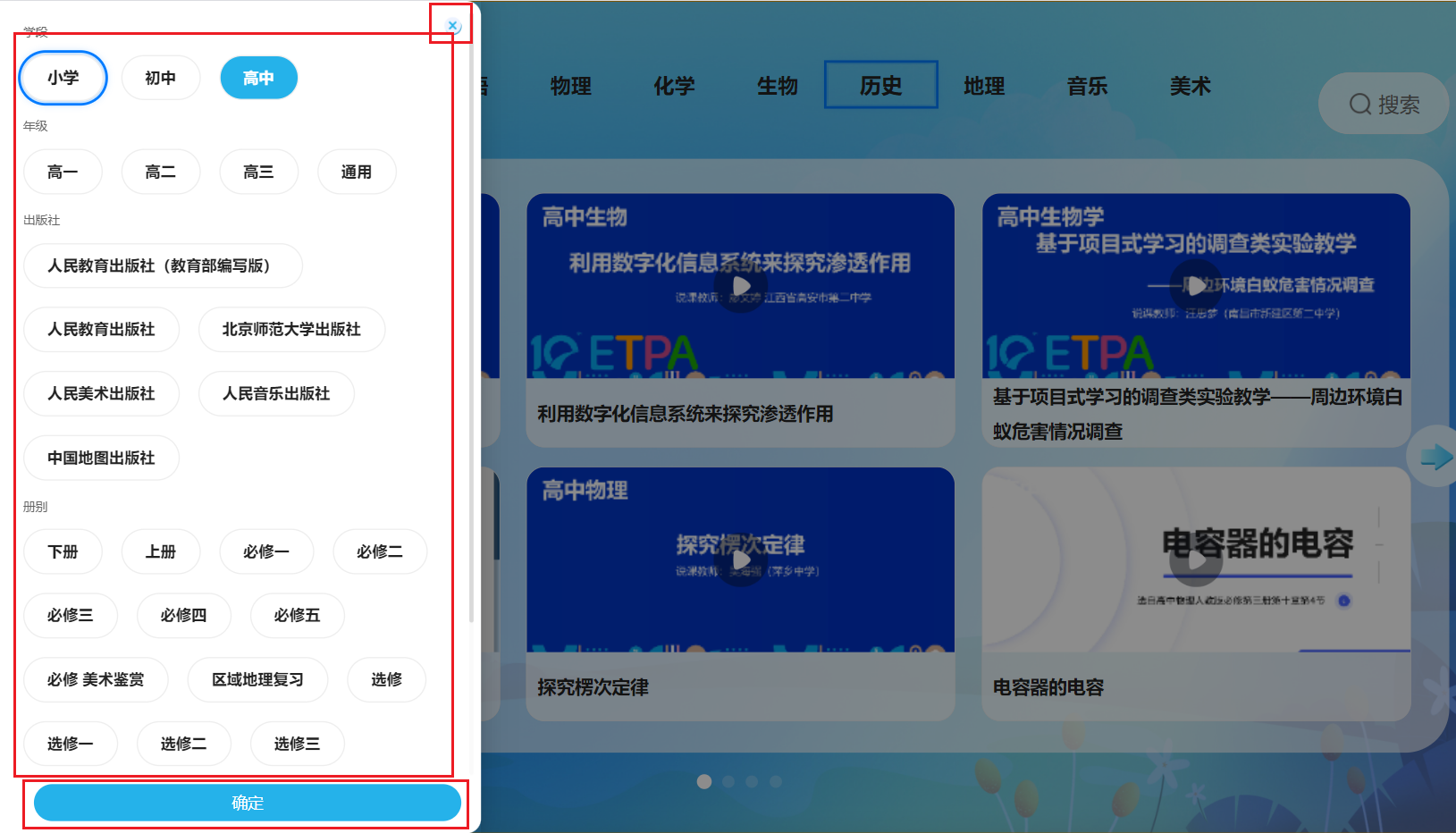
index.tsx
import { observer, useLocalObservable } from 'mobx-react'
import React, { FC, useEffect, useRef, useState } from 'react'
import styles from './index.module.scss'
import IndexMobx from '../mobx';
import { toJS } from 'mobx';

type IndexProps = {
  closeDrawer?: () => void;
  confirmDrawer?: () => void;
}

interface FocusPosition {
  area: 'close' | 'filter_row' | 'confirm';
  row: number;
  col: number;
}

const ModalContent: FC<IndexProps> = (props: any) => {
  const { closeDrawer, confirmDrawer } = props;
  const vm = useLocalObservable(() => IndexMobx);

  // 焦点管理
  const [focusPosition, setFocusPosition] = useState<FocusPosition>({
    area: 'filter_row', // close filter_row confirm
    row: 0,
    col: 0
  });

  // 存储所有可聚焦元素的引用
  const focusableElementsRef = useRef<{
    close: HTMLDivElement[];
    filter_row: HTMLDivElement[][];
    confirm: HTMLDivElement[];
  }>({
    close: [],
    filter_row: [],
    confirm: []
  });

  // 添加滚动容器的引用
  const scrollContainerRef = useRef<HTMLDivElement>(null);

  // 存储每个select_item的引用,用于滚动到头部
  const selectItemRefs = useRef<(HTMLDivElement | null)[]>([]);

  // 构建筛选行的数据结构
  const filterRows = [
    {
      title: '学段',
      options: vm.eduPhaseList,
      selected: vm.eduPhase,
      onSelect: (code: string) => vm.setInfo({ eduPhase: code }),
      colCount: vm.eduPhaseList.length
    },
    {
      title: '年级',
      options: vm.eduGradeList,
      selected: vm.eduGrade,
      onSelect: (code: string) => vm.setInfo({ eduGrade: vm.eduGrade === code ? '' : code }),
      colCount: vm.eduGradeList.length
    },
    {
      title: '出版社',
      options: vm.bookPublisherList,
      selected: vm.bookPublisher,
      onSelect: (code: string) => vm.setInfo({ bookPublisher: vm.bookPublisher === code ? '' : code }),
      colCount: vm.bookPublisherList.length
    },
    {
      title: '册别',
      options: vm.bookVolumeList,
      selected: vm.bookVolume,
      onSelect: (code: string) => vm.setInfo({ bookVolume: vm.bookVolume === code ? '' : code }),
      colCount: vm.bookVolumeList.length
    }
  ];

  // 滚动到焦点元素的函数
  const scrollToFocusedElement = (element: HTMLElement | null, area: string, row: number) => {
    if (!element || !scrollContainerRef.current) return;

    const container = scrollContainerRef.current;

    // 如果是第一行(学段),滚动到头部
    if (area === 'close' || area === 'filter_row' && row === 0) {
      // 直接滚动到容器顶部
      container.scrollTo({
        top: 0,
        behavior: 'smooth'
      });
      return;
    }

    const containerRect = container.getBoundingClientRect();
    const elementRect = element.getBoundingClientRect();

    // 检查元素是否在容器视口内
    const isInView = (
      elementRect.top >= containerRect.top &&
      elementRect.bottom <= containerRect.bottom
    );

    // 如果元素不在视口内,滚动到该元素
    if (!isInView) {
      // 计算需要滚动的距离
      const scrollTop = container.scrollTop;
      const elementTopRelativeToContainer = element.offsetTop;
      const elementHeight = element.offsetHeight;
      const containerHeight = container.offsetHeight;

      // 如果元素在容器上方
      if (elementRect.top < containerRect.top) {
        // 滚动到元素顶部对齐容器顶部
        container.scrollTo({
          top: elementTopRelativeToContainer - 20, // 留一点边距
          behavior: 'smooth'
        });
      }
      // 如果元素在容器下方
      else if (elementRect.bottom > containerRect.bottom) {
        // 滚动到元素底部对齐容器底部
        container.scrollTo({
          top: elementTopRelativeToContainer - containerHeight + elementHeight + 20, // 留一点边距
          behavior: 'smooth'
        });
      }
    }
  };

  // 焦点移动后自动滚动到焦点元素
  useEffect(() => {
    const { area, row, col } = focusPosition;
    console.log("%c Line:133 🍆 area, row, col", "color:#f5ce50", area, row, col);
    let element: HTMLElement | null = null;

    if (area === 'close') {
      element = focusableElementsRef.current.close[0];
      // 如果是关闭按钮,滚动到顶部
      if (scrollContainerRef.current) {
        scrollContainerRef.current.scrollTo({
          top: 0,
          behavior: 'smooth'
        });
      }
    } else if (area === 'confirm') {
      // element = focusableElementsRef.current.confirm[0];
    } else if (area === 'filter_row') {
      const rowElements = focusableElementsRef.current.filter_row[row];
      if (rowElements && rowElements[col]) {
        element = rowElements[col];
      }
    }

    if (element) {
      // 使用requestAnimationFrame确保DOM已更新
      requestAnimationFrame(() => {
        scrollToFocusedElement(element, area, row);
      });
    }
  }, [focusPosition]);

  useEffect(() => {
    const handleKeyDown = (event: KeyboardEvent) => {
      event.preventDefault();

      switch (event.key) {
        case 'ArrowUp':
          handleMoveUp();
          break;
        case 'ArrowDown':
          handleMoveDown();
          break;
        case 'ArrowLeft':
          handleMoveLeft();
          break;
        case 'ArrowRight':
          handleMoveRight();
          break;
        case 'Enter':
          handleConfirm();
          break;
        case 'Escape':
        case 'Backspace':
          handleBack();
          break;
      }
    };

    window.addEventListener('keydown', handleKeyDown);
    return () => {
      window.removeEventListener('keydown', handleKeyDown);
    };
  }, [focusPosition]);

  // 向上移动焦点
  const handleMoveUp = () => {
    const { area, row, col } = focusPosition;

    if (area === 'close') {
      setFocusPosition({
        area: 'confirm',
        row: 0,
        col: 0
      });
    } else if (area === 'filter_row') {
      if (row === 0) {
        // 从第一行筛选条件移动到关闭按钮
        setFocusPosition({
          area: 'close',
          row: 0,
          col: 0
        });
      } else {
        // 向上移动到上一行筛选条件
        const prevRow = row - 1;
        const prevRowOptions = filterRows[prevRow];
        const targetCol = Math.min(col, prevRowOptions.options.length - 1);
        setFocusPosition({
          area: 'filter_row',
          row: prevRow,
          col: targetCol
        });
      }
    } else if (area === 'confirm') {
      // 从确定按钮移动到第四行筛选条件
      const targetRow = 3; // 第四行
      const targetCol = Math.min(col, filterRows[targetRow].options.length - 1);
      setFocusPosition({
        area: 'filter_row',
        row: targetRow,
        col: targetCol
      });
    }
  };

  // 向下移动焦点
  const handleMoveDown = () => {
    const { area, row, col } = focusPosition;

    if (area === 'close') {
      // 从关闭按钮移动到第一行筛选条件
      const targetCol = Math.min(col, filterRows[0].options.length - 1);
      setFocusPosition({
        area: 'filter_row',
        row: 0,
        col: targetCol
      });
    } else if (area === 'filter_row') {
      if (row === 3) {
        // 从第四行筛选条件移动到确定按钮
        setFocusPosition({
          area: 'confirm',
          row: 0,
          col: 0
        });
      } else {
        // 向下移动到下一行筛选条件
        const nextRow = row + 1;
        const nextRowOptions = filterRows[nextRow];
        const targetCol = Math.min(col, nextRowOptions.options.length - 1);
        setFocusPosition({
          area: 'filter_row',
          row: nextRow,
          col: targetCol
        });
      }
    } else if (area === 'confirm') {
      setFocusPosition({
        area: 'close',
        row: 0,
        col: 0
      });
    }
  };

  // 向左移动焦点
  const handleMoveLeft = () => {
    const { area, row, col } = focusPosition;

    if (area === 'close') {
      // 关闭按钮向左移动(如果有多个关闭按钮,这里只有一个)
      // 可以移动到最后一行的最后一个筛选条件
      const lastRow = 3;
      const lastRowOptions = filterRows[lastRow];
      const targetCol = lastRowOptions.options.length - 1;
      setFocusPosition({
        area: 'filter_row',
        row: lastRow,
        col: targetCol
      });
    } else if (area === 'filter_row') {
      if (col > 0) {
        setFocusPosition({
          area: 'filter_row',
          row: row,
          col: col - 1
        });
      } else if (row > 0) {
        // 当前行第一个,移动到上一行最后一个
        const prevRow = row - 1;
        const prevRowOptions = filterRows[prevRow];
        const targetCol = prevRowOptions.options.length - 1;
        setFocusPosition({
          area: 'filter_row',
          row: prevRow,
          col: targetCol
        });
      } else {
        // 第一行第一个,移动到关闭按钮
        setFocusPosition({
          area: 'close',
          row: 0,
          col: 0
        });
      }
    } else if (area === 'confirm') {
      // 确定按钮向左移动到第四行最后一个筛选条件
      const lastRow = 3;
      const lastRowOptions = filterRows[lastRow];
      const targetCol = lastRowOptions.options.length - 1;
      setFocusPosition({
        area: 'filter_row',
        row: lastRow,
        col: targetCol
      });
    }
  };

  // 向右移动焦点
  const handleMoveRight = () => {
    const { area, row, col } = focusPosition;

    if (area === 'close') {
      // 关闭按钮向右移动到第一行第一个筛选条件
      setFocusPosition({
        area: 'filter_row',
        row: 0,
        col: 0
      });
    } else if (area === 'filter_row') {
      const currentRowOptions = filterRows[row];
      if (col < currentRowOptions.options.length - 1) {
        setFocusPosition({
          area: 'filter_row',
          row: row,
          col: col + 1
        });
      } else if (row < 3) {
        // 当前行最后一个,移动到下一行第一个
        setFocusPosition({
          area: 'filter_row',
          row: row + 1,
          col: 0
        });
      } else {
        // 第四行最后一个,移动到确定按钮
        setFocusPosition({
          area: 'confirm',
          row: 0,
          col: 0
        });
      }
    } else if (area === 'confirm') {
      // 确定按钮向右移动(只有一个确定按钮)
      // 可以移动到第一行第一个筛选条件
      setFocusPosition({
        area: 'filter_row',
        row: 0,
        col: 0
      });
    }
  };

  // 确认操作
  const handleConfirm = () => {
    const { area, row, col } = focusPosition;

    if (area === 'close') {
      closeDrawerFn();
    } else if (area === 'filter_row') {
      const currentRow = filterRows[row];
      if (currentRow && currentRow.options[col]) {
        const option = currentRow.options[col];
        currentRow.onSelect(option.code);
      }
    } else if (area === 'confirm') {
      filterConfirm();
    }
  };

  // 返回操作
  const handleBack = () => {
    closeDrawerFn();
  };

  useEffect(() => {
    // 根据学段设置年级列表、学科列表
    vm.eduPhaseRelateFilter(vm.eduPhase, true, false);

    // 初始化焦点
    // setFocusPosition({
    //   area: 'filter_row',
    //   row: 0,
    //   col: 0
    // });

    // 初始化滚动到顶部
    if (scrollContainerRef.current) {
      scrollContainerRef.current.scrollTo({
        top: 0,
        behavior: 'auto'
      });
    }

    return () => {
    }
  }, [vm.eduPhase]);

  const closeDrawerFn = () => {
    closeDrawer && closeDrawer()
  }

  const filterConfirm = () => {
    confirmDrawer && confirmDrawer()
    closeDrawerFn();
  }

  // 渲染焦点样式
  const renderFocusStyle = (area: string, row?: number, col?: number) => {
    const { area: focusArea, row: focusRow, col: focusCol } = focusPosition;

    if (area === focusArea) {
      if (area === 'close' || area === 'confirm') {
        // 对于单元素区域,只需要检查area
        return styles.focused;
      } else if (area === 'filter_row') {
        // 对于多行多列区域,检查行和列
        return focusRow === row && focusCol === col ? styles.focused : '';
      }
    }
    return '';
  };

  return (
    <div className={styles['custom_drawer_content']}>
      {/* 关闭按钮 */}
      <div
        className={`${styles['right_close']} ${renderFocusStyle('close')}`}
        onClick={closeDrawerFn}
        ref={el => {
          if (el) {
            focusableElementsRef.current.close[0] = el;
          }
        }}
      ></div>

      {/* 筛选条件列表 - 添加滚动容器引用 */}
      <div
        className={styles['scroll_list']}
        ref={scrollContainerRef}
      >
        {/* 学段 */}
        <div
          className={`${styles['select_item']} ${styles['first']}`}
          ref={el => {
            selectItemRefs.current[0] = el;
          }}
        >
          <div className={styles['text']}>学段</div>
          <div className={styles['select_list']}>
            {vm.eduPhaseList.map((item: any, index: number) => (
              <div
                key={index}
                className={`${vm.eduPhase === item.code ? styles['active_item'] : ''} ${styles['select_tag']} ${renderFocusStyle('filter_row', 0, index)}`}
                onClick={() => { vm.setInfo({ eduPhase: item.code }) }}
                ref={el => {
                  if (el) {
                    if (!focusableElementsRef.current.filter_row[0]) {
                      focusableElementsRef.current.filter_row[0] = [];
                    }
                    focusableElementsRef.current.filter_row[0][index] = el;
                  }
                }}
              >
                {item.name}
              </div>
            ))}
          </div>
        </div>

        {/* 年级 */}
        <div
          className={`${styles['select_item']} ${styles['second']}`}
          ref={el => {
            selectItemRefs.current[1] = el;
          }}
        >
          <div className={styles['text']}>年级</div>
          <div className={styles['select_list']}>
            {vm.eduGradeList.map((item: any, index: number) => (
              <div
                key={index}
                className={`${vm.eduGrade === item.code ? styles['active_item'] : ''} ${styles['select_tag']} ${renderFocusStyle('filter_row', 1, index)}`}
                onClick={() => { vm.setInfo({ eduGrade: vm.eduGrade === item.code ? '' : item.code }) }}
                ref={el => {
                  if (el) {
                    if (!focusableElementsRef.current.filter_row[1]) {
                      focusableElementsRef.current.filter_row[1] = [];
                    }
                    focusableElementsRef.current.filter_row[1][index] = el;
                  }
                }}
              >
                {item.name}
              </div>
            ))}
          </div>
        </div>

        {/* 出版社 */}
        <div
          className={`${styles['select_item']} ${styles['third']}`}
          ref={el => {
            selectItemRefs.current[2] = el;
          }}
        >
          <div className={styles['text']}>出版社</div>
          <div className={styles['select_list']}>
            {vm.bookPublisherList.map((item: any, index: number) => (
              <div
                key={index}
                className={`${vm.bookPublisher === item.code ? styles['active_item'] : ''} ${styles['select_tag']} ${renderFocusStyle('filter_row', 2, index)}`}
                onClick={() => { vm.setInfo({ bookPublisher: vm.bookPublisher === item.code ? '' : item.code }) }}
                ref={el => {
                  if (el) {
                    if (!focusableElementsRef.current.filter_row[2]) {
                      focusableElementsRef.current.filter_row[2] = [];
                    }
                    focusableElementsRef.current.filter_row[2][index] = el;
                  }
                }}
              >
                {item.name}
              </div>
            ))}
          </div>
        </div>

        {/* 册别 */}
        <div
          className={`${styles['select_item']} ${styles['third']}`}
          ref={el => {
            selectItemRefs.current[3] = el;
          }}
        >
          <div className={styles['text']}>册别</div>
          <div className={styles['select_list']}>
            {vm.bookVolumeList.map((item: any, index: number) => (
              <div
                key={index}
                className={`${vm.bookVolume === item.code ? styles['active_item'] : ''} ${styles['select_tag']} ${renderFocusStyle('filter_row', 3, index)}`}
                onClick={() => { vm.setInfo({ bookVolume: vm.bookVolume === item.code ? '' : item.code }) }}
                ref={el => {
                  if (el) {
                    if (!focusableElementsRef.current.filter_row[3]) {
                      focusableElementsRef.current.filter_row[3] = [];
                    }
                    focusableElementsRef.current.filter_row[3][index] = el;
                  }
                }}
              >
                {item.name}
              </div>
            ))}
          </div>
        </div>
      </div>

      {/* 确定按钮 */}
      <div className={styles['bottom_btn']}>
        <div
          className={`${styles['confirm_btn']} ${renderFocusStyle('confirm')}`}
          onClick={filterConfirm}
          ref={el => {
            if (el) {
              focusableElementsRef.current.confirm[0] = el;
            }
          }}
        >
          确定
        </div>
      </div>
    </div>
  )
}

export default observer(ModalContent)
index.module.scss
.custom_drawer_content {
  width: 100%;
  height: 100%;
  padding: vh(15) vw(10) vh(16) vw(20);
  position: relative;
  display: flex;
  flex-direction: column;

  .right_close {
    width: vw(34);
    height: vw(34);
    position: absolute;
    top: vh(15);
    right: vw(20);
    background: url('@/images/tvScreenView/modal_close.png') no-repeat;
    background-size: 100% 100%;
  }

  .scroll_list {
    height: calc(100% - vh(60));
    overflow-y: auto;
    @include overflowScroll();

    .select_item {
      .text {
        width: 100%;
        height: vh(50);
        line-height: vh(50);
        vertical-align: middle;
        font-family:
          Source Han Sans CN,
          Source Han Sans CN;
        font-weight: 400;
        font-size: fontSize(16);
        color: #666666;
        text-align: left;
        font-style: normal;
        text-transform: none;
        margin-bottom: vh(5);
        padding-left: vw(10);
      }

      .select_list {
        width: 100%;
        display: flex;
        justify-content: flex-start;
        gap: vw(24);
        flex-wrap: wrap;
        padding-left: vw(10);
        padding-bottom: vh(8);
        box-sizing: border-box;

        .select_tag {
          height: vh(59);
          line-height: vh(55);
          padding-left: vw(30);
          padding-right: vw(30);

          background: rgba(255, 255, 255, 0.6);
          border-radius: 99px 99px 99px 99px;
          border: vh(2) solid #eeeeee;

          font-family:
            Source Han Sans CN,
            Source Han Sans CN;
          font-weight: bold;
          font-size: fontSize(20);
          color: #222222;
          text-align: center;
          font-style: normal;
          text-transform: none;
          box-sizing: border-box;
        }

        .active_item {
          background: #25b2ea;
          border-radius: 99px 99px 99px 99px;
          border: vh(2) solid #eeeeee;
          box-sizing: border-box;
          color: #fff;
        }
      }
    }
  }

  .bottom_btn {
    width: 100%;
    // height: vh(48);
    height: vh(60);
    line-height: vh(48);
    padding-top: vh(12);
    padding-left: vw(24);
    padding-right: vw(16);

    .confirm_btn {
      width: 100%;
      height: vh(48);
      background: #25b2ea;
      border-radius: vh(24);
      text-align: center;

      font-family:
        PingFang SC,
        PingFang SC;
      font-weight: 500;
      font-size: 17px;
      color: #ffffff;
      text-align: center;
      font-style: normal;
      text-transform: none;
    }
  }
}

:global {
  .ant-drawer-body {
    overflow: hidden !important;
  }
}

.focused {
  outline: 3px solid #007bff !important;
  outline-offset: 2px;
  box-shadow: 0 0 10px rgba(0, 123, 255, 0.5);
  transform: scale(1.02);
  transition: all 0.2s ease;
  z-index: 10;
  position: relative;
  box-sizing: border-box;
  z-index: 99;
}
/mobx/index.ts
/*
 * @Author: OctopusRoe
 * @Date: 2024-05-28 17:22:57
 * @LastEditors: OctopusRoe
 * @LastEditTime: 2025-11-03 17:19:04
 * @Description:
 */
import { observable, makeObservable, action, toJS, makeAutoObservable, reaction } from 'mobx'
import request from '@/utils/request'
// import request from '../../service/request';
import { Decrypt } from '@/utils/crypto'
import dayjs from 'dayjs'
import {
  fullGradeList,
  middleBookVolumeList,
  middleSchoolBookPublisherList,
  middleSchoolSubjectList,
  primaryBookPublisherList,
  primaryBookVolumeList,
  primarySubjectList,
  seniorBookVolumeList,
  seniorSchoolBookPublisherList,
  seniorSubjectList,
} from '../modalContent/config'
import { getScreenHeader } from '@/utils/utilFunc'
import local from '@/utils/localTool'

export class IndexMobx {
  drawerOpen: boolean = false
  // 筛选弹框
  eduPhase: string = '2'
  eduPhaseList: any[] = [
    { name: '小学', code: '2' },
    { name: '初中', code: '4' },
    { name: '高中', code: '6' },
  ]
  // 年级
  // eduGrade: string = '2';
  eduGrade: string = ''
  eduGradeList: any[] = fullGradeList
  // 学科
  eduSubject: string = ''
  eduSubjectList: any[] = primarySubjectList
  // 出版社
  // bookPublisher: string = '9';
  bookPublisher: string = ''
  bookPublisherList: any[] = primaryBookPublisherList
  // 册别
  bookVolume: string = ''
  bookVolumeList: any[] = primaryBookVolumeList

  // 轮播列表
  courseList: any[] = [
    {
      image: 'https://img0.baidu.com/it/u=3260383401,4157111732&fm=253&fmt=auto&app=138&f=GIF?w=889&h=500',
      name: '统编版我是中国人',
      grade: '一年级下册',
    },
    {
      image: 'https://img0.baidu.com/it/u=3260383401,4157111732&fm=253&fmt=auto&app=138&f=GIF?w=889&h=500',
      name: '统编版我是中国人',
      grade: '一年级下册',
    },
    {
      image: 'https://img0.baidu.com/it/u=3260383401,4157111732&fm=253&fmt=auto&app=138&f=GIF?w=889&h=500',
      name: '统编版我是中国人',
      grade: '一年级下册',
    },
    {
      image: 'https://img0.baidu.com/it/u=3260383401,4157111732&fm=253&fmt=auto&app=138&f=GIF?w=889&h=500',
      name: '统编版我是中国人',
      grade: '一年级下册',
    },
    {
      image: 'https://img0.baidu.com/it/u=3260383401,4157111732&fm=253&fmt=auto&app=138&f=GIF?w=889&h=500',
      name: '统编版我是中国人',
      grade: '一年级下册',
    },
    {
      image: 'https://img0.baidu.com/it/u=3260383401,4157111732&fm=253&fmt=auto&app=138&f=GIF?w=889&h=500',
      name: '统编版我是中国人',
      grade: '一年级下册',
    },
    {
      image: 'https://img0.baidu.com/it/u=3260383401,4157111732&fm=253&fmt=auto&app=138&f=GIF?w=889&h=500',
      name: '统编版我是中国人',
      grade: '一年级下册',
    },
    {
      image: 'https://img0.baidu.com/it/u=3260383401,4157111732&fm=253&fmt=auto&app=138&f=GIF?w=889&h=500',
      name: '统编版我是中国人',
      grade: '一年级下册',
    },
    {
      image: 'https://img0.baidu.com/it/u=3260383401,4157111732&fm=253&fmt=auto&app=138&f=GIF?w=889&h=500',
      name: '统编版我是中国人',
      grade: '一年级下册',
    },
  ]

  constructor() {
    makeAutoObservable(this)
  }

  setInfo = (info: Record<string, any>) => {
    Object.keys(info).forEach((key) => {
      this[key as keyof typeof this] = info[key]
    })
  }

  // 更新缓存的筛选条件
  refreshStorageData = async () => {
    const tvFilterData: any = await local.getItem('tvFilterData')
    console.log('%c Line:56 🍅 tvFilterData', 'color:#4fff4B', tvFilterData)
    if (tvFilterData) {
      const storageEduPhase = tvFilterData.eduPhase ? tvFilterData.eduPhase : '2'
      // 先赋值学段,让自动触发联动修改先执行
      this.setInfo({ eduPhase: storageEduPhase })
      // 手动触发联动修改
      this.eduPhaseRelateFilter(storageEduPhase, false, true)
      // 缓存数据最后赋值展示
      setTimeout(() => {
        this.setInfo({
          eduGrade: tvFilterData.eduGrade,
          eduSubject: tvFilterData.eduSubject,
          bookPublisher: tvFilterData.bookPublisher,
          bookVolume: tvFilterData.bookVolume,
        })
      }, 5)
    }
  }

  // 根据学段数据联动筛选展示项
  // needResetSelect是否需要重置选中项 needRefreshSubjectList是否需要联动学科列表
  eduPhaseRelateFilter = (
    eduPhase: string,
    needResetSelect: boolean = false,
    needRefreshSubjectList: boolean = true,
  ) => {
    if (eduPhase == '2') {
      this.setInfo({
        eduGradeList: fullGradeList.slice(0, 7),
        bookPublisherList: primaryBookPublisherList,
        bookVolumeList: primaryBookVolumeList,
      })
    } else if (eduPhase == '4') {
      this.setInfo({
        eduGradeList: fullGradeList.slice(7, 11),
        bookPublisherList: middleSchoolBookPublisherList,
        bookVolumeList: middleBookVolumeList,
      })
    } else if (eduPhase == '6') {
      this.setInfo({
        eduGradeList: fullGradeList.slice(11),
        bookPublisherList: seniorSchoolBookPublisherList,
        bookVolumeList: seniorBookVolumeList,
      })
    }
    if (needResetSelect) {
      this.setInfo({
        eduGrade: '',
        eduSubject: '',
        bookPublisher: '',
        bookVolume: '',
      })
    }
    if (needRefreshSubjectList) {
      this.setInfo({
        eduSubjectList:
          eduPhase === '2'
            ? primarySubjectList
            : eduPhase === '4'
              ? middleSchoolSubjectList
              : eduPhase === '6'
                ? seniorSubjectList
                : [],
      })
    }
  }

  // 获取轮播列表
  getCarouselList = async (data: Object) => {
    const res: any = await request({
      url: `/smartScreen/api/resource/selectCourseResource`,
      method: 'POST',
      data: {
        eduPhase: this.eduPhase,
        eduGrade: this.eduGrade ? this.eduGrade : undefined,
        eduSubject: this.eduSubject ? this.eduSubject : undefined,
        bookPublisher: this.bookPublisher ? this.bookPublisher : undefined,
        bookVolume: this.bookVolume ? this.bookVolume : undefined,
        ...data,
      },
      headers: {
        ...getScreenHeader(),
      },
    })
    if (res && res.data && res.data?.records?.length) {
      console.log('%c Line:117 🌽 res.data', 'color:#fca650', res.data)
      this.setInfo({ courseList: res.data.records })
      // return res.data;
    } else {
      this.setInfo({ courseList: [] })
    }
  }

  resetMobx = () => {
    this.setInfo({
      drawerOpen: false,
      eduPhase: '2',
      eduPhaseList: [
        { name: '小学', code: '2' },
        { name: '初中', code: '4' },
        { name: '高中', code: '6' },
      ],

      eduGrade: '',
      eduGradeList: fullGradeList,

      eduSubject: '',
      eduSubjectList: primarySubjectList,

      bookPublisher: '',
      bookPublisherList: primaryBookPublisherList,

      bookVolume: '',
      bookVolumeList: primaryBookVolumeList,
    })
  }
}

export default new IndexMobx()
低版本浏览器样式兼容
gap失效
// 正常写法
  .search_content {
  width: 100%;
  height: 100%;
  display: flex;
  flex-direction: column;
  gap: vh(36);
}

// 兼容写法
  /* 先写兼容方案 - 支持所有浏览器 */
  .search_content>*+* {
  margin-top: 36px;
}

/* 如果支持gap,则覆盖掉margin,使用gap */
@supports (gap: 36px) {
  .search_content {
    gap: 36px;
  }

  .search_content > * + * {
    margin-top: 0;
  }
}
flex布局导致高度变矮
/* 正常写法 */
.search_line {
  width: 100%;
  height: vh(80);
  justify-content: center;
}
/* 兼容写法 */
.search_line {
  width: 100%;
  height: 80px;
  /* 先设置一个固定高度作为降级 */
  height: vh(80);
  /* 再使用 vh 单位 */
  min-height: 80px;
  /* 确保最小高度 */
  display: flex;
  justify-content: center;

  /* IE10+ 的 flex 前缀 */
  display: -ms-flexbox;
  -ms-flex-pack: center;
}