
Vue3 + TypeScript
基本使用
html CDN或本地引入
<script src="https://unpkg.com/vue@next"></script>
>
Vue声明式编程基本语法(MVVM)
M:数据 V:视图 VM:实现数据绑定和视图事件的监听
<body>
  <div id="app">
    <h2>{{title}}</h2>
    <ul>
      <li v-for="item in list">{{item}}</li>
    </ul>
    <h2>当前计数:{{count}}</h2>
    <button
      @click="increment"
      style="cursor: pointer"
    >
      +1
    </button>
    <button
      @click="decrement"
      style="cursor: pointer"
    >
      -1
    </button>
  </div>

  <script src="./lib/vue.js"></script>
  <script>
    const app = Vue.createApp({
      // 有template优先将template里的内容放入#app下挂载,无template则自动渲染#app下的DOM节点
      // template: `<div>template优先</div>`,
      // data对应的数据为函数返回一个对象
      data() {
        return {
          title: "Hello World",
          list: ["424535", "35t54", "u7676", "76454"],
          count: 0,
        };
      },
      methods: {
        increment() {
          this.count++;
        },
        decrement() {
          this.count--;
        },
      },
    });
    app.mount("#app");
  </script>
</body>
options-API
data
data中返回的对象会被Vue的响应式系统劫持,之后对该对象的修改或者访问都会在劫持中被处理:
所以我们在template或者app中通过 访问counter,可以从对象中获取到数据;
所以我们修改counter的值时,app中的 也会发生改变;
methods
methods里的函数/方法不能使用箭头函数,不然方法内的this指向的不是data函数返回的劫持对象,指向的是window全局作用域(对象没有自己的作用域)
vue3源码里实现为:对methods里的函数进行遍历,对每个函数都进行了bind(proxy)指向了其劫持的响应式代理对象
computed计算属性
在某些情况,我们可能需要对数据进行一些转化后再显示,或者需要将多个数据结合起来进行显示
模板中放入太多的逻辑会让模板过重和难以维护
一种方式是将逻辑抽取到一个method中,放到methods的options中,这种做法有一个直观的弊端,就是所有的data使用过程都会变成了一个方法的调用
另外一种方式就是使用计算属性computed
对于任何包含响应式数据的复杂逻辑,你都应该使用计算属性;
<div id="app">
  <h2>{{ fullName }}</h2>
  <h2>{{ fullName }}</h2>

  <h2>{{ scoreLevel }}</h2>

  <h2>{{ reverseContent }}</h2>
</div>

<script src="../lib/vue.js"></script>
<script>
  const app = Vue.createApp({
    data() {
      return {
        firstName: "zzz",
        lastName: "jf",
        score: 80,
        content: "this is a content",
      };
    },
    computed: {
      fullName() {
        return this.firstName + " " + this.lastName;
      },
      scoreLevel() {
        return this.score >= 60 ? "及格" : "不及格";
      },
      reverseContent() {
        return this.content.split(" ").reverse().join(" ");
      },
    },
  });
  app.mount("#app");
</script>
计算属性对比methods
使用计算属性不用写()
计算属性有缓存,methods没有,使用效率比方法高
在数据不发生变化时,计算属性是不需要重新计算的;
但是如果依赖的数据发生变化,在使用时,计算属性依然会重新进行计算;
<div id="app">
  <h2>{{ fullName }}</h2>
  <button @click="changeName">改变fullName</button>
</div>

<script src="../lib/vue.js"></script>
<script>
  const app = Vue.createApp({
    data() {
      return {
        firstName: "zzz",
        lastName: "jf",
      };
    },
    computed: {
      // 语法糖函数式写法
      fullName() {
        return this.firstName + " " + this.lastName;
      },
      // set,get对象写法
      fullName: {
        get() {
          return this.firstName + " " + this.lastName;
        },
        set(val) {
          const vals = val.split(" ");
          this.firstName = vals[0];
          this.lastName = vals[1];
        },
      },
    },
    methods: {
      changeName() {
        this.fullName = "zhu sdsffew";
      },
    },
  });
  app.mount("#app");
</script>
watch侦听器
在某些情况下,我们希望在代码逻辑中监听某个数据的变化,随即添加相应的逻辑,这个时候就需要用侦听器watch来完成
<div id="app">
  <h2>{{message}}</h2>
  <button @click="changeMessage">改变message</button>
</div>

<script src="../lib/vue.js"></script>
<script>
  const app = Vue.createApp({
    data() {
      return {
        message: "Hello Vue3",
        info: { name: "zjf", age: 23 },
      };
    },
    methods: {
      changeMessage() {
        this.message = "Hello zjf";
        this.info = { name: "why" };
      },
    },
    watch: {
      // 1.观察的数据函数默认有两个参数newValue, oldValue
      message(newValue, oldValue) {
        console.log("message数据发生了变化", newValue, oldValue);
      },
      info(newValue, oldValue) {
        // 2.如果数据是对象类型,拿到的是Proxy代理对象
        // console.log('info发生了变化', newValue, oldValue)
        // 3.获取原始对象
        // console.log({ ...newValue }, { ...oldValue }) // 不是原始的对象
        console.log(Vue.toRaw(newValue), Vue.toRaw(oldValue));
      },
    },
  });
  app.mount("#app");
</script>
对象的深度监听
<div id="app">
  <h2>{{info.name}}</h2>
  <button @click="changeInfo">改变message</button>
</div>

<script src="../lib/vue.js"></script>
<script>
  const app = Vue.createApp({
    data() {
      return {
        info: { name: "zjf", age: 23 },
      };
    },
    methods: {
      changeInfo() {
        // 直接修改对象watch能监听到
        // this.info = { name: 'why' }
        // 如果直接修改的是对象的某个属性,普通写法监听不到
        this.info.name = "zzz";
      },
    },
    watch: {
      // 监听不到对象属性的变化
      // info(newValue, oldValue) {
      //   console.log('info发生了变化', Vue.toRaw(newValue), Vue.toRaw(oldValue))
      // },
      // 深度监听
      info: {
        handler(newValue, oldValue) {
          console.log(Vue.toRaw(newValue), Vue.toRaw(oldValue));
          console.log(newValue === oldValue); // true
        },
        // 进行深度监听
        deep: true,
        // 第一次渲染时执行一次监听器
        immediate: true, // undefined => { }
      },
      // 直接监听对象的某个属性写法(了解)
      "info.name": function (newValue, oldValue) {
        console.log(newValue, oldValue);
      },
    },
  });
  app.mount("#app");
</script>
其他不同写法

$watch写法
<div id="app">
  <h2>{{message}}</h2>
  <button @click="changeMessage">改变message</button>
</div>

<script src="../lib/vue.js"></script>
<script>
  const app = Vue.createApp({
    data() {
      return {
        message: "Hello message",
      };
    },
    methods: {
      changeMessage() {
        this.message = "Hello Vue3";
      },
    },
    created() {
      this.$watch(
        "message",
        (newValue, oldValue) => {
          console.log(newValue, oldValue);
        },
        { deep: true, immediate: true },
      );
    },
  });
  app.mount("#app");
</script>
模板语法
mustache
<div id="app">
  <!-- 展示 -->
  <h2>{{ message }}</h2>
  <h2>当前计数:{{ count }}</h2>
  <!-- 运算 -->
  <h2>计数双倍:{{ count * 2 }}</h2>
  <h2>{{ info.split(' ') }}</h2>
  <h2>{{ age > 18? '成年': '未成年' }}</h2>
  <!-- 函数使用 -->
  <h2>{{ test('bbb') }}</h2>
</div>

<script src="../lib/vue.js"></script>
<script>
  const app = Vue.createApp({
    data() {
      return {
        message: "Hello Vue3",
        count: 100,
        info: "this is a content",
        age: 20,
      };
    },
    methods: {
      test(s) {
        return "aaa" + s;
      },
    },
  });
  app.mount("#app");
</script>
v-once
只进行一次渲染:只按照一开始的值进行渲染,后续数据变化不会重新渲染最新的数据,元素及其子节点都只会进行一次渲染
<div id="app">
  <!-- v-once -->
  <h2 v-once>
    {{ message }}
    <span>{{ count }}</span>
  </h2>
  <button @click="changeMessage">改变message</button>
</div>

<script src="../lib/vue.js"></script>
<script>
  const app = Vue.createApp({
    data() {
      return {
        message: "Hello Vue3",
        count: 100,
      };
    },
    methods: {
      changeMessage() {
        this.message = "hello 111";
        this.count = 200;
      },
    },
  });
  app.mount("#app");
</script>
v-text
<div id="app">
  <h2>{{message}}</h2>
  <!-- 等价于上面,但不如上面的方式灵活,如下会替代ccc -->
  <h2 v-text="message">ccc</h2>
</div>
v-html
如果我们希望内容被Vue当做节点解析出来,那么可以使用 v-html 来展示
<div id="app">
  <h2>{{ content }}</h2>
  <h2 v-html="content"></h2>
</div>

<script src="../lib/vue.js"></script>
<script>
  const app = Vue.createApp({
    data() {
      return {
        content: `<span style="color: red;font-size: 30px;">hhh111</span>`,
      };
    },
  });
  app.mount("#app");
</script>
v-pre
跳过元素和它的子元素的编译过程,显示原始的mustache标签
跳过不需要编译的节点,加快编译速度
<div v-pre>
  <h2>{{message}}</h2>
  <h2>当前计数:{{counter}}</h2>
</div>
v-cloak
和 CSS 规则如 [v-cloak] { display: none } 一起用时,这个指令可以隐藏还未编译的 Mustache 标签直到组件实例准备完毕
<head>
  <meta charset="UTF-8" />
  <meta
    http-equiv="X-UA-Compatible"
    content="IE=edge"
  />
  <meta
    name="viewport"
    content="width=device-width, initial-scale=1.0"
  />
  <title>Document</title>
  <style>
    [v-cloak] {
      display: none;
    }
  </style>
</head>

<body>
  <div id="app">
    <h2 v-cloak>{{message}}</h2>
  </div>

  <script src="../lib/vue.js"></script>
  <script>
    setTimeout(() => {
      const app = Vue.createApp(
        {
          data() {
            return {
              message: "Hello Vue3",
            };
          },
        },
        3000,
      );
      app.mount("#app");
    }, 3000);
  </script>
</body>
v-memo
指定节点和子树节点可以发生页面更新的条件,当数组为空时,相当于v-once只初始化时更新一次
<div id="app">
  <!-- 指定只有当name发生改变时div节点才会进行更新 -->
  <div v-memo="[name]">
    <h2>姓名:{{ name }}</h2>
    <h2>年龄:{{ age }}</h2>
    <h2>身高:{{ height }}</h2>
  </div>
  <button @click="changeInfo">改变info</button>
</div>

<script src="../lib/vue.js"></script>
<script>
  const app = Vue.createApp({
    data() {
      return {
        name: "zjf",
        age: 23,
        height: 1.8,
      };
    },
    methods: {
      changeInfo() {
        this.name = "zzz";
        // this.age = 22
      },
    },
  });
  app.mount("#app");
</script>
v-bind属性绑定
用法:动态地绑定一个或多个 attribute属性,或一个组件 prop 到表达式
语法糖::
基本用法:
<div id="app">
  <div>
    <button @click="changeImg">切换图片</button>
  </div>
  <img
    v-bind:src="showImgUrl"
    alt=""
  />
  <!-- v-bind语法糖: -->
  <a
    :href="href"
    target="_blank"
    >跳转到百度</a
  >
</div>

<script src="../lib/vue.js"></script>
<script>
  const app = Vue.createApp({
    data() {
      return {
        imgUrl1: "http://p1.music.126.net/5Eg9JmbMKaatFItNduaXhA==/109951168563614529.jpg",
        imgUrl2: "http://p1.music.126.net/cq95aHVsFRKnmF4EGS1PXw==/109951168563663637.jpg",
        showImgUrl: "http://p1.music.126.net/5Eg9JmbMKaatFItNduaXhA==/109951168563614529.jpg",

        href: "https://www.baidu.com",
      };
    },
    methods: {
      changeImg() {
        this.showImgUrl = this.showImgUrl === this.imgUrl1 ? this.imgUrl2 : this.imgUrl1;
      },
    },
  });
  app.mount("#app");
</script>
:class对象绑定方式(掌握)
<head>
  <meta charset="UTF-8" />
  <title>Document</title>
  <style>
    .active {
      color: red;
    }
  </style>
</head>

<body>
  <div id="app">
    <!-- 1.普通绑定 -->
    <h2 :class="classes">{{message}}</h2>
    <!-- 2.1对象绑定多个键值对、class和:class的自动拼接 zzz mmm nnn -->
    <h2
      class="zzz"
      :class="{mmm: true, 'lll': false, 'nnn': true}"
    >
      {{message}}
    </h2>
    <!-- 2.2动态切换 -->
    <h2 :class="{active: isActive}">{{message}}</h2>
    <button @click="changeClass">改变class</button>
    <!-- 2.3调用函数接收对象作为class -->
    <h2 :class="getClasses()">{{message}}</h2>
    <!-- 3.1动态class使用数组语法,使用变量 -->
    <h2 :class="['zzz', 'lll', classes]">{{message}}</h2>
    <!-- 3.2动态class使用数组语法,数组中使用对象(推荐) -->
    <h2 :class="['zzz', 'lll', classes, { active: isActive }]">{{message}}</h2>
  </div>

  <script src="../lib/vue.js"></script>
  <script>
    const app = Vue.createApp({
      data() {
        return {
          message: "Hello Vue3",
          classes: "abc cba nba",
          isActive: false,
        };
      },
      methods: {
        changeClass() {
          this.isActive = !this.isActive;
        },
        getClasses() {
          return { zzz: true, mmm: true, nnn: true, lll: false };
        },
      },
    });
    app.mount("#app");
  </script>
</body>
:style样式绑定
<body>
  <div id="app">
    <!-- 1.普通写法 -->
    <h2 style="color: red; font-size: 30px;">{{message}}</h2>
    <!-- 2.动态绑定style写法 -->
    <h2 :style="{ color: fontColor, 'font-size': '30px' }">{{message}}</h2>
    <h2 :style="{ color: fontColor, fontSize: fontSize }">{{message}}</h2>
    <h2 :style="objStyle">{{message}}</h2>
    <h2 :style="[objStyle, objStyle1, { backgroundColor: 'blue' }]">{{message}}</h2>
  </div>

  <script src="../lib/vue.js"></script>
  <script>
    const app = Vue.createApp({
      data() {
        return {
          message: "Hello Vue3",
          fontColor: "blue",
          fontSize: "40px",
          objStyle: {
            color: "green",
            fontSize: "50px",
          },
          objStyle1: {
            opacity: 0.6,
          },
        };
      },
    });
    app.mount("#app");
  </script>
</body>
:[name]动态绑定属性名
<div id="app">
  <h2
    :[name]="'zzz'"
    :[qqq]="'aaa'"
  >
    {{message}}
  </h2>
</div>

<script src="../lib/vue.js"></script>
<script>
  const app = Vue.createApp({
    data() {
      return {
        message: "Hello Vue3",
        name: "title", // 动态添加title属性
        qqq: "class",
      };
    },
  });
  app.mount("#app");
</script>
v-bind直接绑定对象(组件传参的方式)
将对象中的所有key/value绑定到元素(组件)上
<div id="app">
  <h2
    :name="name"
    :age="age"
    :height="height"
  >
    {{message}}
  </h2>
  <!-- v-bind直接绑定对象,后续组件传递参数的方式 -->
  <h2 v-bind="infos"></h2>
</div>

<script src="../lib/vue.js"></script>
<script>
  const app = Vue.createApp({
    data() {
      return {
        message: "Hello Vue3",
        infos: { name: "zzz", age: 23, height: 1.8 },
        name: "zjf",
        age: 23,
        height: 1.8,
      };
    },
  });
  app.mount("#app");
</script>
v-on事件绑定
基本写法
<div id="app">
  <!-- 1.v-on -->
  <div
    v-on:click="boxClick"
    class="box"
  ></div>
  <br />
  <!-- 2.语法糖@ -->
  <div
    @click="boxClick"
    class="box"
  ></div>
  <!-- 3.也可绑定一个简单表达式(较少用到,不推荐) -->
  <h2>{{counter}}</h2>
  <button @click="increment">+1</button>
  <button @click="counter++">+1</button>
  <!-- 4.绑定其它事件 -->
  <!-- <div @mousemove="onMouseMove" @click="boxClick" class="box"></div> -->
  <!-- 4.1对象写法 -->
  <div
    v-on="{ mousemove: onMouseMove, click: boxClick }"
    class="box"
  ></div>
  <div
    @="{ mousemove: onMouseMove, click: boxClick }"
    class="box"
  ></div>
</div>

<script src="../lib/vue.js"></script>
<script>
  const app = Vue.createApp({
    data() {
      return {
        counter: 0,
      };
    },
    methods: {
      boxClick() {
        console.log("box点击");
      },
      increment() {
        this.counter++;
      },
      onMouseMove() {
        console.log("divMouseMove");
      },
    },
  });
  app.mount("#app");
</script>
@事件绑定参数传递
<div id="app">
  <!-- 1.默认参数的传递event -->
  <button @click="btnClick">按钮</button>
  <!-- 2.明确参数传递会替代默认的点击事件参数event -->
  <button @click="btn2Click('zzz', age)">按钮2</button>
  <!-- 3.既传递明确参数,也传递event事件 -->
  <button @click="btn3Click('zzz', 23, $event)">按钮3</button>
</div>

<script src="../lib/vue.js"></script>
<script>
  const app = Vue.createApp({
    data() {
      return {
        message: "Hello Vue3",
        age: 23,
      };
    },
    methods: {
      btnClick(e) {
        console.log("btnClick", e);
      },
      btn2Click(name, age) {
        console.log("btn2Click", name, age);
      },
      btn3Click(name, age, e) {
        console.log("btn3Click", name, age, e);
      },
    },
  });
  app.mount("#app");
</script>
v-on修饰符@click.
.stop - 同调用 event.stopPropagation()效果一样。
.prevent - 调用 event.preventDefault(),例如阻止a标签的默认跳转事件,.prevent可以和.stop连用。
.capture - 添加事件侦听器时使用 capture 模式。
.self - 只当事件是从侦听器绑定的元素本身触发时才触发回调。
.{keyAlias} - 仅当事件是从特定键触发时才触发回调。
.once - 只触发一次回调。
.left - 只当点击鼠标左键时触发。
.right - 只当点击鼠标右键时触发。
.middle - 只当点击鼠标中键时触发。
.passive - { passive: true } 模式添加侦听器
<div id="app">
  <!-- 1.stop阻止冒泡,先btnClick,后阻止boxClick触发 -->
  <div
    class="box"
    @click="boxClick"
  >
    <button @click.stop="btnClick">按钮</button>
    <button @click.left="btn1Click">按钮1</button>
    <!-- 2.prevent可阻止a标签的默认跳转,可和.stop连用 -->
    <a
      href="https://www.baidu.com"
      @click.prevent.stop="aClick"
      >百度</a
    >
  </div>
</div>

<script src="../lib/vue.js"></script>
<script>
  const app = Vue.createApp({
    data() {
      return {
        message: "Hello Vue3",
      };
    },
    methods: {
      boxClick() {
        console.log("boxClick");
      },
      btnClick(e) {
        // e.stopPropagation()
        console.log("btnClick");
      },
      btn1Click() {
        console.log("btn1Click");
      },
      aClick() {
        console.log("aClick");
      },
    },
  });
  app.mount("#app");
</script>
条件渲染
v-if、v-else-if、v-else
v-show
回流 > 重绘
不能和template结合使用,相当于给元素添加了display: none样式,不能控制template,只触发页面重绘,
适用于页面需要进行频繁切换的情况
template
必须通过v-if,v-else来控制,类似小程序的block,react的<></>,fragment
<div id="app">
  <template v-if="Object.keys(info).length">
    <h2>用户信息</h2>
    <ul>
      <li>姓名:{{info.name}}</li>
      <li>年龄:{{info.age}}</li>
    </ul>
  </template>
  <template v-else>
    <h2>暂无相关用户信息~</h2>
  </template>
  <h2 v-show="showScore">分数:100分</h2>
</div>

<script src="../lib/vue.js"></script>
<script>
  const app = Vue.createApp({
    data() {
      return {
        info: {
          name: "zzz",
          age: 23,
        },
        showScore: true,
      };
    },
  });
  app.mount("#app");
</script>
v-for(diff)
v-for的基本格式是 "item in 数组":
数组通常是来自data或者prop,也可以是其他方式(computed);
item是我们给每项元素起的一个别名,这个别名可以自定来定义;
如果我们需要索引,可以使用格式: "(item, index) in 数组";
基本使用
<div id="app">
  <!-- 遍历数组 -->
  <h2>电影列表</h2>
  <ul>
    <!-- v-for...in... v-for...of...都可以 -->
    <li v-for="(item, index) in movies">{{index + 1}} - {{item}}</li>
  </ul>
  <!-- 遍历对象 -->
  <ul>
    <li v-for="(item, key, index) in info">{{index + 1}} - {{key}} - {{item}}</li>
  </ul>
  <!-- 遍历字符串a b c d -->
  <ul>
    <li v-for="item in 'abcd'">{{item}}</li>
  </ul>
  <!-- 遍历数字1-10,结合template的使用 -->
  <ul>
    <template v-for="item in 10">
      <li>{{item}}</li>
    </template>
  </ul>
</div>

<script src="../lib/vue.js"></script>
<script>
  const app = Vue.createApp({
    data() {
      return {
        movies: ["zzz", "xxx", "ccc", "vdse"],
        info: { name: "zzz", age: 23, height: 1.8 },
      };
    },
  });
  app.mount("#app");
</script>
v-for :key
key属性主要用在Vue的虚拟DOM算法,在新旧nodes对比时辨识VNodes(Virtual Node);
如果不使用key,Vue会使用一种最大限度减少动态元素并且尽可能的尝试就地修改/复用相同类型元素的算法;
而使用key时,它会基于key的变化重新排列元素顺序,并且会移除/销毁key不存在的元素;
v-node和虚拟DOM
VNode的全称是Virtual Node,也就是虚拟节点;
事实上,无论是组件还是元素,它们最终在Vue中表示出来的都是一个个VNode;
VNode的本质是一个JavaScript的对象;
template -> VNode -> Virtual DOM -> 真实DOM

有了虚拟DOM,就可以通过该javascript对象将其渲染成不止浏览器端的其它平台的如移动端(view, image),IOS(UIButton,UIImage),桌面端(客户端),VR等实际的节点,实现跨平台
diff
Vue事实上会对于有key和没有key会调用两个不同的方法;
有key,那么就使用 patchKeyedChildren方法;
没有key,那么就使用 patchUnkeyedChildren方法;
v-model表单绑定
表单提交是开发中非常常见的功能,也是和用户交互的重要手段:
比如用户在登录、注册时需要提交账号密码;
比如用户在检索、创建、更新信息时,需要提交一些数据;
这些都要求我们可以在代码逻辑中获取到用户提交的数据,我们通常会使用v-model指令来完成:
v-model指令可以在表单 input、textarea以及select元素上创建双向数据绑定;
它会根据控件类型自动选取正确的方法来更新元素;
尽管有些神奇,但 v-model 本质上不过是语法糖,它负责监听用户的输入事件来更新数据,并在某种极端场景下进行一些特殊处理
<div id="app">
  <!-- 1.手动实现双向绑定 -->
  <input
    type="text"
    :value="message"
    @input="inputValue"
  />
  <!-- 2.v-model实现双向绑定 -->
  <input
    type="text"
    v-model="message"
  />
  <h2>{{message}}</h2>

  <label for="name">
    用户名:<input
      type="text"
      type="text"
      v-model="username"
    />
  </label>
  <label for="password">
    密码:<input
      type="text"
      type="password"
      v-model="password"
    />
  </label>
  <button @click="loginClick">登录</button>
</div>

<script src="../lib/vue.js"></script>
<script>
  const app = Vue.createApp({
    data() {
      return {
        message: "Hello Vue3",
        username: "zzzjf",
        password: "xxxxxxxxxx",
      };
    },
    methods: {
      inputValue(e) {
        this.message = e.target.value;
      },
      loginClick() {
        // 提交this.username,this.password
      },
    },
  });
  app.mount("#app");
</script>
v-model原理
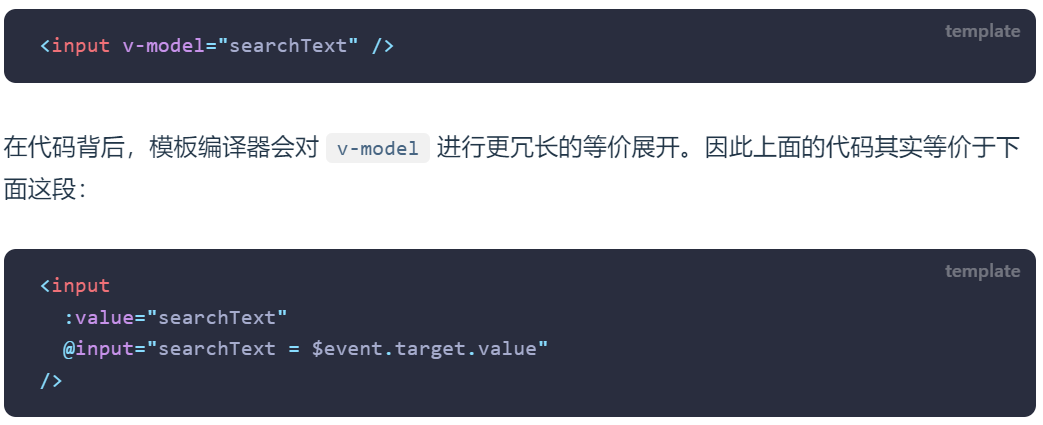
v-model的原理其实是背后有两个操作:
v-bind绑定value属性的值;
v-on绑定input事件监听到函数中,函数会获取最新的值赋值到绑定的属性中;
其它节点的绑定
<div id="app">
  <!-- 1.绑定textarea -->
  <textarea
    id=""
    cols="30"
    rows="10"
    v-model="content"
  ></textarea>
  <p>输入的内容:{{content}}</p>
  <!-- 2.绑定checkbox单选框 -->
  <label for="aggree">
    <input
      type="checkbox"
      name=""
      id="aggree"
      v-model="isAgree"
    />同意
  </label>
  <h2>同意:{{isAgree}}</h2>
  <br />
  <!-- 3.绑定checkbox多选框 -->
  <div class="hodbbies">
    <label for="sing">
      <input
        type="checkbox"
        id="sing"
        value="sing"
        v-model="hobbies"
      />
      唱
    </label>
    <label for="jump">
      <input
        type="checkbox"
        id="jump"
        value="jump"
        v-model="hobbies"
      />
      跳
    </label>
    <label for="rap">
      <input
        type="checkbox"
        id="rap"
        value="rap"
        v-model="hobbies"
      />
      Rap
    </label>
    <label for="basketball">
      <input
        type="checkbox"
        id="basketball"
        value="basketball"
        v-model="hobbies"
      />
      篮球
    </label>
    <h2>爱好:{{hobbies}}</h2>
  </div>
  <!-- 4.绑定radio -->
  <div class="gender">
    <label for="male">
      <input
        id="male"
        type="radio"
        v-model="gender"
        value="male"
        name="gender"
      />
      男
    </label>
    <label for="female">
      <input
        id="female"
        type="radio"
        v-model="gender"
        value="female"
        name="gender"
      />
      女
    </label>
    <h2>{{gender}}</h2>
  </div>
  <!-- 5.绑定select -->
  <!-- 单选 -->
  <select v-model="fruit">
    <option value="apple">苹果</option>
    <option value="banana">香蕉</option>
    <option value="pear">梨</option>
  </select>
  <h2>单选:{{fruit}}</h2>
  <!-- 多选 -->
  <select
    multiple
    size="3"
    v-model="fruits"
  >
    <option value="apple">苹果</option>
    <option value="banana">香蕉</option>
    <option value="pear">梨</option>
  </select>
  <h2>多选:{{fruits}}</h2>
</div>

<script src="../lib/vue.js"></script>
<script>
  const app = Vue.createApp({
    data() {
      return {
        content: "",
        isAgree: true,
        hobbies: [],
        gender: "male",
        fruit: "apple",
        fruits: [],
      };
    },
  });
  app.mount("#app");
</script>
v-model修饰符的使用
<div id="app">
  <!-- 1.lazy回车或移除光标时赋值 -->
  <input
    type="text"
    v-model.lazy="message"
  />
  <h2>{{message}}</h2>
  <hr />
  <!-- 2.number -->
  <input
    type="text"
    v-model.number="counter"
  />
  <h2>counter:{{counter}}-{{typeof counter}}</h2>
  <br />
  <!-- type='number'直接阻止了输入字符串,v-model所以不必要加.number -->
  <input
    type="number"
    v-model="counter2"
  />
  <h2>counter2:{{counter2}}-{{typeof counter2}}</h2>
  <!-- 3.trim自动去除首位空格 -->
  <input
    type="text"
    v-model.trim="content"
  />
  <h2>content:{{content}}</h2>
  <hr />
  <!-- 4.使用多个修饰符 -->
  <input
    type="text"
    v-model.lazy.trim="moreContent"
  />
  <h2>moreContent:{{moreContent}}</h2>
</div>

<script src="../lib/vue.js"></script>
<script>
  const app = Vue.createApp({
    data() {
      return {
        message: "Hello Vue3",
        counter: 0,
        counter2: 0,
        content: "",
        moreContent: "",
      };
    },
  });
  app.mount("#app");
</script>
组件化开发
组件名称定义规范
方式一:使用kebab-case(短横线分割符)
方式二:使用PascalCase(大驼峰标识符)
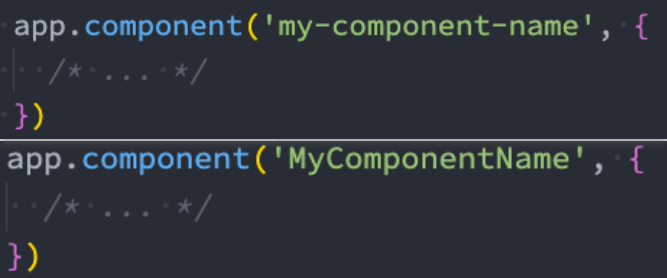
在html中节点会被识别成
全局组件注册
全局组件可以在任意组件的template内使用
使用app.component('组件名', 组件对象实例)的方式注册,该过程需要在app.mount('#app')挂载前进行注册
<div id="app">
  <h2>{{title}}</h2>
  <h2>{{content}}</h2>
  <child-cpn></child-cpn>
  <child-cpn></child-cpn>
  <child-cpn></child-cpn>
</div>

<!-- 子组件模板 -->
<template id="childCpn">
  <h2>我是子组件</h2>
  <h3>子组件h3</h3>
  <p>段落1111</p>
  <br />
</template>

<script src="../lib/vue.js"></script>
<script>
  // 2.根组件
  // 1.创建并挂载app
  const app = Vue.createApp({
    data() {
      return {
        title: "title content",
        content: "vvfgdfgsfwe",
      };
    },
  });

  // 4.创建组件并
  // 5.注册为全局组件
  app.component("child-cpn", {
    template: `#childCpn`,
  });
  // 6.最后挂载顺序要对
  app.mount("#app");
</script>
局部组件
局部注册是在我们需要使用到的组件中,通过options-API的components属性选项来进行注册
所以在真实开发中,我们可以通过一个后缀名为 .vue 的single-file components (单文件组件) 来解决,并且可以使用webpack或者vite或者rollup等构建工具变成组件对象来对其进行处理

组件间通信
如果我们一个应用程序将所有的逻辑都放在一个组件中,那么这个组件就会变成非常的臃肿和难以维护;
所以组件化的核心思想应该是对组件进行拆分,拆分成一个个小的组件;
再将这些组件组合嵌套在一起,最终形成我们的应用程序;
父传子(props)
父组件
<template>
  <div class="app">
    <!-- age,height子组件内限制传递为Number在属性前加上:用于区分 -->
    <PersonInfo
      name="zjf"
      :age="23"
      :height="1.8"
    ></PersonInfo>
    <PersonInfo
      name="zzz"
      :age="18"
      :height="2.3"
      show-message="嘻嘻嘻"
    ></PersonInfo>
    <PersonInfo
      name="why"
      showMessage="哈哈哈"
    ></PersonInfo>
  </div>
</template>

<script>
  import PersonInfo from "./components/PersonInfo.vue";

  export default {
    components: {
      PersonInfo,
    },
  };
</script>
子组件
<template>
  <div class="person_vue">
    <h3>姓名:{{ name }}</h3>
    <h3>年龄:{{ age }}</h3>
    <h3>身高:{{ height }}</h3>
    <h3>message:{{ showMessage }}</h3>
  </div>
</template>

<script>
  export default {
    // 1.使用props的数组语法
    // 弊端:不能对类型进行验证、无默认值
    // props: ['name', 'age', 'height']
    // 2.使用props的对象语法
    // props: {
    //   name: String,
    //   age: Number,
    //   height: Number
    // }
    props: {
      name: {
        type: String,
        // default: '默认名字',
        required: true, // 为true时,default默认值无意义
      },
      age: {
        type: Number,
        default: 22,
      },
      height: {
        type: Number,
        default: 1.8,
      },
      // 重要原则:对象类型写默认值时,需要编写default的函数,函数返回默认值,
      // 不然会出现对象指针指向引用相关的问题
      friend: {
        type: Object,
        default() {
          return { name: "zzz", age: 23 };
        },
      },
      hobbies: {
        type: Array,
        default: () => ["跑步", "健身"],
      },
      showMessage: {
        type: String,
        default: "show message",
      },
    },
  };
</script>
非props的父传子attribute传递$attrs
父组件
<template>
  <div class="app">
    <PersonInfo1
      name="zjf"
      :age="23"
      :height="1.9"
      address="南昌"
      class="opq"
    ></PersonInfo1>
  </div>
</template>

<script>
  import PersonInfo1 from "./components/PersonInfo1.vue";

  export default {
    components: {
      PersonInfo1,
    },
  };
</script>
子组件
<template>
  <div class="person_vue">
    <!-- 通过$attrs可以访问到所有的非props的attribute -->
    <h3 :class="$attrs.address">姓名:{{ name }}</h3>
    <h3>年龄:{{ age }}</h3>
    <h3>身高:{{ height }}</h3>
  </div>
  <!-- 如果有多个根且attribute如果没有显示的绑定,那么会报警告,我们必须手动的指定要绑定到哪一个属性 -->
  <div
    class="test"
    v-bind="$attrs"
  ></div>
</template>

<script>
  export default {
    // 禁用属性继承
    // inheritAttrs: false, // 表示不展示父组件传递的未用props定义的属性
    props: {
      name: {
        type: String,
        // default: '默认名字',
        required: true, // 为true时,default默认值无意义
      },
      age: {
        type: Number,
        default: 22,
      },
      height: {
        type: Number,
        default: 1.8,
      },
    },
  };
</script>
子传父($emit)
父组件
<template>
  <div class="app">
    <h2>当前计数:{{ counter }}</h2>
    <!-- 通过子组件自定义的add事件触发父组件的方法,来达到控制父组件数据的效果 -->
    <AddCount @add="addCount"></AddCount>
  </div>
</template>

<script>
  import AddCount from "./AddCount.vue";
  export default {
    components: {
      AddCount,
    },
    data() {
      return {
        counter: 0,
      };
    },
    methods: {
      addCount(count) {
        this.counter += count;
      },
    },
  };
</script>
子组件
<template>
  <div class="add">
    <button @click="addBtnClick(1)">+1</button>
    <button @click="addBtnClick(5)">+5</button>
    <button @click="addBtnClick(10)">+10</button>
  </div>
</template>

<script>
  export default {
    // 推荐在组件内将所有自定义事件放在emits里,方便代码维护和获得更好的提示
    // emits: ['add'],
    // 对象写法,可用于验证参数,获得更好的提示
    emits: {
      add: function (count) {
        if (count <= 10) {
          return true;
        } else return false;
      },
    },
    methods: {
      addBtnClick(count) {
        this.$emit("add", count);
      },
    },
  };
</script>
非父子组件通信Provide和Inject
祖先组件
<template>
  <div class="app">
    <Home></Home>

    <h2>{{ message }}</h2>
    <button @click="message = 'Hello World'">修改message</button>
  </div>
</template>

<script>
  import { computed } from "vue";
  import Home from "./Home.vue";
  export default {
    components: {
      Home,
    },
    data() {
      return {
        message: "Hello Vue",
      };
    },
    // provide: {
    //   name: 'zjf',
    //   age: 23
    // }
    // 使用provide函数式写法传递data里的数据
    provide() {
      return {
        name: "zjf",
        age: 23,
        // 借用computed函数来传递最新的响应式data数据,返回的是ComputedRef,使用时需通过.value解包
        message: computed(() => {
          return this.message;
        }),
      };
    },
  };
</script>
中间组件
<template>
  <div class="">
    <HomeBanner></HomeBanner>
  </div>
</template>

<script>
  import HomeBanner from "./HomeBanner.vue";

  export default {
    components: {
      HomeBanner,
    },
  };
</script>
孙组件
<template>
  <div class="">
    <h2>祖先组件Provide的数据:{{ name }} - {{ age }}</h2>
    <!-- 借用computed函数获取到的最新的响应式data数据,返回的是ComputedRef,使用时需通过.value解包 -->
    <h2>祖先组件Provide的数据:{{ message.value }}</h2>
  </div>
</template>

<script>
  export default {
    inject: ["name", "age", "message"],
  };
</script>事件总线(非祖先组件通信)hy-event-store
Vue3从实例中移除了事件总线方法,所以我们如果希望继续使用全局事件总线,要通过第三方的库:
Vue3官方推荐的库:mitt或tiny-emitter

App.vue
<template>
  <div class="app">
    <Child1></Child1>
    <Child2 v-if="child2Show"></Child2>
    <button @click="child2Show = !child2Show">移除Child2组件</button>
  </div>
</template>

<script>
  import Child1 from "./Child1.vue";
  import Child2 from "./Child2.vue";
  export default {
    data() {
      return {
        child2Show: true,
      };
    },
    components: {
      Child1,
      Child2,
    },
  };
</script>
子组件1
<template>
  <div class="">
    <h2>Child1</h2>
    <button @click="child1BtnClick">Child1发出事件</button>
  </div>
</template>

<script>
  import eventBus from "./lib/event-bus";
  export default {
    methods: {
      child1BtnClick() {
        eventBus.emit("child1BtnClick", 111, "aaa", 222);
      },
    },
  };
</script>
子组件2
<template>
  <div class="">
    <h2>Child2</h2>
  </div>
</template>

<script>
  import eventBus from "./lib/event-bus";
  export default {
    methods: {
      child1BtnClickHandler() {
        console.log("Child2组件里监听到Child1组件的按钮点击了");
      },
    },
    // 组件初始化时开启监听事件
    created() {
      eventBus.on("child1BtnClick", this.child1BtnClickHandler);
    },
    // 一定要针对事件名和相应的回调函数进行监听移除!
    unmounted() {
      eventBus.off("child1BtnClick", this.child1BtnClickHandler);
    },
  };
</script>
组件的v-model
vue支持在input节点上使用v-model,也支持在组件上使用v-model;
当我们在组件上使用的时候,等价于如下的操作:
我们会发现和**input元素不同的只是属性的名称和事件触发的名称(默认为modelValue)**而已;
App.vue
<template>
  <div class="app">
    <h2>{{ message }}</h2>
    <!-- 1.普通表单的v-model -->
    <input v-model="message" />
    <!-- 等同于 -->
    <input
      :value="message"
      @input="message = $event.target.value"
    />

    <!-- 2.组件的v-model: 默认叫modelValue model-value -->
    <Counter v-model="appData"></Counter>
    <!-- 等同于 -->
    <Counter
      :modelValue="appData"
      @update:modelValue="appData = $event"
    ></Counter>
    <Counter
      :model-value="appData"
      @update:model-value="appData = $event"
    ></Counter>

    <hr />
    <!-- 3.组件绑定多个v-model,修改modelValue为addD,所以可以绑定多个不同的v-model -->
    <Counter2
      v-model:appD="appData"
      v-model:hhh="text"
    ></Counter2>
  </div>
</template>

<script>
  import Counter from "./Counter";
  import Counter2 from "./Counter2.vue";
  export default {
    components: {
      Counter,
      Counter2,
    },
    data() {
      return {
        message: "Hello Vue3",
        appData: "data app",

        text: "啦啦啦",
      };
    },
  };
</script>
Counter.vue
<template>
  <div class="counter">
    <h2>counter:{{ modelValue }}</h2>
    <button @click="btnClick">改变父组件appData</button>
  </div>
</template>

<script>
  export default {
    props: ["modelValue"],
    emits: ["update:modelValue"],
    methods: {
      btnClick() {
        this.$emit("update:modelValue", "changed data");
      },
    },
  };
</script>
Counter2.vue
<template>
  <div class="counter">
    <h2>counter:{{ appD }}</h2>
    <button @click="btnClick">改变父组件appData</button>
    <h2>text:{{ hhh }}</h2>
    <button @click="btnClick2">改变父组件appData</button>
  </div>
</template>

<script>
  export default {
    props: ["appD", "hhh"],
    emits: ["update:appD", "update:hhh"],
    methods: {
      btnClick() {
        this.$emit("update:appD", "changed data");
      },
      btnClick2() {
        this.$emit("update:hhh", "嘻嘻嘻");
      },
    },
  };
</script>
mixin混入(实现组件options API的逻辑复用)
mixin混入和组件本身逻辑代码不冲突,相同的options API逻辑代码会自动进行合并使用
合并规则: 属性相同时,组件本身的代码逻辑会覆盖mixin相同属性的逻辑
情况一:如果是data函数的返回值对象
- 返回值对象默认情况下会进行合并;
- 如果data返回值对象的属性发生了冲突,那么会保留组件自身的数据;
如何生命周期钩子函数
- 生命周期的钩子函数会被合并到数组中,都会被调用;
值为对象的选项,例如 methods、components 和 directives,将被合并为同一个对象。
- 比如都有methods选项,并且都定义了方法,那么它们都会生效;
- 但是如果对象的key相同,那么会取组件对象的键值对;
全局混入
全局混入,使每个组件都有这部分逻辑
import { createApp } from 'vue' import App from './12_组件的混入/App.vue' import './global.css' const app =
createApp(App) app.mixin({ created() { console.log('全局混入,每个组件都有这部分逻辑') } }) app.mount('#app')
vue脚手架
Vue的脚手架就是Vue CLI:
- CLI是Command-Line Interface, 翻译为命令行界面;
- 我们可以通过CLI选择项目的配置和创建出我们的项目;
- Vue CLI已经内置了webpack相关的配置,我们不需要从零来配置;
安装Vue CLI
- 我们是进行全局安装,这样在任何时候都可以通过vue的命令来创建项目;
npm install @vue/cli -g- 升级Vue CLI:如果是比较旧的版本,可以通过下面的命令来升级
npm update @vue/cli -g- 通过Vue的命令来创建项目
vue create 项目名称(尽量用英文)vscode插件:vetur(不推荐),volar
vue-devtool插件安装
插件商店
main.js
import App from "./components/App.vue";
// 脚手架中默认vue版本(.vue文件):由runtime, vue-loader完成template的compile编译过程来创建VNode(createVNode)
// 普通模板(对象,如下所示):需要使用源码里的vue.esm-bundler: runtime + compile完成template的编译过程来创建VNode(createVNode)
import { createApp } from "vue";
// import { createApp } from 'vue/dist/vue.esm-bundler'

// const App = {
//   template: `<h2>qqqqq</h2>`,
//   data() {
//     return {}
//   }
// }

createApp(App).mount("#app");
.vue文件
<template>
  <div class="app">
    <h2 class="title">我是App标题</h2>
    <h2>{{ title }}</h2>

    <ProductItem></ProductItem>
    <product-item></product-item>
  </div>
</template>

<script>
  import ProductItem from "./components/ProductItem.vue";

  export default {
    components: {
      ProductItem,
    },
    data() {
      return {
        title: "data标题111",
      };
    },
  };
</script>

<style lang="css" scoped>
  h2 {
    color: red;
  }
</style>
snippet代码片段配置
<template>
  <div class="${1:home}">
    <h2>${1:home}</h2>
  </div>
</template>

<script setup></script>

<style lang="less" scoped></style>
vue.config.js(对webpack.config.js的拓展补充)
const { defineConfig } = require("@vue/cli-service");
module.exports = defineConfig({
  transpileDependencies: true,
  configureWebpack: {
    resolve: {
      alias: {
        components: "@/components",
        utils: "@/utils",
      },
    },
  },
});
jsconfig.json(供vscode读取,提供更好的代码提示)
注意需要先确定有相应的webpack路径配置生效,再配置jsconfig.json,让vscode有更好的路径提示(但jsconfig.json不仅仅只有这个功能)
{
  "compilerOptions": {
    "target": "es5",
    "module": "esnext",
    "baseUrl": "./",
    "moduleResolution": "node",
    "paths": {
      "@/*": ["src/*"],
      "components/*": ["src/components/*"],
      "utils/*": ["src/utils/*"]
    },
    "lib": ["esnext", "dom", "dom.iterable", "scripthost"]
  }
}
vite创建vue项目
npm init vue@latest以上命令实现了以下步骤(vite):
- 安装一个本地工具:create-vue
- 使用create-vue创建一个vue项目
插槽
为了让一个组件具备更强的通用性,我们不能将组件中的内容限制为固定的div、span等等这些元素
父组件
<template>
  <div class="app">
    <!-- 1.默认使用双标签,在里面插入节点会自动替换子组件<slot></slot>节点 -->
    <ShowMessage title="展示信息title">
      <button>按钮</button>
    </ShowMessage>
    <ShowMessage title="展示信息title">
      <a
        href="http://www.baidu.com"
        target="_blank"
        >跳转百度</a
      >
    </ShowMessage>
    <ShowMessage title="展示信息title"></ShowMessage>
  </div>
</template>

<script>
  import ShowMessage from "./ShowMessage.vue";
  export default {
    components: {
      ShowMessage,
    },
  };
</script>
子组件
<template>
  <div class="showMessage">
    <h2>{{ title }}</h2>
    <div class="content">
      <!-- 2.插槽默认值设置 -->
      <slot>
        <p>我是插槽的默认值p节点</p>
      </slot>
    </div>
  </div>
</template>

<script>
  export default {
    props: {
      title: {
        type: String,
        default: "",
      },
    },
  };
</script>
具名插槽
动态插槽名
父组件
<template>
  <div class="app">
    <NavBar>
      <!-- 使用template指定插槽 -->
      <template v-slot:left>
        <button>{{ leftBtnText }}</button>
      </template>
      <template v-slot:center>
        <h3>中间标题</h3>
      </template>
      <!-- v-slot:语法糖:# -->
      <template #right>
        <span>右侧图标</span>
      </template>
      <!-- 默认插槽的各个写法 -->
      <!-- <template v-slot:default> -->
      <!-- <template #default> -->
      <template v-slot>
        <div>默认插槽内容</div>
      </template>
    </NavBar>
    <!-- 动态插槽名 -->
    <NavBar>
      <template v-slot:[slotPosition]>
        <a href="#">跳转</a>
      </template>
    </NavBar>
    <button @click="slotPosition = 'left'">左边</button>
    <button @click="slotPosition = 'center'">中间</button>
    <button @click="slotPosition = 'right'">右边</button>
  </div>
</template>

<script>
  import NavBar from "./NavBar.vue";
  export default {
    components: {
      NavBar,
    },
    data() {
      return {
        slotPosition: "left",
        leftBtnText: "hh123",
      };
    },
  };
</script>
子组件
具名插槽顾名思义就是给插槽起一个名字,<slot> 元素有一个特殊的 attribute:name;
一个不带 name 的slot,会带有隐含的名字 default;
<template>
  <div class="navbar">
    <div class="left">
      <!-- 给插槽添加上具体的name -->
      <slot name="left">left</slot>
    </div>
    <div class="center">
      <slot name="center">center</slot>
    </div>
    <div class="right">
      <slot name="right">right</slot>
    </div>
  </div>
  <slot></slot>
</template>

<script>
  export default {};
</script>
作用域插槽
父组件slot使用子组件slot传递过来的数据进行显示

插槽简写相关
v-slot: === #
v-slot:default === #default(常见) === v-slot

生命周期
每组件都可能会经历从创建、挂载、更新、卸载等一系列的过程
这个过程中的某一个阶段,我们可能会想要添加一些属于自己的代码逻辑(比如组件创建完后就请求一些服务器数据)

$refs的使用
某些情况下,我们在组件中想要直接获取到元素对象或者子组件实例
在Vue开发中我们是不推荐进行DOM操作的;
这个时候,我们可以给元素节点或者组件绑定一个ref的attribute属性;
父组件
<template>
  <div class="app">
    <!-- ref对节点的使用 -->
    <h2 ref="title">{{ message }}</h2>
    <button @click="changeMessage">获取title h2节点,改变数据</button>
    <!-- ref对节点对组件的使用:拿到组件实例,注意:下面两个组件ref拿到的不是同一个组件实例 -->
    <ChildCpn ref="childCpn1" />
    <ChildCpn ref="childCpn2" />
  </div>
</template>

<script>
  import ChildCpn from "./ChildCpn.vue";
  export default {
    components: {
      ChildCpn,
    },
    data() {
      return {
        message: "Hello World",
      };
    },
    methods: {
      changeMessage() {
        // 1.可获取节点
        console.log(this.$refs.title);
        this.message = "Hello vvvv";
        // 2.可获取组件实例,拿到两个子组件实例(代理对象)
        console.log(this.$refs.childCpn1);
        console.log(this.$refs.childCpn2);
        // 2.1.可通过$refs拿到子组件实例,即可实现父组件里调用子组件的方法
        this.$refs.childCpn1.bannerClick();
        // 2.2.可通过$refs拿到子组件实例,可拿到组件的模板
        console.log(this.$refs.childCpn1.$el);
        // 2.3拿到组件的模板,如果有多个根(开发中不推荐一个组件有多个根)
        // console.log(this.$refs.childCpn1.$el.nextSibling)
        // 3.组件实例还有两个属性(了解)
        console.log(this.$parent); // 获取父组件
        console.log(this.$root); // 获取当前根组件
      },
    },
  };
</script>
子组件
<template>
  <div class="childCpn">
    <h2>ChildCpn</h2>
  </div>
  <!-- <div class="qqq"></div> -->
</template>

<script>
  export default {
    methods: {
      bannerClick() {
        console.log("子组件方法调用");
      },
    },
  };
</script>动态组件(<component :is=></component>)
注意:composition api中只能通过引入的名称进行显示,:is不能使用字符串,所以使用动态组件建议结合options api和composition api进行书写
<template>
  <div class="app">
    <div class="tabs">
      <template
        v-for="(item, index) in tabs"
        :key="item"
      >
        <button
          :style="{ color: activeIndex === index ? 'red' : 'black' }"
          @click="btnClick(index)"
        >
          {{ item }}
        </button>
      </template>
    </div>
    <component :is="Home"></component>
  </div>
</template>

<script setup>
  import Home from "./views/Home.vue";
  import About from "./views/About.vue";
  import Category from "./views/Category.vue";
</script>
使用 component 组件,通过一个特殊的attribute is 来实现
<template>
  <div class="app">
    <div class="tabs">
      <template
        v-for="(item, index) in tabs"
        :key="item"
      >
        <button
          :style="{ color: activeIndex === index ? 'red' : 'black' }"
          @click="btnClick(index)"
        >
          {{ item }}
        </button>
      </template>
    </div>
    <!-- 第一种方式 -->
    <!-- <home v-if="activeIndex === 0"></home>
    <about v-else-if="activeIndex === 1"></about>
    <category v-else-if="activeIndex === 2"></category> -->
    <!-- 第二种方式:直接使用<components :is='name'></components> -->
    <component :is="tabs[activeIndex]"></component>
  </div>
</template>

<script>
  import Home from "./views/Home.vue";
  import About from "./views/About.vue";
  import Category from "./views/Category.vue";
  export default {
    components: {
      Home,
      About,
      Category,
    },
    data() {
      return {
        tabs: ["home", "about", "category"],
        activeIndex: 0,
      };
    },
    methods: {
      btnClick(index) {
        this.activeIndex = index;
      },
    },
  };
</script>
动态组件传值

keep-alive保持组件存活
include - string | RegExp | Array。只有**名称匹配的组件(name)**会被缓存;
exclude - string | RegExp | Array。任何名称匹配的组件都不会被缓存;
max - number | string。最多可以缓存多少组件实例,一旦达到这个数字,那么缓存组件中最近没有被访问的实例会被销毁;
建议在一个setup的script函数中给定组件的name是不允许的,可以单独再写一个options api 的script标签
<script>
export default {
  name: 'home'
}
</script>
activated和deactivated
对于缓存的组件来说,再次进入时,我们是不会执行created或者mounted等生命周期函数的:
但是有时候我们确实希望监听到何时重新进入到了组件,何时离开了组件;
这个时候我们可以使用activated 和 deactivated 这两个生命周期钩子函数来监听;
动态组件和keep-alive代码示例
// App.vue
<template>
  <div class="app">
    <div class="tabs">
      <template
        v-for="(item, index) in tabs"
        :key="item"
      >
        <button
          :style="{ color: activeIndex === index ? 'red' : 'black' }"
          @click="btnClick(index)"
        >
          {{ item }}
        </button>
      </template>
    </div>
    <!-- 视图组件展示第一种方式 -->
    <!-- <home v-if="activeIndex === 0"></home>
    <about v-else-if="activeIndex === 1"></about>
    <category v-else-if="activeIndex === 2"></category> -->
    <!-- 第二种方式:直接使用<components :is='name'></components> -->
    <!-- keep-alive会根据组件include创建时的name来判断组件切换时是否需要对组件进行缓存 -->
    <keep-alive include="home,about">
      <component :is="tabs[activeIndex]"></component>
    </keep-alive>
  </div>
</template>

<script>
  import Home from "./views/Home.vue";
  import About from "./views/About.vue";
  import Category from "./views/Category.vue";
  export default {
    components: {
      Home,
      About,
      Category,
    },
    data() {
      return {
        tabs: ["home", "about", "category"],
        activeIndex: 0,
      };
    },
    methods: {
      btnClick(index) {
        this.activeIndex = index;
      },
    },
  };
</script>
// Home.vue
<template>
<div class="">
<h2>Home组件</h2>
</div>
</template>
<script>
export default {
// keep-alive对应的筛选name
name: "home",
created() {
console.log("home created");
},
unmounted() {
console.log("home unmounted");
},
// 对于keep-alive包含的组件,由于被缓存,
// 再次切换到该组件时不会触发created,mounted,这时可通过activated和deactivated来判断缓存组件的切换和展示
activated() {
console.log("home activated");
},
deactivated() {
console.log("home deactivated");
},
};
</script>Webpack代码分包
默认的打包过程:
- 默认情况下,在构建整个组件树的过程中,因为组件和组件之间是通过模块化直接依赖的,那么webpack在打包时就会将组件模块打包到一起(比如一个app.js文件中);
- 这个时候随着项目的不断庞大,app.js文件的内容过大,会造成首屏的渲染速度变慢;
打包时,代码的分包:
- 所以,对于一些不需要立即使用的组件,我们可以单独对它们进行拆分,拆分成一些小的代码块这部分代码会从打包的app.xxxx.js中独立出来;
- 这些独立于app.xxxx.js的js文件会在需要时从服务器加载下来,并且运行代码,显示对应的内容;

异步组件的使用(懒加载defineAsyncComponent首屏渲染优化)
以下代码中Home组件为首屏展示组件,所以对About组件和Category组件进行的异步打包处理,能实现首屏渲染优化的效果
<script>
  // 1.
  import { defineAsyncComponent } from "vue";

  import Home from "./views/Home.vue";
  // import About from './views/About.vue'
  // import Category from './views/Category.vue'
  // 2.
  const AsyncAbout = defineAsyncComponent(() => import("./views/About.vue"));
  const AsyncCategory = defineAsyncComponent(() => import("./views/Category.vue"));

  export default {
    components: {
      Home,
      // 3.使用异步的方式对组件进行使用
      About: AsyncAbout,
      Category: AsyncCategory,
    },
    data() {
      return {
        tabs: ["home", "about", "category"],
        activeIndex: 0,
      };
    },
    methods: {
      btnClick(index) {
        this.activeIndex = index;
      },
    },
  };
</script>
写法二

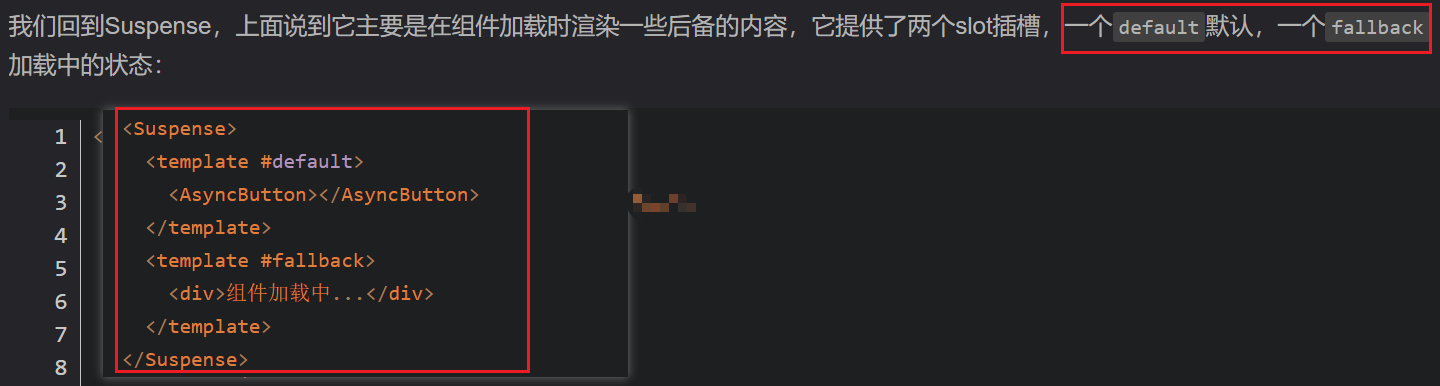
Suspense占位
suspense其余细节自行百度
Composition API(VCA)
对比options API和composition API(逻辑的分散和逻辑的聚合)
options API代码弊端
- 当我们实现某一个功能时,这个功能对应的代码逻辑会被拆分到各个属性中;
- 当我们组件变得更大、更复杂时,逻辑关注点的列表就会增长,那么同一个功能的逻辑就会被拆分的很分散;
- 尤其对于那些一开始没有编写这些组件的人来说,这个组件的代码是难以阅读和理解的(阅读组件的其人);
如果我们能将同一个逻辑关注点相关的代码收集在一起会更好。
- 这就是Composition API想要做的事情,以及可以帮助我们完成的事情。
- 也有人把Vue Composition API简称为VCA。

setup函数参数
setup函数的参数主要有两个:
props
props非常好理解,它其实就是父组件传递过来的属性会被放到props对象中,我们在setup中如果需要使用,那么就可以直接通过props参数获取:
对于定义props的类型,我们还是和之前的规则是一样的,在props选项中定义;
并且在template中依然是可以正常去使用props中的属性,比如message;
如果我们在setup函数中想要使用props,那么不可以通过 this 去获取(后面我会讲到为什么);
因为props有直接作为参数传递到setup函数中,所以我们可以直接通过参数来使用即可;
context
参数context,我们也称之为是一个SetupContext,它里面包含三个属性:
- attrs:所有的非prop的attribute;
- slots:父组件传递过来的插槽(这个在以渲染函数返回时会有作用,后面会讲到);
- emit:当我们组件内部需要发出事件时会用到emit(因为我们不能访问this,所以不可以通过 this.$emit发出事件);
setup函数简单使用
<template>
  <div class="app">
    <!-- 3.template里会自动对counter进行解包展示,不需要.value -->
    <h2>当前计数:{{ counter }}</h2>
    <button @click="increment">+1</button>
    <button @click="decrement">-1</button>
  </div>
</template>

<script>
  import { ref } from "vue";
  import useCounter from "./hooks/useCounter";

  export default {
    setup() {
      // 1.定义counter的内容,使用ref包裹数据,使其变为响应式
      // let counter = ref(0)
      // const increment = () => {
      //   // 2.解包后操作数据
      //   counter.value++
      // }
      // const decrement = () => {
      //   counter.value--
      // }

      // 直接导入封装好的逻辑函数
      const { counter, increment, decrement } = useCounter();

      // 导出与counter相关的数据和函数
      return {
        counter,
        increment,
        decrement,
      };

      // 简便写法
      return { ...useCounter() };
    },
  };
</script>
/hooks/useCounter.js
import { ref } from "vue";

// counter逻辑放一起后导出使用
export default function useCounter() {
  let counter = ref(0);
  const increment = () => {
    counter.value++;
  };
  const decrement = () => {
    counter.value--;
  };

  return { counter, increment, decrement };
}
setup函数内不可以使用this
setup函数调用时没有绑定this
reactive函数(针对复杂数据类型)
如果想为在setup中定义的数据提供响应式的特性,那么我们可以使用reactive的函数:
- 这是因为当我们使用reactive函数处理我们的数据之后,数据再次被使用时就会进行依赖收集;
- 当数据发生改变时,所有收集到的依赖都是进行对应的响应式操作(比如更新界面);
- 事实上,我们编写的data选项,也是在内部交给了reactive函数将其变成响应式对象的;
- reactive返回的复杂数据不存在.value属性(区别和ref使用场景的因素)
ref函数(注意.value的使用时机)
使用const定义,因为在setup中操作的是.value
- ref 会返回一个可变的响应式对象,该对象作为一个 响应式的引用 维护着它内部的值,这就是ref名称的来源;
- 它内部的值是在ref的 value 属性中被维护的;
两个注意事项:
- 在模板中引入ref的值时,Vue会自动帮助我们进行解包操作,所以我们并不需要在模板中通过 ref.value 的方式来使用;
- 但是在 setup 函数内部,它依然是一个 ref引用, 所以对其进行操作时,我们依然需要使用 ref.value的方式;
ref模板中的浅层解包
<template>
  <div class="app">
    <!-- 普通数据展示 -->
    <h2>{{ message }}</h2>
    <button @click="changeMessage">改变message</button>
    <hr />
    <!-- reactive响应式数据使用 -->
    <h2>用户名:{{ account.username }}</h2>
    <h2>密码:{{ account.password }}</h2>
    <button @click="changeUserInfo">改变用户信息</button>
    <hr />
    <!-- 在template中使用ref时,vue会自动进行解包取出value -->
    <h2>计数:{{ counter }}</h2>
    <button @click="increment">+1</button>
    <button @click="counter++">+1</button>
    <hr />
    <h2>计数:{{ info.counter }}</h2>
    <!-- 未解包情况 -->
    <button @click="info.counter.value++">+1</button>
  </div>
</template>

<script>
  import { reactive } from "vue";
  import { ref } from "vue";

  export default {
    setup() {
      // 定义普通数据(非响应式)
      let message = "Hello Vue3";
      function changeMessage() {
        message = "changed message";
      }

      // 1.使用reactive定义响应式数据(复杂数据类型)
      let account = reactive({
        username: "zjf",
        password: "zzzz",
      });
      function changeUserInfo() {
        account.username = "zzzx";
        account.password = "qqqqqq";
      }

      // 2.ref函数,定义简单类型的响应式数据(也可以定义复杂数据类型)
      let counter = ref(0); // 返回一个ref对象
      const increment = () => {
        // 注意需要解包操作数据
        counter.value++;
      };
      const info = { counter };

      // 必须返回所有定义的数据,才能使用
      return {
        message,
        changeMessage,
        account,
        changeUserInfo,
        counter,
        increment,
        info,
      };
    },
  };
</script>
reactive和ref的使用场景区分
<template>
  <div class="app">
    <!-- ref复杂数据类型展示 -->
    <h2>用户名:{{ info.name }}</h2>
    <hr />
    <!-- reactive展示有一定联系的组合数据 -->
    <h2>用户名:{{ account.username }}</h2>
    <h2>密码:{{ account.password }}</h2>
    <hr />
    <!-- ref数据展示 -->
    <h2>{{ username }}</h2>
    <h2>{{ password }}</h2>
    <h2>{{ message }}</h2>
    <ul>
      书籍列表:
      <li
        v-for="item in bookList"
        :key="item"
      >
        {{ item }}
      </li>
    </ul>
  </div>
</template>

<script>
  import { onMounted, reactive, ref } from "vue";
  export default {
    setup() {
      // 定义响应式数据
      // ref也可以定义响应式的复杂类型数据
      const info = ref({ name: "zjf" });

      // 1.reactive的应用场景
      // 条件一:reactive应用于本地的数据(必须是复杂数据类型)
      // 条件二:多个数据之间是有关系/联系的(联合的数据,组织在一起有特定的作用)
      const account = reactive({
        username: "zzz",
        password: "11122333",
      });

      // 2.ref应用场景
      // 2.1本地的一些简单数据
      const username = ref("zjf");
      const password = ref("333444");
      const message = ref("Hello Vue3");

      // 2.2定义从网络中获取的数据
      const bookList = ref([]);

      onMounted(() => {
        const resBooks = ["第七天", "活着", "文城"];
        // ref包裹返回的对象有.value属性,因此会比reactive数据赋值是具有更高的性能
        bookList.value = resBooks;
      });

      return {
        info,
        account,
        username,
        password,
        message,
        bookList,
      };
    },
  };
</script>
readonly(context.emit父传子)
保证父子组件间的单向数据流的规范
单向数据流实现
readonly函数手动限制单向数据流
readonly会返回原始对象的只读代理(也就是它依然是一个Proxy,这是一个proxy的set方法会被劫持,并且不能对其进行修改);
在开发中常见的readonly方法会传入三个类型的参数:
- 类型一:普通对象;
- 类型二:reactive返回的对象;
- 类型三:ref的对象;
本质上就是readonly返回的对象的setter方法被劫持了
App.vue
<template>
  <div class="app">
    <h2>App:{{ info }}</h2>

    <ChangeInfo
      :info="info"
      :roInfo="roInfo"
      @changeInfo="changeInfo"
      @roInfoChange="roInfoChange"
    >
    </ChangeInfo>
  </div>
</template>

<script>
  import ChangeInfo from "./ChangeInfo.vue";
  import { reactive, readonly } from "vue";

  export default {
    components: {
      ChangeInfo,
    },
    setup() {
      const info = reactive({
        name: "zjf",
        age: 23,
      });
      const changeInfo = (payload) => {
        info.name = payload;
      };

      // 创建info的readonly对象
      const roInfo = readonly(info);
      const roInfoChange = (payload) => {
        info.name = payload;
      };

      return {
        info,
        changeInfo,
        roInfo,
        roInfoChange,
      };
    },
  };
</script>
ChangeInfo.vue
<template>
  <div class="change_info">
    <h2>chnage info:{{ info }}</h2>

    <!-- 错误做法,违背单向数据流规范 -->
    <!-- <button @click="info.name='zzz'">改变父组件info</button> -->
    <button @click="changeInfoBtnClick">改变父组件info</button>

    <hr />

    <h2>readonly对象:{{ roInfo }}</h2>
    <!-- 错误做法,且不会产生任何效果 -->
    <button @click="roInfo.name = 'why'">改变父组件readonly对象(错误做法)</button>
    <button @click="roInfoChange">改变父组件readonly对象(正确做法)</button>
  </div>
</template>

<script>
  export default {
    props: {
      info: {
        type: Object,
        default: () => ({}),
      },
      // 接收到了父组件reactive返回的readonly对象
      roInfo: {
        type: Object,
        default: () => ({}),
      },
    },
    emits: ["changeInfo", "roInfoChange"],
    setup(props, context) {
      const changeInfoBtnClick = () => {
        // setup函数里不能使用this
        // this.$emit('changeInfo', 'zzz')
        context.emit("changeInfo", "zzz");
      };

      const roInfoChange = () => {
        context.emit("roInfoChange", "why");
      };

      return {
        changeInfoBtnClick,
        roInfoChange,
      };
    },
  };
</script>
Reactive判断的API
◼ isProxy
- 检查对象是否是由 reactive 或 readonly创建的 proxy。
◼ isReactive
- 检查对象是否是由 reactive创建的响应式代理:
- 如果该代理是 readonly 建的,但包裹了由 reactive 创建的另一个代理,它也会返回 true;
- 如果该代理是 reactive 建的,但包裹了由 readonly 创建的另一个代理,它也会返回 true;
◼ isReadonly
- 检查对象是否是由 readonly 创建的只读代理。
◼ toRaw(获取原始对象)
- 返回 reactive 或 readonly 代理的原始对象(不建议保留对原始对象的持久引用。请谨慎使用)。
◼ shallowReactive(使用浅层监听对象)
- 创建一个响应式代理,它跟踪其自身 property 的响应性,但不执行嵌套对象的深层响应式转换 (深层还是原生对象)。
◼ shallowReadonly(仅浅层不可写,深层可读可写)
- 创建一个 proxy,使其自身的 property 为只读,但不执行嵌套对象的深度只读转换(深层还是可读、可写的)。
toRefs(保证解构数据的响应式)
使用toRefs让我们解构出来的属性是响应式的
- Vue为我们提供了一个toRefs的函数,可以将reactive返回的对象中的属性都转成ref;
- 那么我们再次进行结构出来的 name 和 age 本身都是 ref的;
如果我们只希望转换一个reactive对象中的属性为ref, 那么可以使用toRef的方法
toRef
<script>
  import { reactive, toRef, toRefs } from "vue";

  export default {
    setup() {
      const info = reactive({
        name: "zjf",
        age: 23,
        height: 0.8,
      });
      // 直接结构拿到的name,age会失去响应式,使用toRefs使得解构出的name,age保持响应式
      // const { name, age } = info
      const { name, age } = toRefs(info);
      // 也可针对某一个属性独立出来使用,并保证其响应式
      const height = toRef(info, "height");

      return {
        info,
        name,
        age,
        height,
      };
    },
  };
</script>
通过ref获取元素节点、组件
<template>
  <div class="app">
    <h2 ref="titleRef">我是标题</h2>
    <button ref="btnRef">按钮</button>

    <ShowInfo ref="showInfoRef"></ShowInfo>
  </div>
</template>

<script>
  import { onMounted, ref } from "vue";
  import ShowInfo from "./ShowInfo.vue";

  export default {
    // mounted() {
    //   console.log(this.$refs.titleRef)
    //   console.log(this.$refs.btnRef)
    // }
    components: {
      ShowInfo,
    },
    setup() {
      // 对节点的使用
      const titleRef = ref();
      const btnRef = ref();
      // 对组件的使用
      const showInfoRef = ref();

      console.log(titleRef.value); // undefined
      console.log(btnRef.value); // undefined
      onMounted(() => {
        console.log(titleRef.value); // <h2>我是标题</h2>
        console.log(btnRef.value); // <button>按钮</button>

        console.log(showInfoRef.value); // Proxy{ }
        showInfoRef.value.showInfoFn();
      });

      return {
        titleRef,
        btnRef,
        showInfoRef,
      };
    },
  };
</script>
computed函数(可以实现响应式,建议计算包含多个响应式数据的时候使用)
computed计算属性(常用的对响应式数据的依赖,返回的也是响应式数据)
<template>
  <div class="app">
    <h2>{{ names.firstName }} {{ names.lastName }}</h2>
    <h2>{{ fullName }}</h2>
    <h2>{{ fullname1 }}</h2>
    <button @click="changeName('zzz zcx')">改变名字</button>
    <h2>{{ score }} {{ scoreLevel }}</h2>
  </div>
</template>

<script>
  import { computed, reactive, ref } from "vue";

  export default {
    setup() {
      const names = reactive({
        firstName: "James",
        lastName: "Smith",
      });
      // computed函数式写法
      const fullName = computed(() => {
        return names.firstName + " " + names.lastName;
      });
      // computed对象写法
      const fullname1 = computed({
        // computed返回的是一个ref对象,通过.value即可传到其对象的set函数的payload中
        set(payload) {
          const nameArr = payload.split(" ");
          names.firstName = nameArr[0];
          names.lastName = nameArr[1];
        },
        get() {
          return names.firstName + " " + names.lastName;
        },
      });
      const changeName = (payload) => {
        fullname1.value = payload;
      };

      const score = ref(86);
      const scoreLevel = computed(() => {
        return score.value >= 60 ? "及格" : "不及格";
      });

      return {
        names,
        fullName,
        fullname1,
        score,
        scoreLevel,
        changeName,
      };
    },
  };
</script>
组件的生命周期

<template>
  <div class="app"></div>
</template>

<script>
  import { onMounted } from "vue";

  export default {
    // mounted() {
    // },
    // created() {
    // },
    // updated() {
    // },
    // unmounted() {
    // }
    setup() {
      onMounted(() => {
        console.log("mounted1");
      });
      onMounted(() => {
        console.log("mounted2");
      });
    },
  };
</script>
Provide/Inject的使用
provide可以传入两个参数:
- name:提供的属性名称;
- value:提供的属性值;
inject可以传入两个参数:
- 要 inject 的 property 的 name;
- 默认值;
App.vue
<template>
  <div class="app">
    <h2>AppContent: {{ name }} - {{ age }}</h2>
    <button @click="name = 'zzz'">改变name</button>
    <ShowInfo></ShowInfo>
  </div>
</template>

<script>
  import { provide, ref } from "vue";
  import ShowInfo from "./ShowInfo.vue";

  export default {
    components: {
      ShowInfo,
    },
    setup() {
      const name = ref("zjf");
      const age = ref(23);
      // provide共享数据:provide(key, value)
      provide("name", name);
      provide("age", age);

      return {
        name,
        age,
      };
    },
  };
</script>
ShowInfo.vue
<template>
  <div class="showInfo">
    <h2>ShowInfo: {{ name }} - {{ age }} - {{ height }}</h2>
  </div>
</template>

<script>
  import { inject } from "vue";

  export default {
    // 通过options拿到setup函数传来的provide时,目前需要通过.value进行解包
    // inject: ['name', 'age'],
    setup() {
      // inject通过key拿到相应的值
      const name = inject("name");
      const age = inject("age");
      // inject接收数据第二个参数可设置默认值,在未接收到相应的数据是会自动使用
      const height = inject("height", 1.8);

      return {
        name,
        age,
        height,
      };
    },
  };
</script>
watch/watchEffect的使用(当需要根据响应式数据,执行一堆操作时)
(当需要根据响应式数据,执行一堆操作时使用watch,当需要根据响应式数据的部分修改变化,返回一个响应式数据时,推荐使用computed)
在Composition API中,我们可以使用watchEffect和watch来完成响应式数据的侦听;
- watch:需要手动指定侦听的数据源;可以拿到最新值和旧值
- watchEffect:用于自动收集响应式数据的依赖;只可以拿到新值
watch
<template>
  <div class="app">
    <h2>{{ message }}</h2>
    <button @click="message = 'Hello 123'">修改message</button>
    <h2>{{ info.name }} - {{ info.age }} - {{ info.friend.name }}</h2>
    <button @click="info.friend.name = 'why'">修改用户信息</button>
  </div>
</template>

<script>
  import { reactive, ref, watch } from "vue";

  export default {
    setup() {
      // 1.创建响应式数据
      const message = ref("Hello Vue3");
      const info = reactive({
        name: "zjf",
        age: 23,
        friend: {
          name: "zzz",
        },
      });

      // 使用watch函数监听
      watch(message, (newValue, oldValue) => {
        console.log(newValue, oldValue);
      });
      // 默认会对复杂数据类型进行深度监听
      watch(
        info,
        (newValue, oldValue) => {
          console.log(newValue, oldValue);
        },
        {
          immediate: true, // 初始化立即监听
        },
      );

      // 侦听reactive数据变化后,获取普通对象
      watch(
        () => ({ ...info }),
        (newValue, oldValue) => {
          console.log(newValue, oldValue); // 获取到的是info的原始对象,而且此时为浅层监听
        },
        {
          immediate: true,
          deep: true, // 手动改为深度监听
        },
      );

      return {
        message,
        info,
      };
    },
  };
</script>
watch仅监听对象某个属性
const formValue = reactive({ name: '张三', age: 18, address: { city: '北京' } });1. 监听顶层属性 watch( () => formValue.name, // 只监听 name 的变化 (newName, oldName) => { console.log('name changed:',
newName, oldName); } );2. 监听嵌套属性 watch( () => formValue.address?.city, (newCity, oldCity) => { console.log('city changed:', newCity,
oldCity); } );3. 如果 formValue 是 ref const formValue = ref({ name: '张三', age: 18 }); // 监听 ref 内部对象的某个属性 watch( () =>
formValue.value.name, (newName, oldName) => { console.log(newName, oldName); } );- 注意事项
- 如果监听的是对象或数组的某个属性,且该属性可能被整体替换(如
formValue.address = {}),那么监听其子属性可能无法捕获。这时可以改用监听整个address对象,并设置deep: true,但这样也会捕获其内部所有变化。 - 如果你希望监听多个属性,可以同时监听多个 getter:
watch( [ () => formValue.name, () => formValue.age ], ([newName, newAge], [oldName, oldAge]) => { console.log('name or
age changed'); } );<template>
<div
ref="pieChartRef"
:style="{ width: width, height: height }"
></div>
</template>
<script setup>
import { onMounted, ref, watch } from "vue";
const props = defineProps({
width: {
type: String,
default: "100%",
},
height: {
type: String,
default: "100%",
},
pieData: {
type: Array,
default: () => [],
},
});
// 推荐写法:() => props. ,直接使用props.监听父组件传来的响应式数据或异步数据,会出现监听不到的情况,具体原因请看上面的跳转连接
watch(
() => props.pieData,
(newValue, oldValue) => {
console.log("pieData发生变化");
chartOperate(newValue);
},
{
deep: true,
},
);
let myChart = null;
function chartOperate(pieData = []) {
if (!myChart) {
myChart = useEcharts(pieChartRef.value);
}
const options = getOptions(pieData);
myChart.setOption(options);
}
</script>
<style lang="less" scoped></style>watchEffect
<template>
  <div class="app">
    <h2>当前计数:{{ counter }}</h2>
    <button @click="counter++">+1</button>
    <h2>name:{{ name }}</h2>
    <button @click="name = 'zzz'">修改name</button>
  </div>
</template>

<script>
  import { ref, watchEffect } from "vue";

  export default {
    setup() {
      const counter = ref(0);
      const name = ref("zjf");

      // 引入watchEffect函数默认会自动执行一次,
      // 并且watchEffect函数会自动收集其中用到的响应式对象,将其作为依赖(作为触发函数的条件)
      // watchEffect函数默认会返回一个stop,执行后将会停止该watch
      const stopWatch = watchEffect(() => {
        console.log("-----", counter.value, name.value); // 收集到了counter依赖和,name依赖
        console.log("++++++");

        if (counter.value >= 8) {
          stopWatch(); // 关闭watchEffect函数监听
        }
      });

      return {
        counter,
        name,
      };
    },
  };
</script>
自定义Hooks(逻辑代码的复用,composition API优势的体现)
计数器案例逻辑复用

hooks封装写法参照(动态修改页面title)
useTitle hook的使用,返回ref
import { ref, watch } from "vue";

export default function (titleValue) {
  // document.title = title

  // hooks常见优化写法
  const title = ref(titleValue);

  watch(title, (newValue) => {
    document.title = newValue;
  });

  return title;
}
script setup语法糖(父传子,子传父,子串祖)
当使用 < script setup> 的时候,任何在 < script setup> 声明的顶层的绑定 (包括变量,函数声明,以及 import 引入的内容) 都能在模板中直接使用
响应式数据使用reactive或ref进行定义
导入的组件直接使用

defineProps,defineEmits,defineExpose
为了在声明 props 和 emits 选项时获得完整的类型推断支持,我们可以使用 defineProps 和 defineEmits API,它们将自动地在 < script setup > 中可用
App.vue
<template>
  <div class="app">
    <h2>mesage: {{ message }}</h2>
    <button @click="changeMessage">改变message</button>
    <!-- 引入组件的直接使用 -->
    <ShowInfo
      name="zjf"
      :age="23"
      @infoBtnClick="infoBtnClick"
      ref="showInfoRef"
    />
  </div>
</template>

<!-- 推荐script放在template上面 -->
<script setup>
  // 1.所有编写在顶层中的代码,都可以直接在template中使用
  import { onMounted, ref } from "vue";
  import ShowInfo from "./ShowInfo.vue";
  // 2.定义响应式数据
  const message = ref("Hello Vue3");
  // 3.定义函数
  // const changeMessage = () => {
  //   message.value = 'Hello setup script'
  // }
  function changeMessage() {
    message.value = "Hello setup script";
  }

  // 接收子组件emit事件
  function infoBtnClick(payload) {
    console.log(payload);
  }

  // 4.获取子组件实例,父组件调用子组件方法
  const showInfoRef = ref();
  onMounted(() => {
    showInfoRef.value.foo(); // 子组件中必须通过defineExpose函数将foo函数暴露出去才能进行调用(重要)
  });
</script>

<style scoped></style>
ShowInfo.vue
<template>
  <div class="show-info">
    <h2>ShowInfo</h2>
    name: {{ name }} age: {{ age }}
    <button @click="btnClick">子传父事件传递</button>
  </div>
  <hr />
</template>

<script setup>
  // 1.defineProps定义接收的props
  defineProps({
    name: {
      type: String,
      default: "默认值",
    },
    age: {
      type: Number,
      default: 0,
    },
  });

  // 2.defineEmits子传父
  const emits = defineEmits(["infoBtnClick"]);
  function btnClick() {
    emits("infoBtnClick", "哈哈哈");
  }

  // foo函数
  function foo() {
    console.log("showInfo foo函数被调用");
  }
  // defineExpose暴露foo函数,使得父组件能够进行调用
  defineExpose({
    foo,
  });
</script>
项目模拟网络数据请求
<template>
  <div class="app">
    <HeaderContent
      :headerTitle="resData.title"
      :subTitle="resData.subtitle"
    ></HeaderContent>
    <div class="home_list">
      <template
        v-for="(item, index) of resData.list"
        :key="item.id"
      >
        <HomeItem :homeItemData="resData.list[index]"></HomeItem>
      </template>
    </div>
  </div>
</template>

<script setup>
  import { ref } from "vue";

  import HeaderContent from "./components/HeaderContent.vue";
  import HomeItem from "./components/HomeItem.vue";

  // 1.获取数据
  // import resData from './data/high_score.json'
  // console.log(resData)
  // 2.模拟网络请求获取数据
  const resData = ref({});
  setTimeout(() => {
    import("./data/high_score.json").then((res) => {
      resData.value = res.default;
      console.log(res.default);
    });
  }, 500);
</script>

<style scoped>
  .app {
    width: 1100px;
    margin: 0 auto;
    background-color: orange;
  }

  .home_list {
    width: 100%;
    display: flex;
    flex-wrap: wrap;
    justify-content: space-between;
  }
</style>
v-bind-in-css
单文件组件的 <style> 标签支持使用 v-bind CSS 函数将 CSS 的值链接到动态的组件状态:
<template>
  <div class="text">hello</div>
</template>

<script>
  export default {
    data() {
      return {
        color: "red",
      };
    },
  };
</script>

<style>
  .text {
    color: v-bind(color);
  }
</style>
这个语法同样也适用于 script setup,且支持 JavaScript 表达式 (需要用引号包裹起来):
<template>
  <p>hello</p>
</template>

<script setup>
  const theme = {
    color: "red",
  };
</script>

<style scoped>
  p {
    color: v-bind("theme.color");
  }
</style>
实际的值会被编译成哈希化的 CSS 自定义属性,因此 CSS 本身仍然是静态的。自定义属性会通过内联样式的方式应用到组件的根元素上,并且在源值变更的时候响应式地更新。
常用实践用
<script setup lang="ts">
  const props = defineProps<{
    levelFirstOptions: { value: string | number; label: string }[];
  }>();

  const emit = defineEmits<{
    (e: "refresh"): void;
  }>();

  const options = ref();

  onMounted(() => {
    getCampusList();
  });

  // 获取校区列表
  const getCampusList = async () => {
    try {
      const res = await getRegionListPage({
        pageNum: 1,
        size: 1000,
        dataKind: 1, // 假设1代表校区类型
      });
      if (res.data && (res.data as any).records) {
        options.value = (res.data as any).records;
      }
    } catch (error) {
      console.error("获取校区列表失败:", error);
    }
  };

  watch(
    () => formData.enrollmentYear,
    (newValue, oldValue) => {
      if (newValue) {
        formData.name = dayjs(toRaw(newValue)).format("YYYY") + "级";
      }
    },
    {
      immediate: false, // 初始化立即监听
      deep: false,
    },
  );
</script>
封装hook复用
useRoundId.ts
import { ref } from "vue";
import { getGradeList, getClassListByGrade, getTermList } from "@/api/modules/schoolWork";
import dayjs from "dayjs";
import { selElectiveRulePageList } from "@/api/modules/teacherEnd";

export function useRoundId() {
  const currentTerm = ref<any>({});
  const roundId = ref<string>("");

  const loadTermList = async () => {
    try {
      const res: any = await getTermList({ current: 1, size: 99999 });
      // console.log("%c Line:161 🍋 res", "color:#465975", res);

      if (res?.data?.records?.length) {
      } else {
      }
    } catch (error) {}
  };

  const getTermRoundId = async () => {
    const res: any = await selElectiveRulePageList({
      current: 1,
      size: 10,
      termId: termId,
      termIndex: termIndex,
    });
  };

  return {
    currentTerm,
    roundId,
    loadTermList,
    getTermRoundId,
  };
}
inde.vue
<script setup lang="ts">
  import { useRoundId } from "@/hooks/useRoundId";
  const { currentTerm, roundId, loadTermList, getTermRoundId } = useRoundId();

  console.log(currentTerm.value, roundId.value);
</script>
vue里使用模板
inde.vue
<script setup lang="tsx">
  const columns: any = [
    {
      label: "状态",
      prop: "status",
      width: 100,
      render: (scope: any) => {
        return (
          <ElSwitch
            modelValue={scope.row.status}
            active-value={1}
            inactive-value={0}
            onChange={(val: number) => handleStatusChange(scope.row, val)}
          />
        );
      },
    },
    {
      prop: "operation",
      label: "操作",
      width: 180,
      fixed: "right",
      slot: "operation",
    },
  ];
</script>