
2022/6/3大约 13 分钟
react中axios的使用、react-router(v5)
react中axios的使用
axios是目前前端使用非常广泛的网络请求库,包括Vue作者也是推荐在vue中使用axios;
主要特点包括:在浏览器中发送 XMLHttpRequests 请求、在 node.js 中发送 http请求、支持 Promise API、拦截请求和响应、转换请求和响应数据等等;
axios: ajax i/o system.
import axios from 'axios';
import React, { PureComponent } from 'react'

export default class App extends PureComponent {
  constructor(props) {
    super(props);
    this.state = {
      list: []
    }
  }

  async componentDidMount() {
    console.log('didMount');
    // 1.axios发送get/post网络请求
    axios({
      url: 'https://httpbin.org/get',
      params: {
        name: 'zjf',
        age: 22
      }
    }).then(res => {
      console.log(res);
    }).catch(err => {
      console.log(err);
    })

    axios({
      url: 'https://httpbin.org/post',
      data: {
        name: 'why',
        age: 18
      },
      method: 'post'
    }).then((res => {
      console.log(res);
    }))

    axios.get('https://httpbin.org/get', {
      params: {
        name: 'lilei',
        age: 25
      }
    }).then(res => {
      console.log(res);
    })

    axios.post('https://httpbin.org/post', {
      data: {
        name: 'lucy',
        age: 21
      }
    }).then(res => {
      console.log(res);
    })
    // 2.无论是哪种请求最终都会转成.request()方法
    axios.request({
      url: 'https://httpbin.org/post',
      data: {
        name: 'why',
        age: 18
      },
      method: 'post'
    }).then(res => {
      console.log(res);
    })
    // 3.结合async+awaitd的使用
    try {
      const data = await axios.get('https://httpbin.org/get', {
        params: {
          name: 'zjf',
          age: 22
        }
      })
      console.log(data);
    } catch (err) {
      console.log(err);
    }
    // 4.axios.all发送多个请求
    const requset1 = axios({
      url: 'https://httpbin.org/get',
      params: { name: 'zjf', age: 22 }
    })
    const request2 = axios({
      url: 'https://httpbin.org/post',
      data: { name: 'why', age: 18 },
      method: 'post'
    })

    axios.all([requset1, request2]).then(res => {
      // 将结果放至数组内返回
      console.log(res);
    })
    // 5.创建新的实例(设置新的默认地址和参数),为了防止axios配置和不同的服务器请求数据时,应该使用create创建不同的实例来进行请求,防止配置发生冲突
    const instance = axios.create({
      baseURL: "https://fdsaf.com",
      timeout: 3000,
      headers: {},
    })
    instance.defaults.baseURL = "https://xxxxxxx.com";
    instance.defaults.headers["token"] = "fdafdas";
    instance({
      url: '/zjf',
      params: {
        name: 'zjf',
        age: 22
      }
    }).then(res => {console.log(res);})
  }

  render() {
    return (
      <div>
        App
      </div>
    )
  }
}- axios默认配置(根据实际情况而定)
import axios from 'axios';

// 真实项目中不推荐下列方式来配置axios,原因是一个项目中可能会用到多个服务器中的数据,建议使用axios.create单独创建创建一个实例(参照上方)进行配置
axios.defaults.baseURL = 'https://httpbin.org'; // 配置了baseURL后实际传递的url传路径和其他参数即可
axios.defaults.timeout = 5000;
axios.defaults.headers["token"] = 'dsadewdsaD';
// axios.defaults.headers.post["Content-Type"] = "application/text";
axios请求拦截器(请求拦截、响应拦截)
import axios from 'axios';
import React, { PureComponent } from 'react'

export default class App extends PureComponent {
  constructor(props) {
    super(props);
    this.state = {
      list: []
    }
  }

  async componentDidMount() {
    console.log('didMount');
    // 请求和响应的拦截
    // .use方法内两个回调函数,第一个请求拦截,第二个为请求失败后的拦截
    // 请求拦截
    axios.interceptors.request.use(config => {
      config.headers['token'] = 'xxxxxxxx'
      // 请求成功后的回调函数
      // 1.发送网络请求时,在界面中间位置提示Loading组件

      // 2.某些请求要求用户必需携带token,如果没有携带,那么直接跳转至登录页

      // 3.params/data序列化的操作
      console.log(config);
      return config;
    }, err => {
      // 请求失败后的回调函数
      Promise.reject(err)
    });
    // 响应拦截
    axios.interceptors.response.use(res => {
      // 1.结束loading的动画
      // 2.返回数据的转化,再返回
      return res.data
    }, err => {
      if(err && err.response) {
        switch (err.response.status) {
          case 400:
            console.log('请求错误');
            break;
          case 401:
            console.log('未授权访问');
            break;
          default:
            console.log('其他错误信息');
        }
      }
    })

    axios.get('https://httpbin.org/get', {
      params: {
        name: 'zjf'
      }
    }).then(res => {
      console.log(res);
    }).catch(err => {
      console.log(err);
    })
  }

  render() {
    return (
      <div>
        App
      </div>
    )
  }
}
axios请求封装(二次封装)
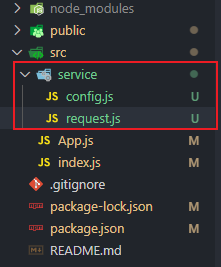
const dev_BASE_URL = 'https://httpbin.org';
const pro_BASE_URL = 'https://fafdsa/com';

export const BASE_URL = process.env.NODE_ENV === 'development'? dev_BASE_URL: pro_BASE_URL;

export const TIMEOUT = 5000;import axios from 'axios';
import { BASE_URL, TIMEOUT } from './config';
const instance = axios.create({
BASE_URL: BASE_URL,
timeout: TIMEOUT
})
instance.defaults.headers['Content-Type'] = 'application/json';
// 添加拦截器
instance.interceptors.request.use(config => {
// 1.发送网络请求时,在界面中间位置提示Loading组件
// 2.某些请求要求用户必需携带token,如果没有携带,那么直接跳转至登录页
// 3.params/data序列化的操作
console.log(config);
return config;
}, err => {
Promise.reject(err)
})
instance.interceptors.response.use(res => {
return res.data
}, err => {
if(err && err.response) {
switch (err.response.status) {
case 400:
console.log('请求错误');
break;
case 401:
console.log('未授权访问');
break;
default:
console.log('其他错误信息');
}
}
})
export default instance;axios自定义配置Content-Type不同使用方式
Content-Type相关
- 默认的格式请求体中的数据会以json字符串的形式发送到后端
'Content-Type: application/json'- 请求体中的数据会以普通表单形式(键值对)发送到后端
'Content-Type: application/x-www-form-urlencoded'- 它会将请求体的数据处理为一条消息,以标签为单元,用分隔符分开。既可以上传键值对,也可以用于上传文件
'Content-Type: multipart/form-data'Content-Type: application/x-www-form-urlencoded示例
import QueryString from 'qs'; // 使用qs将对象转为Form-Data的格式传递给后端

axios({
  url: baseURL + '/Document/ImportData',
  method: 'post',
  data: QueryString.stringify({
    File: file,
    TabName: useLevel ? 'AwardB' : 'AwardA',
    Term: TermYear,
    Remark: AwardRecordID
  }),
  headers: {
    'Content-Type': 'application/x-www-form-urlencoded',
    'Authorization': `X-Token={${window.location.search.split('=')[1]}}`
  }
}).then((res) => {
  console.log(res);
})
Content-Type: multipart/form-data示例
let formData = new FormData();
formData.append('File', file); // 上传的文件,可以用element-react的Upload组件选择拿到文件
formData.append('TabName', useLevel ? 'AwardB' : 'AwardA');
formData.append('Term', TermYear);
formData.append('Remark', AwardRecordID + '');
axios({
  url: baseURL + '/Document/ImportData',
  method: 'post',
  data: formData, // 传入formData
  headers: {
    'Content-Type': 'multipart/form-data',
    'Authorization': `X-Token={${window.location.search.split('=')[1]}}`
  }
}).then((res) => {
  console.log(res.data);
  if (res.data.Msg === 'success') {
    if (res.data.Data.url === '') {
      Message({
        message: '文件导入成功',
        type: 'success',
        duration: 1500
      })
      getStudentsList(props.tableRowData.AwardRecordID);
      props.refreshAwardTable && props.refreshAwardTable();
    } else {
      const iframe = document.createElement('iframe');
      iframe.id = 'iframe2';
      iframe.style.display = 'none';
      document.body.appendChild(iframe);
      iframe.src = res.data.Data.url;
      Message({
        message: '文件导入失败,具体原因请查看下载文件',
        type: 'error',
        duration: 2000
      })
    }
  } else if(res.data.Msg === '程序无法识别您所使用的模板,请尝试使用系统提供的模板') {
    useLevel? (() => {
      Message({
        message: '导入文件模板错误,请使用正确的区分等级模板',
        type: 'error',
        duration: 2300
      })
    })(): (() => {
      Message({
        message: '导入文件模板错误,请使用正确的非等级模板',
        type: 'error',
        duration: 2300
      })
    })()
  }
})
vue中axios的封装使用
import axios from "axios"
import { BASE_URL, TIME_OUT } from "./config"

class JFRequest {
  constructor(baseURL, timeout = 5000) {
    this.instance = axios.create({
      baseURL, // 注意baseURL,timeout写法
      timeout
    })
  }

  request(config) {
    return new Promise((resolve, reject) => {
      this.instance.request(config).then(res => {
        resolve(res)
      }).catch(err => {
        reject(err)
      })
    })
  }

  get(config) {
    return this.request({ ...config, methods: 'GET' })
  }

  post(config) {
    return this.request({ ...config, methods: 'POST' })
  }
}

export default new JFRequest(BASE_URL, TIME_OUT)
纯函数的使用
react-router
- 路由的实现是SPA(单页面应用)的基础
URL的hash
- hash路由的本质:通过监听window的hashChange事件来获取路由的hash值,再通过hash值匹配相应的页面组件进行展示;
- 我们可以通过直接赋值location.hash来改变href(或者点击a标签,通过href改变hash值), 但是页面不发生刷新;
- URL的hash也就是锚点(#), 本质上是改变window.location的href属性;
- hash模式所有的工作都是在前端完成的,不需要后端服务的配合;
- hash的优势就是兼容性更好,在老版IE中都可以运行;
- 但是缺陷是有一个#,显得不像一个真实的路径;
<div class="app">
  <a href="#/home">首页</a>
  <a href="#/about">关于</a>

  <div class="router-view">
    <h3></h3>
  </div>
</div>

<script>
  const routerView = document.getElementsByClassName("router-view")[0];
  // 监听hash的改变
  window.addEventListener('hashchange', () => {
    console.log('hashChange', location.hash);
    switch(location.hash) {
      case '#/home':
        routerView.innerHTML = '首页';
        break;
      case '#/about':
        routerView.innerHTML = '关于';
        break;
      default:
        routerView.innerHTML = '';
    }
  })
</script>
HTML5的history全局对象
history接口是HTML5新增的, 它有l六种模式改变URL而不刷新页面:
window.history.replaceState:替换原来的路径;
window.history.pushState:使用新的路径;
window.history.go:向前或向后改变路径;
window.history.forward:向前改变路径;
window.history.back:向后改变路径;
popState
- history.pushState和history.replaceState不会触发popState事件,但popState事件的state属性,可以通过history.pushState或history.replaceState方法时,传入的指定的数据
history模式下,如果你再跳转路由后再次刷新会得到404的错误,这个错误说白了就是浏览器会把整个地址当成一个可访问的静态资源路径进行访问,然后服务端并没有这个文件~
http://192.168.30.161:5500/mine === http://192.168.30.161:5500/mine/index.html文件,出问题了,服务器上并没有这个资源,404- 所以一般情况下,我们都需要配置下nginx,告诉服务器,当我们访问的路径资源不存在的时候,默认指向静态资源index.html
location / {
  try_files $uri $uri/ /index.html;
} <div class="app">
<!-- href有'/'和没有'/'的Url改变方式不一样,有'/'变的是整个路径,没'/'变的是子路径 -->
<a href="/home">首页</a>
<a href="/about">关于</a>
<!-- <a href="home">首页</a>
<a href="about">关于</a> -->
<div class="router-view">
<h3></h3>
</div>
</div>
<script>
const routerView = document.getElementsByClassName('router-view')[0];
// 获取所有的a元素,自己来监听a元素的改变
const aEls = document.getElementsByTagName('a');
for(let item of aEls) {
item.addEventListener('click', e => {
e.preventDefault();
const href = item.getAttribute('href');
history.pushState({}, '', href); // 改变URL的路径
historyChange();
})
}
// 执行返回操作时,依然来到historyChange
window.addEventListener('popstate', historyChange); // popstate既可以监听到前进操作也可以监听到后退操作
// 路径改变了
function historyChange() {
console.log(location.pathname);
switch (location.pathname) {
case '/home':
routerView.innerHTML = '首页';
break;
case '/about':
routerView.innerHTML = '关于';
break;
default:
routerView.innerHTML = '';
break;
}
}
</script>react-router的基本使用(Link路由跳转及其他方式)
- react-router最主要的API是给我们提供的一些组件:
- BrowserRouter或HashRouter
- Router中包含了对路径改变的监听,并且会将相应的路径传递给子组件
- BrowserRouter使用history模式;
- HashRouter使用hash模式;
- 在Hash模式下,类组件内部可以通过withRouter嵌套进行导出,且要设置其props的type加上RouteComponentProps,即可在该类组件内部的props拿到路由相关信息以及进行操作
import { withRouter, RouteComponentProps } from "react-router-dom";

type SlideBarProps = {
    slideInfo: Array<any>
    onChange?: (data: any) => {}
} & RouteComponentProps // type加上RouteComponentProps

class Index extends Component<SlideBarProps, SlideBarState> {
  render() {
    console.log(this.props); //
  }
}

export default withRouter(Index); // 套上withRouter进行导出Link和NavLink:
- 通常路径的跳转是使用Link组件,最终会被渲染成a元素;
- NavLink是在Link基础之上增加了一些样式属性(后续学习);
- to属性:Link中最重要的属性,用于设置跳转到的路径;
- 函数式组件中可以使用withRoute高阶组件拿到history对象
- 类组件必须在组件下才能通过props拿到history对象
- 其他路由跳转的方式如下
<Redirect ro='路径' /> window.location.href = '路径'; window.open('about:blank').location.href = '路径';Route:
- Route用于路径的匹配;
- path属性:用于设置匹配到的路径;
- component属性:设置匹配到路径后,渲染的组件;
- exact:精准匹配,只有精准匹配到完全一致的路径,才会渲染对应的组件;
// App.js
import React, { PureComponent } from 'react'

import About from './pages/About'
import Home from './pages/Home'
import Profile from './pages/Profile'

import {
  // HashRouter,
  BrowserRouter,
  HashRouter,
  Link,
  Route,
  Routes
} from 'react-router-dom'

export default class App extends PureComponent {
  render() {
    return (
      <div>
        <BrowserRouter>
          <Link to='/'>首页</Link>
          <Link to='/about'>关于</Link>
          <Link to='/profile'>我的</Link>

          {/* 使用Route,来根据不同的路径渲染不同的组件 */}
          {/* react17前 */}
          {/* <Route path="/" component={Home}/>
          <Route path="/about" component={About}/>
          <Route path="/profile" component={Profile}/> */}
          {/* react18 */}
          <Routes>
            <Route path="/" exact element={<Home/>}/>
            <Route path="/about" exact element={<About/>}/>
            <Route path="/profile" exact element={<Profile/>}/>
          </Routes>
        </BrowserRouter>
      </div>
    )
  }
}
NavLink的使用(useResolvedPath、useMatch路径匹配)
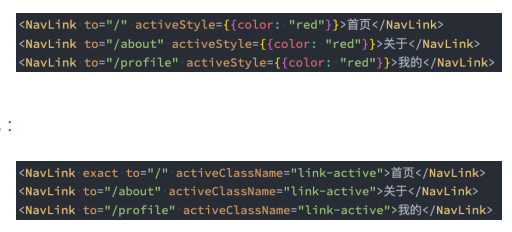
- 路径选中时,对应的a元素变为红色,这个时候,我们要使用NavLink组件来替代Link组件:
- activeStyle:活跃时(匹配时)的样式;(V6版本router已删除)
- activeClassName:活跃时添加的class;(V6版本router已删除)
- 通过
useResolvedPath和useMatch去引入路径并判断当前页是否是该路径 - exact:是否精准匹配;
- 但是,我们会发现在选中about或profile时,第一个也会变成红色:
- 原因是/路径也匹配到了/about或/profile;
- 这个时候,我们可以在第一个NavLink中添加上exact属性;
- 默认的activeClassName:
- 事实上在默认匹配成功时,NavLink就会添加上一个动态的active class;
- 所以我们也可以直接编写样式
import React, { PureComponent } from 'react'

import About from './pages/About'
import Home from './pages/Home'
import Profile from './pages/Profile'
import User from './pages/User'

import {
  HashRouter,
  BrowserRouter,
  Link,
  useMatch,
  useResolvedPath,
  Route,
  Routes
} from 'react-router-dom'

export default class App extends PureComponent {
  constructor(props) {
    super(props);
    this.state = {
      links: [
        { to:'/', title: '首页' },
        { to:'/about', title: '关于' },
        { to:'/profile', title: '我的' }
      ]
    }
  }

  render() {
    return (
      <div>
        <BrowserRouter>
          <CustomLink to="/">首页</CustomLink>
          <CustomLink to="/about">关于</CustomLink>
          <CustomLink to="/profile">我的</CustomLink>
          <CustomLink to="/user">用户</CustomLink>

          <Routes>
            <Route path="/" exact element={<Home/>}/>
            <Route path="/about" exact element={<About/>}/>
            <Route path="/profile" exact element={<Profile/>}/>
            <Route path="/user" exact element={<User/>}/>
          </Routes>
        </BrowserRouter>
      </div>
    )
  }
}
// react-router-dom v6写法,使用自定义函数组件加useResolvedPath+useMatch
function CustomLink({ children, to, ...props }) {
  let resolved = useResolvedPath(to);
  let match = useMatch({ path: resolved.pathname, end: true });
  return (
    <Link style={{color: match? "red": ' blue'}} className={match? 'active': ''} to={to} {...props}>{children}</Link>
  )
}
Redirect
{/* 对于不存在的路径采用重定向 */}
<Route path="*" exact element={<Navigate to="/"/>}/>
{/* 或者跳转到NotMatch/Login页面 */}
<Route path='*' element={<Login/>}/>
路由嵌套
- 注意routes的新写法
- 显示嵌套组件
代码展示
- index.js
// index.js
import React from 'react';
import ReactDOM from 'react-dom';
import App from './App';
import { BrowserRouter } from 'react-router-dom';

ReactDOM.render(
  <BrowserRouter>
    <App/>
  </BrowserRouter>,
  document.getElementById('root')
);- /router/index.js
/router/index.js
import Home from '../pages/home';
import About, { AboutHisotry, AboutCulture, AboutContact, AboutJoin } from '../pages/about';
import Profile from '../pages/profile';
import User from '../pages/user';

const routes = [
  {
    path: "/",
    exact: true,
    component: Home
  },
  {
    path: "/about",
    component: About,
    routes: [
      {
        path: "/about",
        exact: true,
        component: AboutHisotry
      },
      {
        path: "/about/culture",
        component: AboutCulture
      },
      {
        path: "/about/contact",
        component: AboutContact
      },
      {
        path: "/about/join",
        component: AboutJoin
      },
    ]
  },
  {
    path: "/profile",
    component: Profile
  },
  {
    path: "/user",
    component: User
  }
]

export default routes;- App.js
// App.js
import React, { PureComponent } from 'react';
import { renderRoutes } from 'react-router-config';

import routes from './router';

import {
  BrowserRouter,
  Link,
  Route,
  NavLink,
  Switch,
  withRouter
} from 'react-router-dom';

import './App.css';

import Home from './pages/home';
import About from './pages/about';
import Profile from './pages/profile';
import User from './pages/user';
import NoMatch from './pages/noMatch';
import Login from './pages/login';
import Product from './pages/product';
import Detail from './pages/detail';
import Detail2 from './pages/detail2';
import Detail3 from './pages/detail3';

class App extends PureComponent {
  constructor(props) {
    super(props);

    this.state = {
      links: [
        { to: "/", title: "首页" },
        { to: "/about", title: "首页" },
        { to: "/", title: "首页" },
      ]
    }
  }

  render() {
    const id = "123";
    const info = {name: "why", age: 18, height: 1.88};

    return (
      <div>
        {/* <Link to="/">首页</Link>
          <Link to="/about">关于</Link>
          <Link to="/profile">我的</Link> */}

        {/* 1.NavLink的使用 */}
        {/* <NavLink exact to="/" activeStyle={{color: "red", fontSize: "30px"}}>首页</NavLink>
          <NavLink to="/about" activeStyle={{color: "red", fontSize: "30px"}}>关于</NavLink>
          <NavLink to="/profile" activeStyle={{color: "red", fontSize: "30px"}}>我的</NavLink> */}

        <NavLink exact to="/" activeClassName="link-active">首页</NavLink>
        <NavLink to="/about" activeClassName="link-active">关于</NavLink>
        <NavLink to="/profile" activeClassName="link-active">我的</NavLink>
        <NavLink to="/abc" activeClassName="link-active">abc</NavLink>
        <NavLink to="/user" activeClassName="link-active">用户</NavLink>
        <NavLink to={`/detail/${id}`} activeClassName="link-active">详情</NavLink>
        <NavLink to={`/detail2?name=why&age=18`} activeClassName="link-active">详情2</NavLink>
        <NavLink to={{
                  pathname: "/detail3",
                  search: "name=abc",
                  state: info
                 }}
                activeClassName="link-active">
          详情3
        </NavLink>
        <button onClick={e => this.jumpToProduct()}>商品</button>

        {/* 2.Switch组件的作用: 路径和组件之间的映射关系 */}
        {/* <Switch>
          <Route exact path="/" component={Home} />
          <Route path="/about" component={About} />
          <Route path="/profile" component={Profile} />
          <Route path="/:id" component={User} />
          <Route path="/user" component={User} />
          <Route path="/login" component={Login} />
          <Route path="/product" component={Product} />
          <Route path="/detail/:id" component={Detail} />
          <Route path="/detail2" component={Detail2} />
          <Route path="/detail3" component={Detail3} />
          <Route component={NoMatch} />
        </Switch> */}

        {renderRoutes(routes)}

      </div>
    )
  }

  jumpToProduct() {
    // 直接跳转
    this.props.history.push("/product");
  }
}

export default withRouter(App);- About.js
// About.js
import React, { PureComponent } from 'react'
import { NavLink, Switch, Route } from 'react-router-dom';
import { renderRoutes, matchRoutes } from 'react-router-config';


export function AboutHisotry(props) {
  return <h2>企业成立于2000年, 拥有悠久的历史文化</h2>
}

export function AboutCulture(props) {
  return <h2>创新/发展/共赢</h2>
}

export function AboutContact(props) {
  return <h2>联系电话: 020-68888888</h2>
}

export function AboutJoin(props) {
  return <h2>投递简历到aaaa@123.com</h2>
}

export default class About extends PureComponent {
  render() {
    console.log(this.props.route);
    const branch = matchRoutes(this.props.route.routes, "/about");
    console.log(branch);

    return (
      <div>
        <NavLink exact to="/about" activeClassName="about-active">企业历史</NavLink>
        <NavLink exact to="/about/culture" activeClassName="about-active">企业文化</NavLink>
        <NavLink exact to="/about/contact" activeClassName="about-active">联系我们</NavLink>
        <button onClick={e => this.jumpToJoin()}>加入我们</button>

        {/* <Switch>
          <Route exact path="/about" component={AboutHisotry}/>
          <Route path="/about/culture" component={AboutCulture}/>
          <Route path="/about/contact" component={AboutContact}/>
          <Route path="/about/join" component={AboutJoin}/>
        </Switch> */}

        {renderRoutes(this.props.route.routes)}
      </div>
    )
  }

  jumpToJoin() {
    // props里自带了history、location、match
    // console.log(this.props.history);
    // console.log(this.props.location);
    // console.log(this.props.match);
    this.props.history.push("/about/join");
  }
}- detail.js
// detail.js
import React, { PureComponent } from 'react'

export default class Detail extends PureComponent {
  render() {
    const match = this.props.match;
    console.log(match.params);

    return (
      <div>
        <h2>Detail: {match.params.id}</h2>
      </div>
    )
  }
}- detail2.js
import React, { PureComponent } from 'react'

export default class Detail2 extends PureComponent {
  render() {
    console.log(this.props.location);

    return (
      <div>
        <h2>Detail2: {this.props.location.search}</h2>
      </div>
    )
  }
}- detail3.js
// detail3.js
import React, { PureComponent } from 'react'

export default class Detail3 extends PureComponent {
  render() {
    const location = this.props.location;
    console.log(location);

    return (
      <div>
        <h2>Detail3: {location.state.name}</h2>
      </div>
    )
  }
}